Five free AI subtitle generators can produce usable captions, but “free” does not mean the same thing across tools. The practical differences are reusable SRT export, watermarks, account rules, upload allowances, and cloud privacy. No single tool leads every workflow.
My editorial rule is simple: if you need captions for reuse in another editor or platform, export ownership matters more than decorative text styles.
What Free Subtitle Tools Actually Include
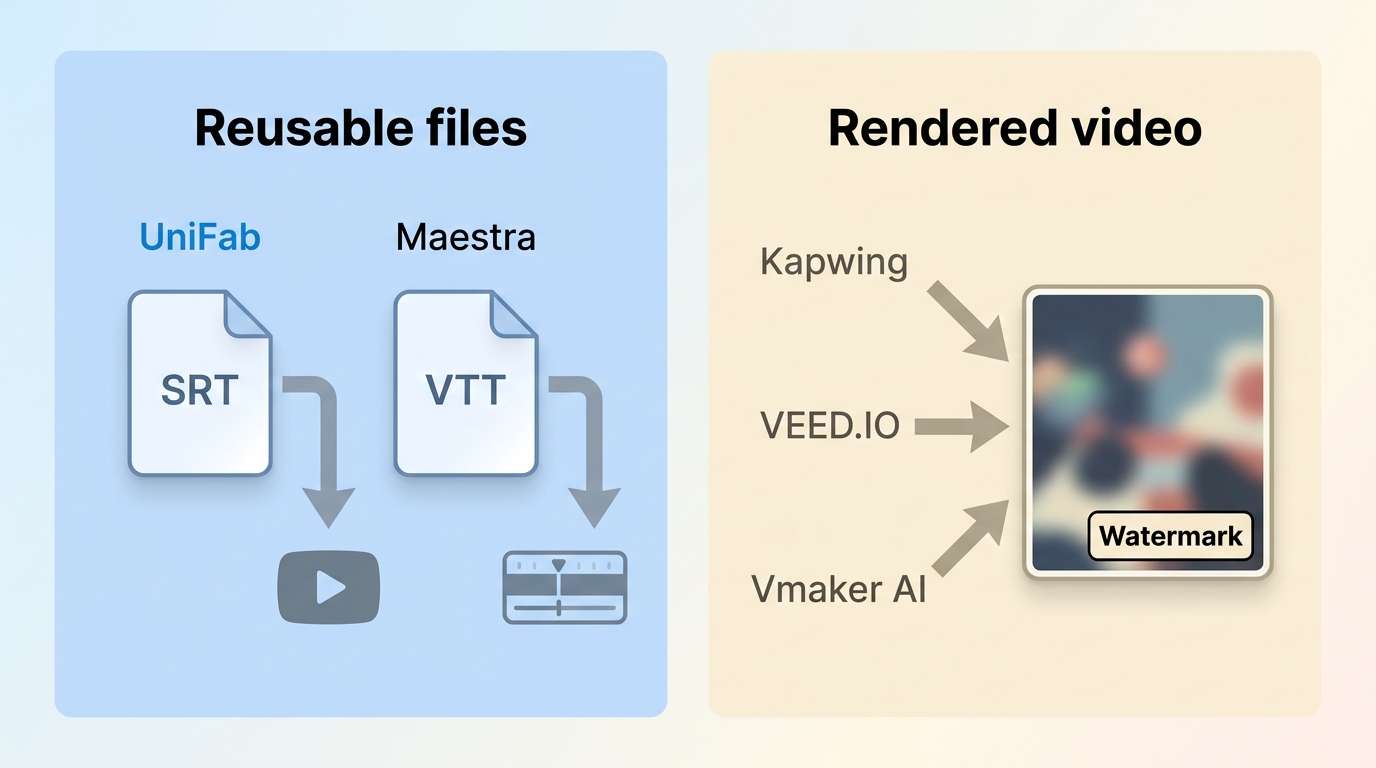
Free subtitle limits usually affect minutes or credits, output type, watermarks, signup, and upload size. A subtitle generator no watermark claim may refer to an SRT file, while the downloadable video still carries branding.
- Allowance: A tool may offer credits, a short sample, or a capped video duration.
- Reusable output: A standalone SRT download can move into YouTube, an editor, or an accessibility workflow; burned-in captions stay attached to the rendered video.
- Watermark: Check the actual free output, not just the editing preview.
- Signup and uploads: Account requirements, file size, duration, and cloud processing can add friction.
- Privacy: Upload only media you own or are authorized to process, and follow the service terms and applicable copyright rules.
Readers who need a dedicated SRT creation walkthrough should use a focused SRT guide; this comparison treats file ownership as one selection criterion. Broader instructions for adding subtitles to a video also belong in a step-by-step tutorial, not in a tool comparison.
How We Tested the Five Tools
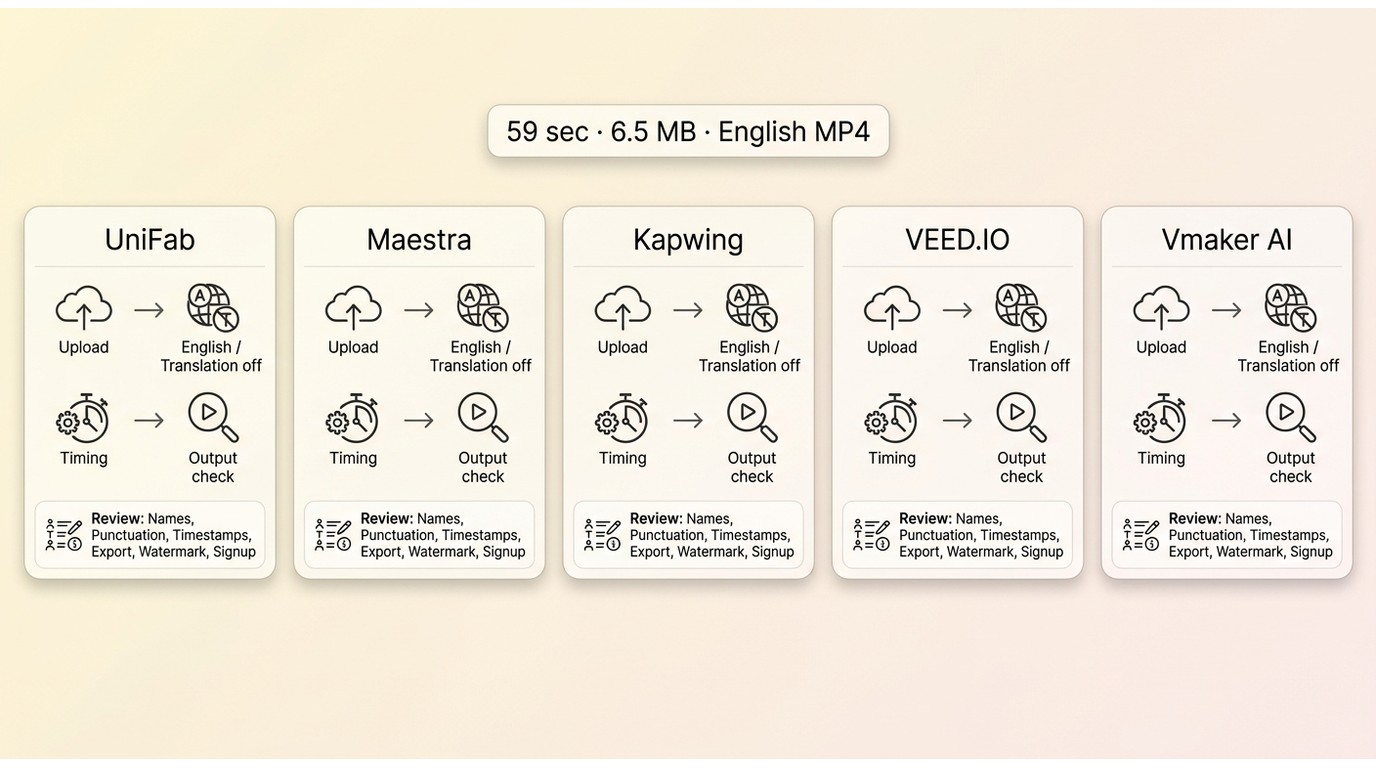
Each selected video subtitle generator was assessed with the same 59-second, 6.5 MB MP4 containing clear spoken English. Translation was disabled so the timing reflected upload, transcription, and export rather than a second language task.
The clip was authorized for this comparison. Anyone repeating the test should use owned or licensed footage, especially when a browser tool sends the file to a cloud service.
Test File and Audio Conditions
The source used one primary speaker, clean dialogue, and no deliberate background-noise stress test. Timing began when the upload started and ended when captions were ready to review or the stated output became downloadable.
- Upload the same MP4 without editing or compression changes.
- Select English as the source language and leave translation off.
- Start automatic caption generation using the default model or mode.
- Record when captions become editable and when the promised free output becomes available.
- Check names, punctuation, timestamps, export type, watermark status, and account friction.
These observations describe one controlled clip, not a general speed guarantee. Server load, file duration, audio complexity, and selected language can change the result.
Scoring Criteria
The rubric gives equal attention to transcript usability and the restrictions that shape a real workflow: free allowance, subtitle export formats, watermark, signup, upload limits, and privacy.
- Transcript usability: whether the clear-speech result needed light or substantial correction.
- Measured processing: the observed result for the shared test file, separated from vendor claims.
- Output ownership: whether the free workflow provides a reusable subtitle file, a rendered video, or both.
- Workflow friction: account creation, credit rules, and export restrictions.
- Fit: the type of reader who gains the most, plus a clear limitation.
Quick Comparison of Free Plans
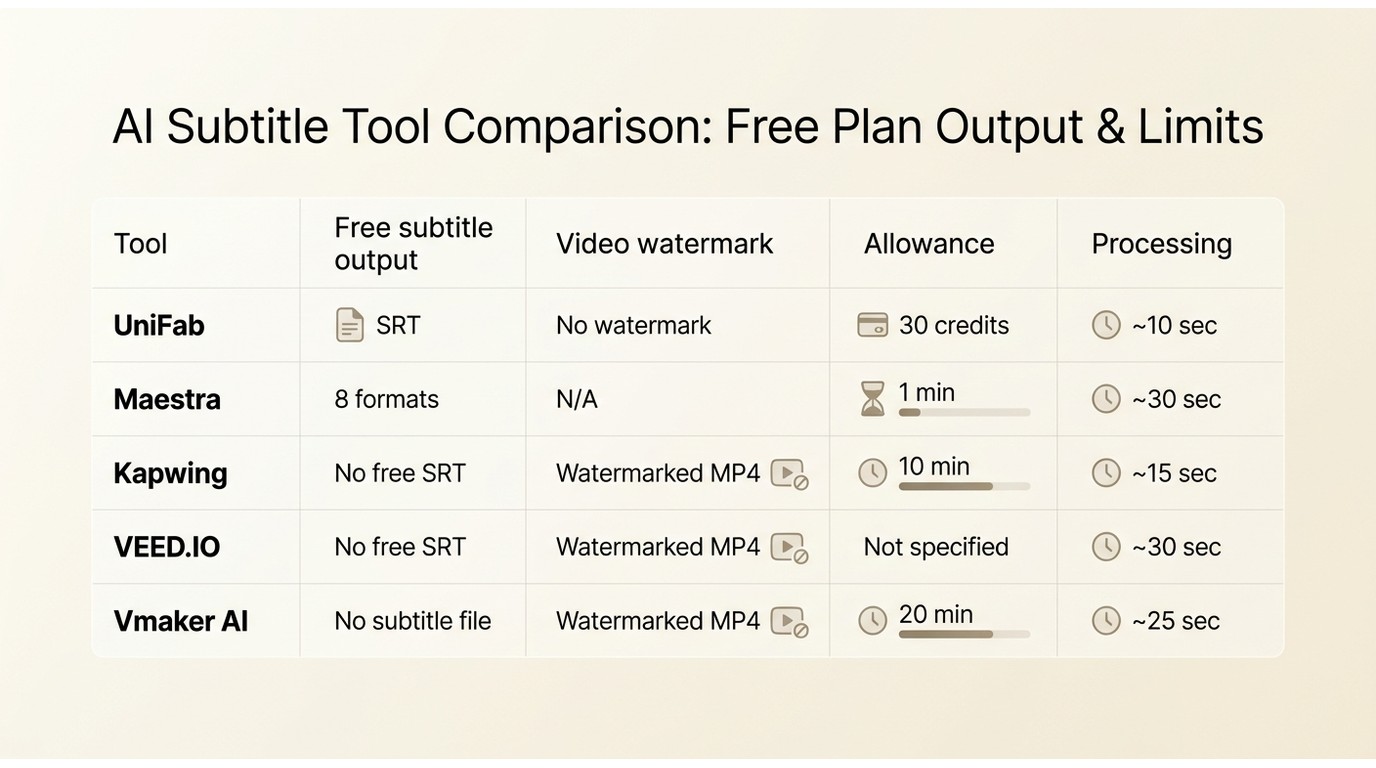
The matrix separates a standalone subtitle file from a rendered video. That distinction is the fastest way to avoid choosing a polished editor that cannot deliver the output you actually need.
| Tool | Free allowance | Standalone subtitle formats | Downloadable video | Watermark on free output | Account required | Maximum upload or duration | Languages | Measured processing result | Privacy or deletion policy | Best fit | Not ideal for |
| UniFab Subtitle Generator AI Cloud | 30 starting credits; the tested workflow used 1 credit for one video | SRT | Caption-file workflow rather than a rendered-video editor | No watermark on the tested SRT output | Yes | Up to 1 GB and 2 hours in the published cloud workflow | 30+ | About 10 seconds after language selection for the 59-second file | Cloud upload; published policy states uploaded files are scheduled for deletion after 15 days | Simple SRT export | Teams needing many professional subtitle formats or local processing |
| Maestra | One-minute sample | SRT, SCC, CAP, TTML XML, VTT, STL, TXT, and SBV | Available within account and export allowances | No watermark on the tested subtitle-file output | Yes, to save or export | The one-minute sample is the practical free cap | 125+ | About 30 seconds for the shared file | Cloud upload; no local-only mode in the reviewed workflow | Language breadth and format variety | Long projects that must stay within a free allowance |
| Kapwing Subtitle Generator | Up to 10 minutes of free transcription in the reviewed workflow | SRT, VTT, and TXT require an upgrade | Yes | Watermark on free rendered video | Yes | 10-minute transcription cap; MP4 supported in the free workflow | Multiple languages with automatic source detection | About 15 seconds for captions after the upload completed | Cloud upload; no local-only mode in the reviewed workflow | Styled short-form social video | Clean standalone caption files without an upgrade |
| VEED.IO | Browser caption generation with export restrictions | SRT, VTT, and TXT require an upgrade | Yes | Watermark on free rendered video | Yes | Free limits vary by account and export path | Multiple languages | About 30 seconds for captions and 10 seconds for the tested video export | Cloud upload; no local-only mode in the reviewed workflow | Browser editing and aspect-ratio presets | Reusable captions or clean video output at no cost |
| Vmaker AI | Free uploads up to 20 minutes in the reviewed workflow | No reusable subtitle-file export in the tested free path | Yes | Watermark on the downloadable free video | Yes | Up to 2 GB and 3 hours accepted; free upload allowance capped at 20 minutes | 35+ for caption generation; translation is a secondary feature | About 25 seconds for generation after a roughly 40-second upload | Cloud upload; no local-only mode in the reviewed workflow | Visual caption treatment and social clips | Readers who need clean subtitle-file ownership |
Free-plan details and snippet-visible ratings referenced in this article are as of July 2026. The measured times apply to the shared test file and conditions above.
Five Free Subtitle Generators Reviewed
Each free AI Subtitle Generator below is judged on the output it delivers, not on feature count alone. The useful question is whether its free workflow matches your next editing step.
1. UniFab Subtitle Generator AI Cloud
Disclosure: UniFab publishes this comparison. UniFab Subtitle Generator AI Cloud is a browser tool for generating and downloading SRT captions.
Its published offer includes 30 starting credits, support for 30+ languages, SRT output, and an accuracy claim of up to 98% on suitable audio. The rating link is retained only as secondary context: UniFab's Trustpilot profile did not affect the workflow assessment.
With the shared 59-second, 6.5 MB MP4, captions became available in about 10 seconds after source and target settings were selected. That result belongs to this clip; larger uploads or more demanding tasks can take a few minutes.
Suitable for: readers who want a simple cloud workflow and a standalone SRT download. Not ideal for: projects requiring a broad professional format set or a private subtitle workflow that must remain local. The desktop AI Subtitle Generator is a separate option for readers evaluating local workflows.
2. Maestra
Maestra is strongest when language breadth and subtitle export formats matter more than a long free allowance. Its current product page advertises 125+ languages and a one-minute sample.
The reviewed editor offers SRT, SCC, CAP, TTML XML, VTT, STL, TXT, and SBV, along with confidence cues that help editors find uncertain words. Readers comparing live captions can also review this free AI caption generator overview.
The shared clip took about 30 seconds to process. Playback-speed controls made line review practical, but signup is required to save or export. Its Trustpilot profile is included as secondary context rather than ranking evidence.
Suitable for: editors prioritizing 125+ languages and a wide format list. Not ideal for: a project longer than the one-minute sample when the budget must remain at zero.
3. Kapwing Subtitle Generator
Kapwing is a video subtitle generator built around editing and visual presentation. It makes more sense for social clips than for a reader whose main requirement is a reusable caption file.
On the shared English clip, automatic language detection selected the expected source language, and caption generation took about 15 seconds after upload. Styling tools cover fonts, colors, borders, and animation, while the free rendered video carries a watermark.
The free workflow does not provide standalone SRT, VTT, or TXT export. For a broader look at the editor, see the Kapwing workflow review.
Suitable for: short-form video that needs styled, burned-in captions. Not ideal for: editors who need clean subtitle files or watermark-free video without an upgrade.
4. VEED.IO
VEED.IO combines automatic captions with a browser editor and useful canvas presets. Its free path favors editing convenience, while reusable subtitle files and clean exports remain restricted.
In the controlled clip, caption processing took about 30 seconds and the tested video export took about 10 seconds. The aspect-ratio presets are helpful when one project needs horizontal, square, and vertical versions.
The VEED.IO review and alternatives guide covers the wider editor. Its Trustpilot profile is secondary context and was not used as a quality score.
Suitable for: creators who want browser editing and layout presets. Not ideal for: a no-cost workflow centered on standalone subtitle files or an unbranded final video.
5. Vmaker AI
Vmaker AI is among subtitle generator apps for visual caption treatment, with many text styles and animation presets. The current free workflow permits a downloadable video with a watermark, correcting the older claim that download was unavailable.
The shared file took about 40 seconds to upload and about 25 seconds to generate captions. Timeline zoom, text splitting, and merging help with timing cleanup, but the free path does not deliver a reusable subtitle file.
Its Trustpilot profile is provided as secondary context, not as evidence of caption accuracy.
Suitable for: visual captions and shareable social video. Not ideal for: anyone who needs a standalone SRT download or a free video without a watermark.
Best Tool for Each Workflow
The right choice changes with the deliverable. I would start with the file you must hand off, then consider styling, language breadth, and privacy.
Standalone Subtitle Files
UniFab fits a straightforward SRT workflow, while Maestra fits editors who need more subtitle export formats. UniFab is less suitable for multi-format delivery; Maestra is less suitable when the one-minute sample is too short.
Styled Social Video
Kapwing and Vmaker AI are practical choices when the final deliverable is a styled video rather than a caption file. They are less suitable when a watermark or lack of reusable subtitle export blocks the next editing step.
Professional Export Formats
Maestra has the broadest listed format set in this comparison. It is a strong fit for caption interchange workflows, but the short sample allowance makes it a poor fit for longer no-cost projects.
Privacy-Sensitive Projects
A private subtitle workflow should begin with deployment and retention policy, not feature count. Browser tools require an upload, so confidential client footage may be better suited to an approved local or self-hosted workflow.
Local control is an alternative category, not a sixth ranked product. It can suit teams with strict data handling rules, but it may demand more setup, hardware, and technical ownership than a cloud tool.
Final Recommendations
No universal winner emerges from these five tools. UniFab suits simple SRT output, Maestra suits language and format breadth, Kapwing and Vmaker suit styled social captions, and VEED.IO suits browser editing with layout presets.
The practical takeaway is to choose by deliverable: reusable subtitle file, rendered social video, professional interchange format, or local control. Even capable AI-generated subtitles still need human review when names, accessibility, translation, or client delivery raise the cost of an error.
Translation is useful as a secondary tool feature, but readers planning a multilingual video workflow should use a dedicated video translation guide rather than treating this comparison as a translator ranking.
Free Subtitle Generator FAQs
Is a browser subtitle tool suitable for confidential videos?
It depends on the vendor's retention, deletion, training, and access policies, plus your organization's approval rules. For sensitive footage, I would favor an approved local workflow unless the cloud terms clearly match the project's requirements.
Can free tools handle noisy audio and overlapping speakers?
They can generate a draft, but correction work rises with noise, crosstalk, accents, music, and specialized terms. Improve the source audio when possible, identify speakers manually, and review every line that affects meaning.
Can I upload an MP4 and download captions separately?
Yes, if the free subtitle generator for MP4 accepts the file and includes separate SRT or VTT export. MP4 input support does not guarantee caption-file ownership; some tools provide a rendered video instead.
Why can processing times vary between uploads?
Duration, file size, server load, audio complexity, language selection, and translation can all change processing time. The timings above describe one controlled 59-second clip and should not be projected directly onto longer media.
What happens when a video exceeds the free allowance?
The upload may be blocked, transcription may stop at the allowance, credits may be required, or export may become restricted. Split the project only when that approach preserves timing and fits the service terms.
When should AI-generated subtitles get a human review?
Review is essential for names, technical terms, overlapping speakers, translated captions, accessibility-critical media, and client deliverables. Automated output is a starting point; the final editor remains responsible for accuracy, timing, and meaning.