An online video translator can create translated subtitles, dubbed speech, or a rendered video, but those outputs require different editing and review work. The useful comparison is not a headline language count. It is whether the tool produces the file you need, lets you correct mistakes, and fits your privacy and workload requirements.
This guide compares six active options without claiming an observed quality winner. A defensible choice starts with output type, correction controls, cloud or local processing, export format, video length, and the number of files you need to handle.
Choose the Right Video Translation Workflow
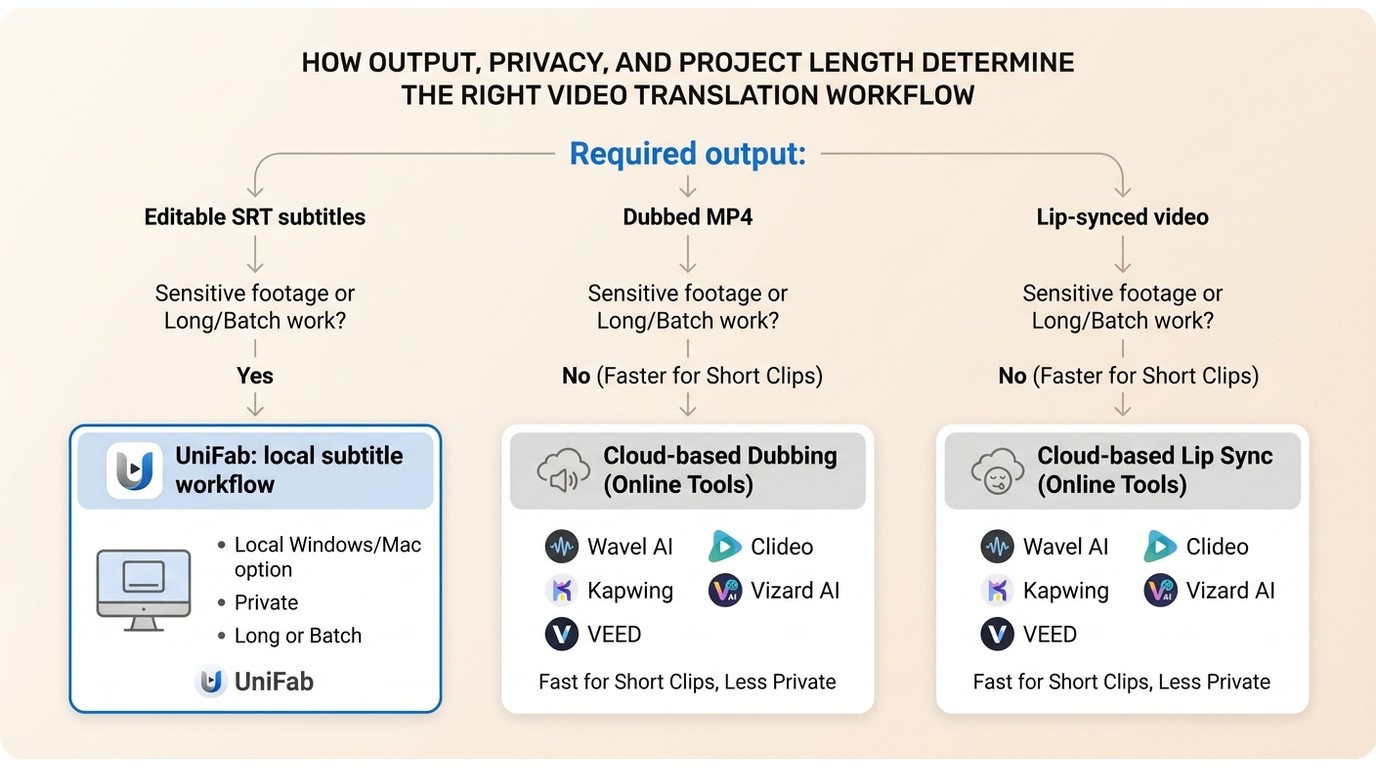
The right online video translator is the one that matches your output and review process. For a useful video translator comparison, decide whether you need subtitle translation, AI video dubbing, or a translated MP4 before comparing convenience, video translator privacy, and cost.
Match Output to Your Content
Subtitle translation is usually the lighter workflow; AI video dubbing adds script approval, speaker assignment, voice selection, audio mixing, and sometimes lip-sync review. For most projects, correction needs matter more than a long language list.
| Content or workflow | Start with | What to check |
| Short social clip | Browser editor with subtitles or dubbing | Fast script correction and translated MP4 export |
| Training or course video | Editable subtitles before dubbing | Terminology review, speaker labels, SRT subtitle export |
| Interview or multi-speaker video | Dubbing workflow with speaker controls | Voice assignment, pauses, audio replacement, and timing |
| Sensitive footage | Local processing where possible | Upload exposure, retention controls, and access policy |
| Long or repeated projects | Desktop or batch-capable workflow | Upload time, project limits, batch video translation, and recovery after interruptions |
The practical dividing line is simple: use subtitles when readability and editability matter most; use dubbing when the audience needs localized audio; add lip sync only when visible speech alignment justifies the extra review.
Check Accuracy, Editing, and Privacy
Video translation accuracy depends on the transcript, context, names, accents, and terminology. A fluent sentence can still be materially wrong, so the right workflow exposes the transcript and translation before final export.
- Transcript control: Can you correct speech-to-text errors before translation?
- Translation control: Can you edit names, technical terms, and line breaks?
- Audio control: Can you replace or lower the original speech without damaging background sound?
- Approval control: Can you reject an automated line and use a human-approved version?
- Privacy control: Does the footage remain local, or is it uploaded to a cloud service?
Editorially, a visible correction path is more valuable than a vendor accuracy percentage. Sensitive footage also changes the choice: cloud convenience may be reasonable for ordinary clips, while a local offline video translator reduces the need to upload source files.
Compare Limits and Total Cost
A free video translator usually trades convenience for limits on minutes, credits, file size, resolution, watermark-free export, or downloadable formats. Long video translation can also be constrained by upload time and browser sessions even when the translation feature itself is available.
Compare the full job rather than the signup price: source upload, transcript correction, translation, dubbing, review, and final export. If a project requires repeated revisions or many files, batch support and local access may outweigh a low entry cost.
UniFab for Private and Batch Translation
UniFab is a Windows and Mac desktop option for offline video translator workflows that prioritize local processing, batch video translation, and subtitle downloads. It is a practical fit for repeated, long-form, or sensitive projects, while a browser tool may be quicker for one short task.
UniFab AI Subtitle Generator keeps the working files on the computer rather than requiring a browser upload. That local model is relevant when upload time, interrupted sessions, or restricted footage make cloud processing inconvenient.
Verified Product Specifications
The verified UniFab subtitle generator specifications cover the operating systems, output formats, resolution, batch processing, and subtitle download capability needed for a grounded comparison.
| Specification | Verified detail |
| Operating systems | Windows and Mac |
| Maximum resolution | Up to 4K |
| Video output formats | MP4 and MKV |
| Batch processing | Supported |
| Subtitle download | Supported |
The practical benefit is workflow continuity: files can be queued locally, translated in batches, and exported without repeating a browser upload for each item. That is a stronger reason to choose desktop software than an unsupported promise about universal accuracy.
Workflow Fit and Trade-Offs
UniFab fits private, repeated, and batch subtitle workflows. It is less suitable for someone who wants an install-free browser session for a single small clip or needs a cloud collaboration space shared by several editors.
- Good fit: Windows or Mac users working with multiple videos, longer files, or footage that should remain on the computer.
- Trade-off: Desktop installation is required, and the supplied specifications do not establish voice cloning, lip sync, or an existing-SRT-to-dub workflow.
- Editorial take: Choose it for local control and throughput, not because a marketing number appears higher than a browser competitor's.
6 Online and Desktop Video Translators
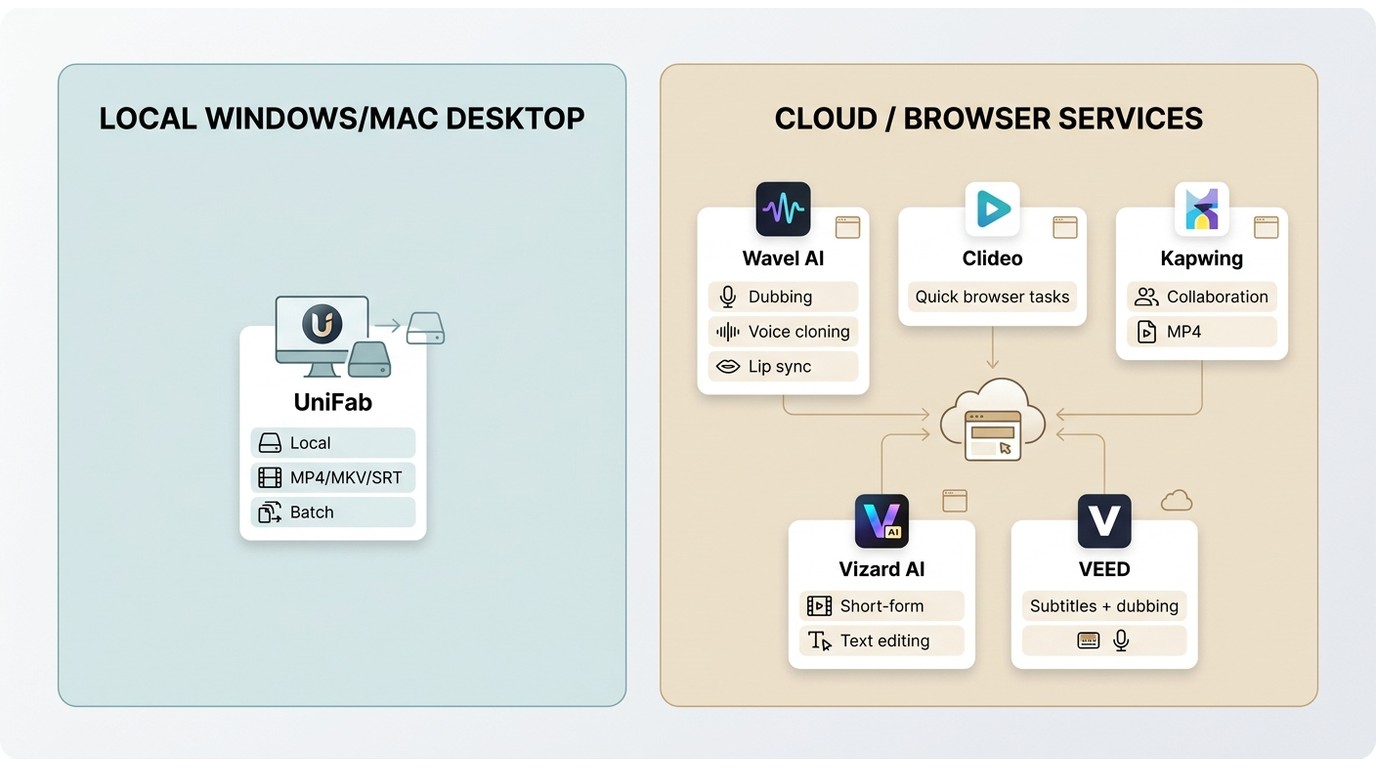
These six tools represent different video translation workflows rather than a quality ranking. The entries focus on documented product roles and decision fit; recommendations are conditional because no reproducible, same-source cross-tool result set is available.
| Tool | Workflow fit | Subtitle translation | Dubbing and voice tools | Deliverable focus | Processing model | Long or batch work | Main trade-off |
| UniFab | Private, repeated, or batch subtitle projects | Supported with subtitle download | Not part of the supplied verified specification set | MP4, MKV, and downloadable subtitles | Local desktop software for Windows and Mac | Batch processing is supported; local files avoid repeated uploads | Requires installation and is less convenient for a one-off browser task |
| Wavel AI | Dubbing-led localization | Available | Dubbing, voice cloning, and lip-sync tools | Localized video and subtitle workflows | Cloud browser service | Upload and plan boundaries affect long projects | Not suited to local-only footage |
| Clideo | Compact browser subtitle and voiceover tasks | Available with text styling and editing | Voiceover workflow | Rendered video and subtitle-oriented output | Cloud browser service | Better suited to individual browser projects than local queues | Long or sensitive workflows depend on cloud upload |
| Kapwing | Translation inside a collaborative video editor | Available | Dubbing, voice, and lip-sync tools | Rendered MP4 and subtitle workflows | Cloud browser editor | Useful when editing and review stay in one project | Plan boundaries and cloud upload shape the workflow |
| Vizard AI | Short-form, text-led editing | Available | Dubbing tools | Rendered video and subtitle output | Cloud browser editor | Its short-form workflow is a more natural fit than a large local queue | Not intended here as a local or batch-first option |
| VEED | Subtitles, dubbing, and visual edits in one browser project | Available | Dubbing and optional lip-sync workflows | Rendered video and subtitle output | Cloud browser editor | Suitable when the project can remain online | Not a local-processing workflow |
Product features and plan boundaries are described at a category level as of July 2026. The table intentionally does not convert vendor claims into observed scores.
Wavel AI Online Video Translator
Wavel AI is oriented toward AI video dubbing, voice cloning, translated subtitles, and lip-sync production. Its fit is most suitable when localized speech is the main output and the editor is prepared to review voice, timing, and pronunciation.
- Good fit: Dubbing-led projects that need multiple voice and script controls.
- Confirm before use: Existing-SRT import, final subtitle file types, plan limits, and how the editor handles background audio.
- Not ideal for: Footage that cannot be uploaded to a cloud service.
Clideo Online Video Translator
Clideo is a browser-based option for subtitle translation, voiceover creation, styling, and file export. It is easier to assess as a compact editor than as a universal privacy or value leader.
Its practical appeal is a focused browser workflow with editable text. Readers comparing entry-level options can also use the free video translator guide for a narrower look at no-cost tiers and their restrictions.
- Good fit: A short project that needs subtitle styling and a rendered browser export.
- Confirm before use: Current upload handling, existing-SRT support, export file types, and plan limits.
- Not ideal for: Long queues or projects that require local processing.
Kapwing Online Video Translator
Kapwing combines subtitle translation and dubbing with a broader browser editor. That makes it useful when translation is one stage in trimming, layout, caption, review, and collaboration rather than a separate utility.
For a wider category comparison beyond online-first tools, see the AI video translator comparison. On this page, Kapwing's value is its connected editing workflow, not an unsupported accuracy rank.
- Good fit: Teams that want browser editing, review, subtitles, dubbing, and a translated MP4 export in one project.
- Confirm before use: Watermark, resolution, duration, voice, lip-sync, and subtitle-export limits for the selected plan.
- Not ideal for: Source video that should not be uploaded.
Vizard AI Online Video Translator
Vizard AI is positioned around text-led editing, captions, dubbing, and short-form production. It is a reasonable candidate for editors who prefer changing a transcript over working directly on a traditional timeline.
- Good fit: Short clips and beginner-friendly transcript editing.
- Confirm before use: Current language availability, watermark rules, export formats, and whether an approved subtitle file can be imported.
- Not ideal for: Long video translation, local privacy requirements, or a large batch queue.
VEED AI Online Video Translator
VEED places subtitle translation, dubbing, optional lip sync, and video editing inside a browser project. Its advantage is workflow consolidation, not an unverified claim that it leads every tool on language breadth or accuracy.
- Good fit: Editors who want translated captions, audio localization, and visual edits in one cloud workspace.
- Confirm before use: Current plan access for lip sync, export resolution, subtitle files, and project limits.
- Not ideal for: Local-only processing or offline batch work.
Video Translator Comparison Scorecard
A responsible scorecard separates documented capabilities from observed performance. Because this article does not have a reproducible same-source dataset for all six products, it does not publish translation, timing, dubbing, lip-sync, or processing-time winners.
| Criterion | What a publishable result requires | Decision value now |
| Transcription accuracy | Same source audio, reference transcript, and error-count method | Review transcript editing and glossary controls |
| Translation accuracy | Same language pair, human reference, and scoring rubric | Prefer editable scripts and a clear approval step |
| Subtitle timing drift | Same clip and measured cue alignment | Look for timeline or cue-level editing |
| Dubbing naturalness | Same script, speaker conditions, and blind review | Listen for pronunciation, pacing, and pauses before export |
| Lip-sync quality | Same visible speaker shots and review criteria | Use it selectively when faces and speech alignment are prominent |
| Processing time | Same file, network, device, output, and timing boundary | Compare upload dependence, queue behavior, and recovery options |
| Watermark and editable output | Final exported file from the same plan tier | Confirm whether the deliverable remains editable and usable |
The key editorial judgment is that correction workload usually matters more than a small speed difference. A fast draft that mishandles names, timing, or speaker turns can take longer to finish than a slower workflow with precise editing controls.
Video Translation Outputs and Workflow
Video translation tools do not all produce the same deliverable. Subtitle translation, AI video dubbing, voice cloning, lip sync, translated MP4 export, and SRT subtitle export each add different review requirements.
Subtitles, Dubbing, Voice Cloning, and Lip Sync
Choose the lightest output that meets the audience need. Subtitles preserve the original voice, dubbing replaces speech, voice cloning imitates a selected voice profile, and lip sync adjusts visible mouth movement to the new audio.
- Subtitle translation: Suitable when readers need editable text, accessibility, or a separate subtitle file.
- AI video dubbing: Better when viewers should hear the target language, but it requires script, pronunciation, speaker, and mix review.
- Voice cloning: Useful for voice continuity when authorization and consent are clear; it adds identity and pronunciation review.
- Lip sync: Most relevant for close-up speaking shots; it adds visual review and may be unnecessary for slides, screen recordings, or voiceover footage.
Audio controls deserve special attention. A usable dubbing workflow should make it clear whether original speech is replaced, lowered, or mixed with the new track so that background sound does not become cluttered.
MP4, SRT, VTT, and Input Options
Confirm both the input path and the deliverable before uploading. A tool that creates a translated MP4 may not provide an editable SRT or VTT file, while a subtitle-focused tool may not render localized audio.
| Option | Why it matters | What to confirm |
| MP4 input and export | Creates a shareable rendered video | Resolution, watermark, audio mix, and plan access |
| SRT subtitle export | Provides portable timed subtitles | Timing edits, encoding, and whether translated text remains editable |
| VTT subtitle export | Fits web-video caption workflows | Styling support and cue formatting |
| TXT or script export | Supports review outside the editor | Speaker labels and timecodes |
| URL import | Can shorten the import step for authorized web video | Supported sites, ownership, and platform terms |
| Existing-SRT import | Avoids repeating transcription after human correction | Speaker assignment, dubbing generation, and timing retention |
| Audio replacement or ducking | Prevents overlapping speech tracks | Control over original dialogue and background audio |
YouTube translation and other URL-based workflows should be used only for content you own or are authorized to process, where permitted by platform terms and applicable law. Movie translation, subtitle generation, speech-to-text, and adding subtitles are broader topics; this comparison keeps them tied to file-based video localization.
A Typical Online Translation Workflow
Most browser tools follow a six-step sequence. The important work happens between generation and export, where the transcript, translation, timing, speakers, and audio mix are checked.
- Upload an authorized source video or use a supported URL import.
- Select or confirm the source language.
- Choose subtitle translation, dubbing, or both.
- Correct the transcript, names, terminology, and translated script.
- Review subtitle timing, speaker assignment, voice, lip sync, and original-audio handling.
- Export the required MP4, SRT, VTT, or other available deliverable.
For a repeated local workflow, the UniFab AI Subtitle Generator desktop page covers the batch-oriented alternative to browser uploads.
Picks by Use Case
The right choice depends on the required output, correction workload, privacy needs, video length, and processing volume. Without controlled comparative results, these are workflow matches rather than a ranked list.
- Dubbing and voice controls: Consider Wavel AI when localized speech and voice configuration are central; confirm import, audio-mix, and export details first.
- Focused browser subtitles: Consider Clideo for a compact subtitle and voiceover workflow; it is less suitable for local or batch processing.
- Editing and collaboration: Consider Kapwing when translation must remain inside a broader browser editing project; cloud upload is the trade-off.
- Short-form, text-led editing: Consider Vizard AI for clips built around transcript edits; check current export and plan limits.
- All-in-one browser project: Consider VEED when subtitles, dubbing, lip-sync options, and visual editing need to stay together; it is not a local workflow.
- Private or batch subtitle work: Consider UniFab on Windows or Mac for local processing, MP4 or MKV output, subtitle downloads, and batch queues; it is not the quickest route for an install-free one-off task.
Frequently Asked Questions
These answers address four workflow gaps that are easy to miss when comparing a free video translator or a full localization editor.
Can Google Translate translate a full video?
No. Google Translate can translate text and speech, but it is not an end-to-end video workflow for timed subtitles, speaker review, AI dubbing, audio mixing, and translated MP4 export. A video translator or a transcript-plus-subtitle workflow is needed for the complete job.
Can I import a corrected SRT file before creating an AI dub?
Support varies by product. Before choosing a tool, confirm existing-SRT import, timing retention, speaker assignment, script editing, and audio replacement controls. This can prevent a human-approved subtitle translation from being transcribed and translated again.
Why do AI subtitles mistranslate names or technical terms?
The error often starts in speech recognition: an unfamiliar name, accent, missing context, or specialized term is transcribed incorrectly and then translated fluently. Use glossary or custom-vocabulary controls when available, and review names and key terms before export.
Are free online video translators really unlimited?
Usually not. Free access commonly limits minutes, credits, file size, resolution, watermark-free output, or export formats. Compare the final deliverable and correction workflow, not just whether the upload screen is available without payment.