If you need a watermark remover for video online for free, start with a short clip and confirm the service lets you download the full result. Free online watermark removers can handle simple static marks, but moving overlays, file caps, and export paywalls often decide whether the job finishes.
A one-off edit can quickly turn into a hunt through previews, credits, and signup screens, especially when you do not want another subscription for a single clip. My view is that a free label matters only when it covers a complete export of your actual video. The practical route is to test the hardest frames first, inspect the service limits, and then choose between a free online watermark remover and a desktop workflow. That sequence protects both your time and the composition you meant to keep.
How to Use a Free Online Video Watermark Remover
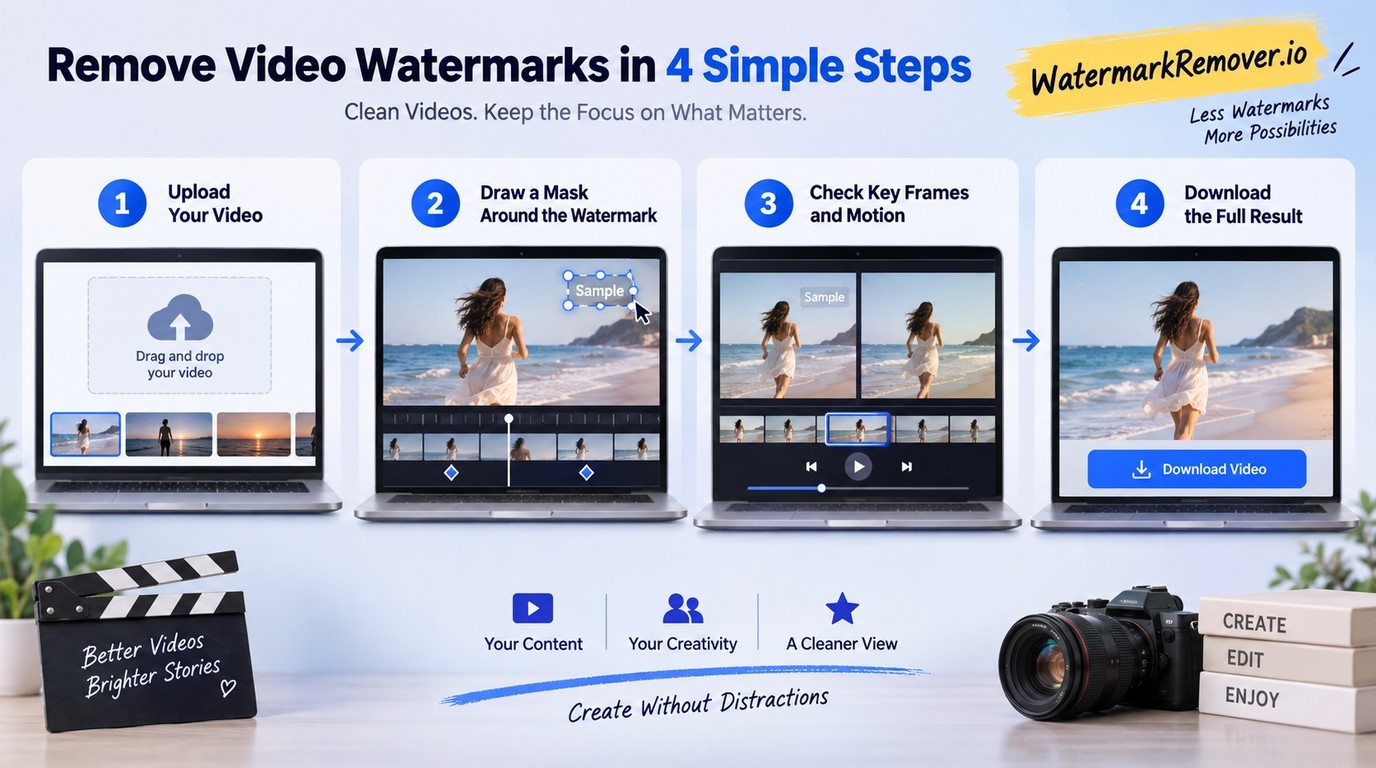
Remove a watermark online by uploading an authorized short clip, selecting or tracking the mark, previewing difficult frames, and exporting only after the entire result passes inspection. Start with a representative sample because automatic detection can miss early frames, movement, faces, or textured backgrounds.
Legal reminder: Process only video you created, licensed, or have permission to edit. Follow the service's terms, keep personal-use copies personal, and do not remove ownership or origin labels to mislead viewers or redistribute someone else's work.
Work through the job in this order:
- Confirm your rights and choose a short clip containing the hardest scene.
- Upload it, then mark the fixed or moving watermark accurately.
- Preview key frames before exporting the complete video.
1. Confirm ownership and choose a representative clip
Use footage you own or are authorized to modify. If the watermark came from an editing app, social platform, stock library, client review system, or AI generator, the right to view the clip does not automatically include the right to remove its label. When you still have the original project, a clean export from that project is usually better than reconstructing pixels after the fact.
Choose a sample that contains the watermark at its hardest: over a face, along a moving edge, across textured fabric, or during a lighting change. My editorial rule is simple: test the most difficult passage first. Automatic detection is a starting point, not evidence that the complete repair will look natural.
2. Upload the video and mark the watermark area
Upload the sample in a format the service accepts, then choose automatic detection or draw a manual mask. A fixed corner logo often needs one stable selection. A moving TikTok-style mark needs tracking or several keyframes, because a static box will clean one position and miss the next.
Keep the mask close to the mark without cutting into nearby eyes, fingers, captions, or object edges. Cropping preserves the remaining pixels but changes framing; blur and overlays hide the mark rather than rebuild the background. Frame-aware filling is the better match for a small mark over a predictable background, while a manual mask gives you more control when the automatic outline drifts.
3. Preview difficult frames, then export the result
Inspect the opening frames, the midpoint, the last seconds, and any shot where the watermark crosses motion or a detailed edge. As one Reddit user in r/SoraAi put it, "All the ones I've seen have spotty removal with it still visible especially at the start of the video." That is why a clean thumbnail or middle frame is not enough.
Watch the preview at normal speed and pause on transitions. Look for a faint logo, smeared texture, warped motion, color flicker, or a patch that stays still while the camera moves. Export the full file only after those frames hold up, then check the downloaded video's duration, audio, resolution, and aspect ratio. A successful preview is useful; a complete, playable export is the real finish line.
What ‘Free Online’ Really Means Before You Upload
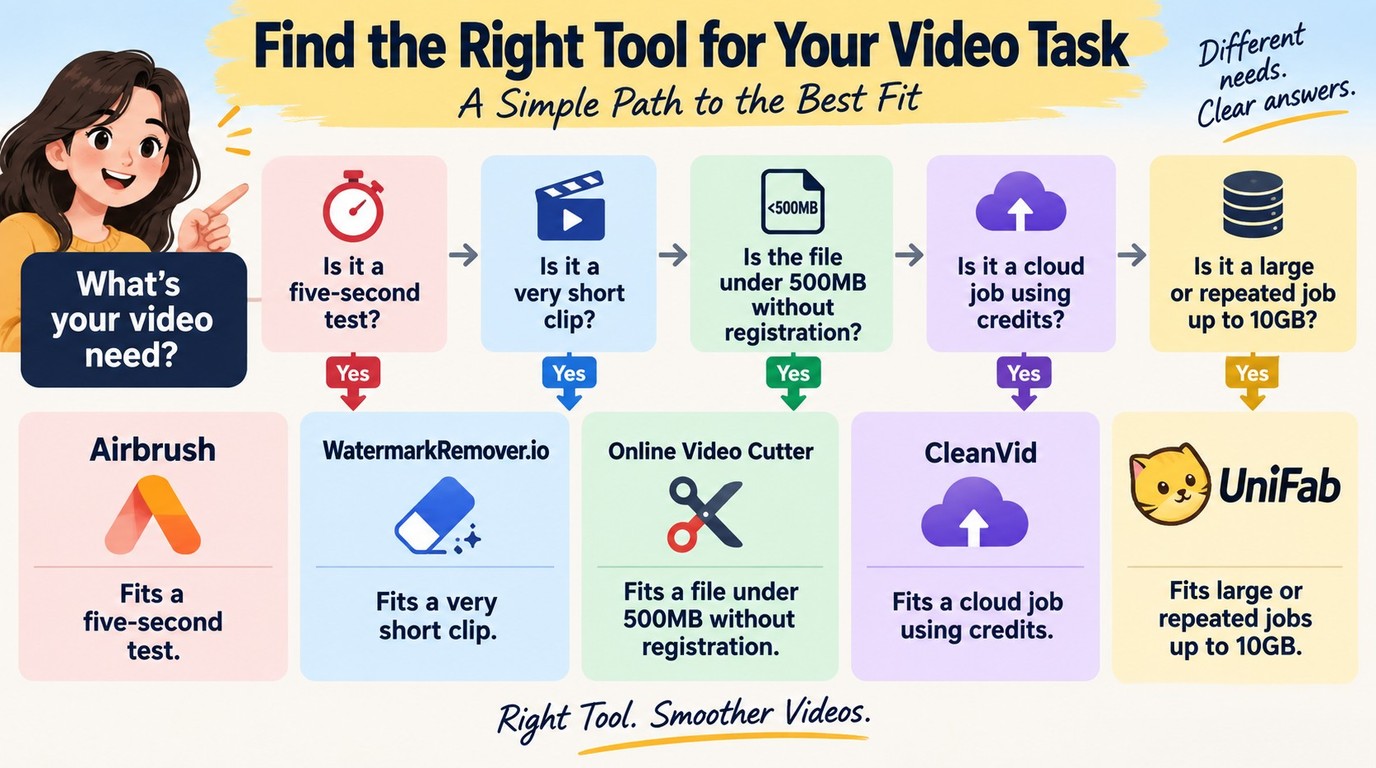
Before trusting a free watermark remover, check whether it exports the full video, accepts your file size and duration, preserves the resolution you need, and requires credits or a subscription. Also check how long the upload remains on the service, because browser convenience means sending the video to another system.
Check export, duration, file-size, and access limits
The word “free” covers several different offers: a five-second download, a short-duration cap, a low file ceiling, a small credit balance, or a preview that stops before full export. As one Reddit user in r/AIAssisted put it, "Most of the ones I've seen online are paywalled in some way. Not against paying but I just need it once or twice and I often forget to cancel subscriptions so I'd rather not sign up to another one."
Free Online vs. Desktop Watermark Removal at a Glance
| Workflow | Access boundary | File or duration | Output detail | Processing |
| Airbrush | First five seconds free | 200MB; under 10 min | Up to 4K input | Browser upload |
| Online Video Cutter | No registration | 500MB | MP4 default; 30+ exports | Browser processing |
| CleanVid | Credits required | 15 min | Up to 2K | Cloud; 24-hour retention |
| WatermarkRemover.io | No-signup trial | 2 min | 1920×1920 maximum | Browser upload |
| UniFab desktop workflow | FabCloud credits | Up to 10GB | Up to 4K; MP4/MKV | Windows/macOS app |
Limits listed on each service's official product page, as of September 2026.
The practical difference appears at export. A file above 500MB already exceeds Online Video Cutter's disclosed cap, while UniFab accepts files up to 10GB. UniFab also requires installation and does not start in a browser tab; if those tradeoffs fit the job, use the official installer and continue with the desktop workflow below.
My editorial cutoff is straightforward: if a service will not export the whole clip at the resolution you need, its free preview has not completed the task. Check this boundary before uploading a private client file or waiting through a long processing queue.
Match the removal mode to the watermark and background
Automatic detection suits a clear, high-contrast mark that stays in one region. Manual masking is more reliable when the mark touches a face, subtitle, hand, or patterned surface. Tracking and keyframes are necessary when the mark changes position; cropping is acceptable only when the lost border does not damage composition.
Reconstruction still has limits. As one Reddit user in r/SoraAi put it, "Most “watermark removal” tools online leave visible artifacts — which is expected, since they’re essentially trying to blur or patch over the watermark." The useful response is not to assume every AI mode is equivalent. Preview motion, lighting changes, faces, and fine texture, then pick the method whose flaw is least visible in your actual scene.
When UniFab Watermark Remover AI Fits the Job
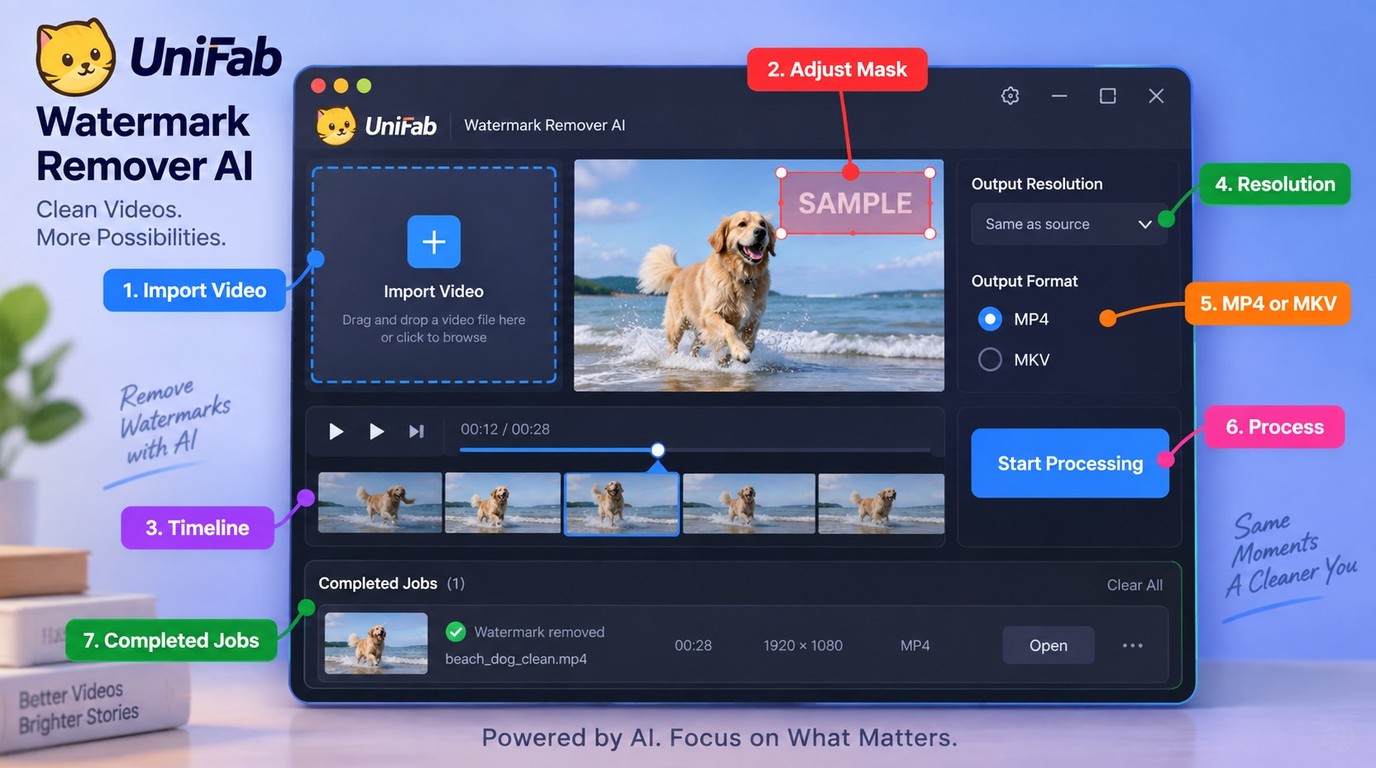
A desktop watermark remover is a better fit when a browser service rejects the file size or when you need a repeatable Windows or macOS workflow. UniFab Watermark Remover AI supports files up to 10GB and credit-based access, but it requires installation rather than opening in a browser tab.
Choose a desktop workflow for large or repeated jobs
UniFab Watermark Remover AI is available for Windows and macOS, accepts files up to 10GB, and exports MP4 or MKV at up to 4K.
The setup cost is real. You must install the desktop application, so it is not the fastest route for one small clip on a borrowed computer or phone. Use UniFab's official download page for the installer. Before importing a long file, first run a short sample containing the most difficult frames—motion, fine edges, faces, or lighting changes—and confirm the preview looks natural.
Access to this FabCloud module is credit-based. As of September 2026, the listed plans are 600 credits for $199.99 per year or $20 per month, and 1,000 credits for $299.99 per year or $30 per month; new users receive 30 credits. That model suits repeated work better than a one-off browser edit, and the initial credits provide a direct way to check your footage and settings.
The key judgment is scale, not a generic claim that desktop software is superior. An online tool remains sensible for a small, non-sensitive clip that clears its export limits. A Windows and macOS desktop workflow becomes the stronger fit when file size, 4K output, or a queue of completed jobs is the constraint.
Remove the watermark and export in MP4 or MKV
The desktop workflow stays short:
- Install UniFab on Windows or macOS and open Watermark Remover AI.
- Import the authorized video, up to the documented 10GB limit.
- Mark the watermark area and review its position across the timeline.
- Preview difficult frames, then choose MP4 or MKV and the needed resolution.
- Start processing and save the result; use batch download for completed jobs.
Choose UniFab when large files or repeated exports make browser limits costly. For a single short clip, an online tool is quicker to open. When a browser service rejects the file or restricts full export, install UniFab, import a short representative clip, mark the watermark, inspect difficult frames, and only then process the complete file.
FAQ About Free Online Video Watermark Removal
For TikTok, Sora, Gemini, or CapCut footage, the decision turns on watermark movement, background detail, upload privacy, and your right to edit the clip. Process only content you created, licensed, or are otherwise allowed to modify, and do not remove platform or AI-origin labels to conceal provenance or mislead viewers.
Can I remove a TikTok watermark online without cropping?
For your own TikTok video, a tracked mask or frame-aware fill can preserve the frame size better than cropping. The challenge is movement: the TikTok mark changes position, so inspect each location and the opening frames before export. If you still have the original project, exporting from it avoids reconstruction artifacts. Do not use a TikTok watermark remover to republish another creator's clip as your own or to erase attribution required by the platform.
Can a free tool remove a moving Sora watermark without blur?
A moving Sora mark is harder than a fixed corner logo because the tool must rebuild different background pixels across time. A free Sora watermark remover should be judged on the hardest transition, not one clean still frame. Preview motion, light changes, and subject edges; faint smears or a stationary patch are signs the track failed. Remove the mark only when you have the right to edit the video, and preserve AI-origin disclosure when the publishing context requires it.
How do I remove a Gemini logo or watermark from a video?
Use automatic detection for a stable Gemini logo and a manual mask or keyframes when it moves or overlaps detailed content. Check the first, middle, and final frames for residual edges, then export a short result before processing the full video. If the mark communicates that the media is AI-generated, do not remove it to disguise origin, authorship, or authenticity. Your publishing context determines whether an additional disclosure should remain visible.
Is it safe and legal to upload a CapCut video to a free remover?
Upload safety depends on the service's retention policy and the sensitivity of your footage. Legal permission depends on who owns the video, template assets, music, and branding. For your own CapCut project, remove an editable ending card inside the project before export when possible; that avoids a cloud upload and preserves quality.