If a Sora logo is visible but a blurred patch would look worse, use a Sora watermark remover only after checking for the cleanest source you still control. Choose an original export first, a compatible public link next, and AI inpainting when the downloaded video is the only copy.
I see the missing source, not the logo itself, as the decisive problem. Once source pixels are gone, an AI remover has to estimate what should appear behind the mark, which is where ghosting and soft detail enter. That distinction separates retrieval from reconstruction. This guide applies it to current Sora access, removing a watermark from video, free browser tools, and a desktop workflow.
How to Remove a Sora Watermark: The Current Workflow
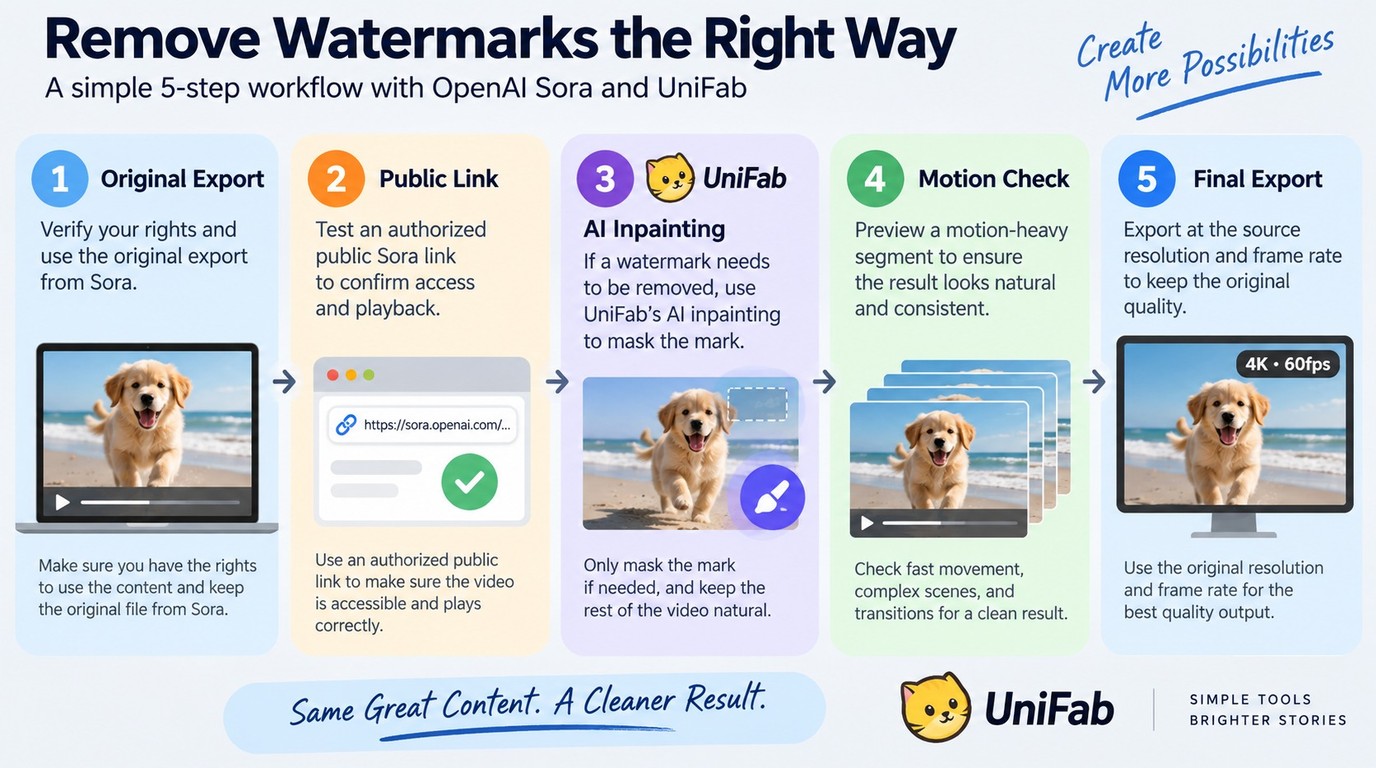
The least damaging workflow starts by separating retrieval from repair. Retrieval preserves existing pixels; repair estimates missing ones, so it belongs after source and link access have been ruled out.
Rights reminder: Process only video you created or are authorized to edit, and follow Sora's terms and applicable law. Do not use removal to evade access restrictions, conceal AI origin, or republish someone else's work without permission.
Check What Source or Export Access You Still Have
Start with access, not an editing tool. As of September 2026, OpenAI had ended the Sora web and app experiences on April 26, while the Sora API was scheduled to end on September 24. Old instructions built around an active Sora app may therefore lead to a screen or link flow that no longer exists.
Before processing, gather these prerequisites:
- The original file, an authorized account export, a compatible public link, or the downloaded clip.
- An untouched backup of the highest-quality file available.
- The original resolution, frame rate, and aspect ratio you want to retain.
- A motion-heavy section for previewing edges, lighting changes, faces, and text.
A public link works only when the service can reach the underlying post. As one Reddit user in r/SoraAi summarized the practical constraint, "Your Sora post must be public, not a draft." Private, expired, or draft links may fail even when the page opens for the account owner.
The clean source should win whenever it is available. Reconstructing a logo area is an unnecessary quality risk when the unmarked pixels still exist in an export or project file.
Run the Removal and Inspect Moving Frames Before Export
Work through the file in this order:
- Recover the original or account-exported file and confirm that it belongs to you or is licensed for editing.
- If no source file remains, test an authorized public link with a compatible retrieval tool.
- If the link cannot supply clean media, open the downloaded video in an AI inpainting tool and draw the tightest practical mask around the visible mark.
- Preview a motion-heavy section before processing the full clip.
- Inspect moving edges, light changes, skin, text, and fine textures for blur, smearing, or repeated shadows.
- Export at the source resolution and frame rate, then compare the result with the untouched backup.
Do not judge the result from one paused frame. A patch can look clean while still sliding, flickering, or softening nearby detail during motion. If the repaired area crosses a face, title, or fast-moving object, reduce the mask and preview again before committing to the full export.
Choose the Right Removal Method for Your Sora File
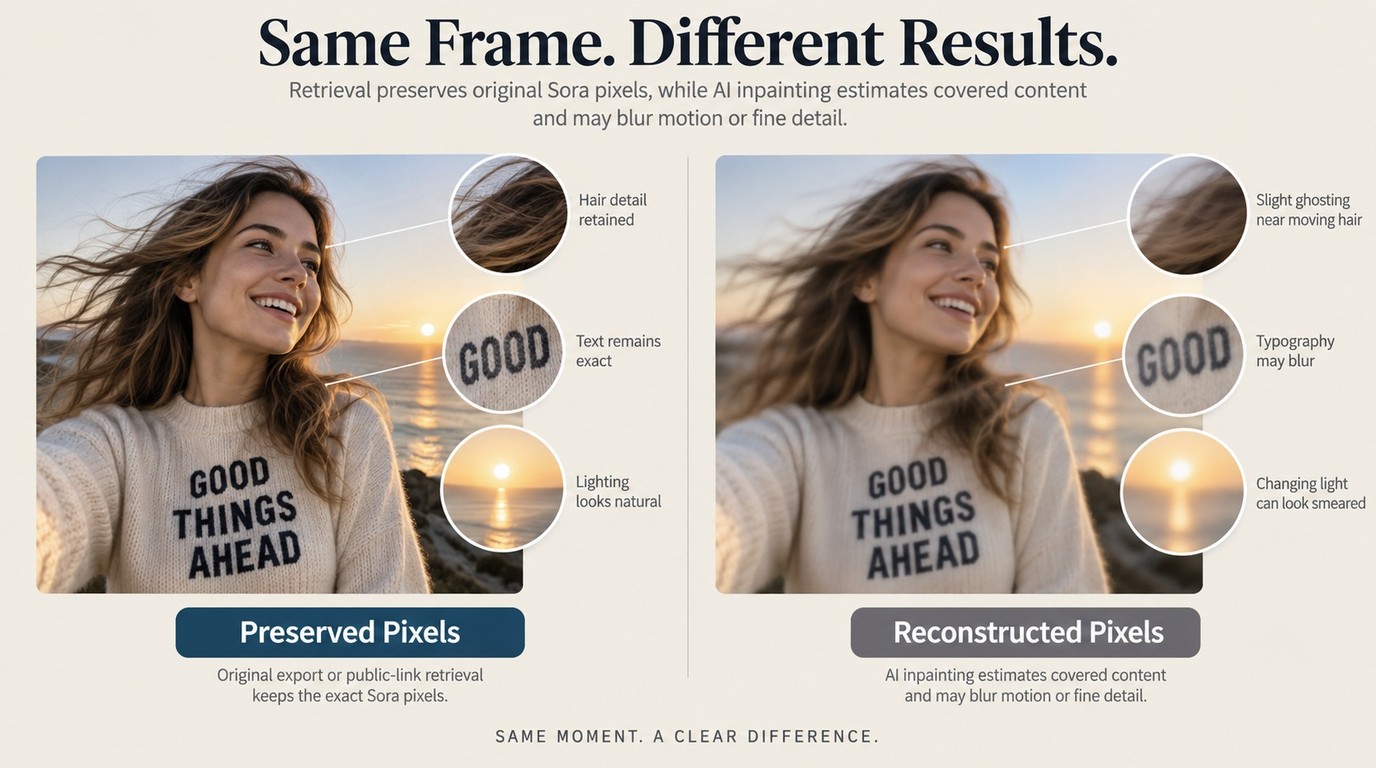
Use a source file or compatible public link when you can retrieve existing unmarked media. Use AI inpainting when the downloaded clip is all that remains and you accept the risk of reconstructed pixels around motion, texture, and changing light.
| Method | Best fit | Input | Main quality risk | Key limit |
| Official export or source | Creators with source access | Original or export | Lowest reconstruction risk | Access may have ended |
| Public-link retrieval | Compatible public posts | Public link | Low if media is retrieved | Drafts may fail |
| AI inpainting | No clean source remains | Downloaded video | Blur or ghosting | Motion needs inspection |
Current-status reference: OpenAI's Sora discontinuation notice, September 2026.
The practical conclusion is clear: retrieval preserves; inpainting repairs. They solve the same visible problem through different mechanisms, so treating them as interchangeable hides the main quality tradeoff.
Use a Source File or Compatible Public Link When Available
A source file is the strongest option because it keeps the original scene instead of rebuilding the covered area. It is best for creators who retained a project export, account archive, or unmarked master. It is not available once those assets have been deleted or access has expired.
Public-link retrieval can be the next choice when the post is public and the tool supports its current URL format. It attempts to retrieve media associated with the post rather than modify every frame. Drafts, private posts, changed endpoints, and discontinued Sora access can make this route fail without saying anything about the video's visual quality.
Use the returned file only after checking its dimensions, frame rate, duration, and audio against the source page. If the resolution is lower than the version you already have, the link route has not preserved the better asset.
Editor-added overlays need a different workflow from generated-video marks
Use AI Inpainting When Only the Downloaded Video Remains
AI inpainting is a repair method: it predicts what should occupy the masked region in each frame. A plain wall or sky gives the model less to reconstruct than moving hair, hands, text, reflections, or a changing light source.
As one Reddit user in r/SoraAi put it, "I've tried a few tools, but they either leave behind ghosting shadows or the output footage becomes blurry, none of them really worked and just wasted my time." That quote establishes the real evaluation target: not whether the logo disappears, but whether the scene still looks coherent while it moves.
Keep the mask close to the mark and preview the hardest section, not the easiest one. Watch the boundary around the repaired area frame by frame, then compare the result at normal playback speed. AI inpainting is best for a clip with no clean source and a relatively simple background. It is not ideal when the mark overlaps a face, detailed typography, or fast motion that must remain exact.
Free Online Sora Watermark Removers: Limits to Check First
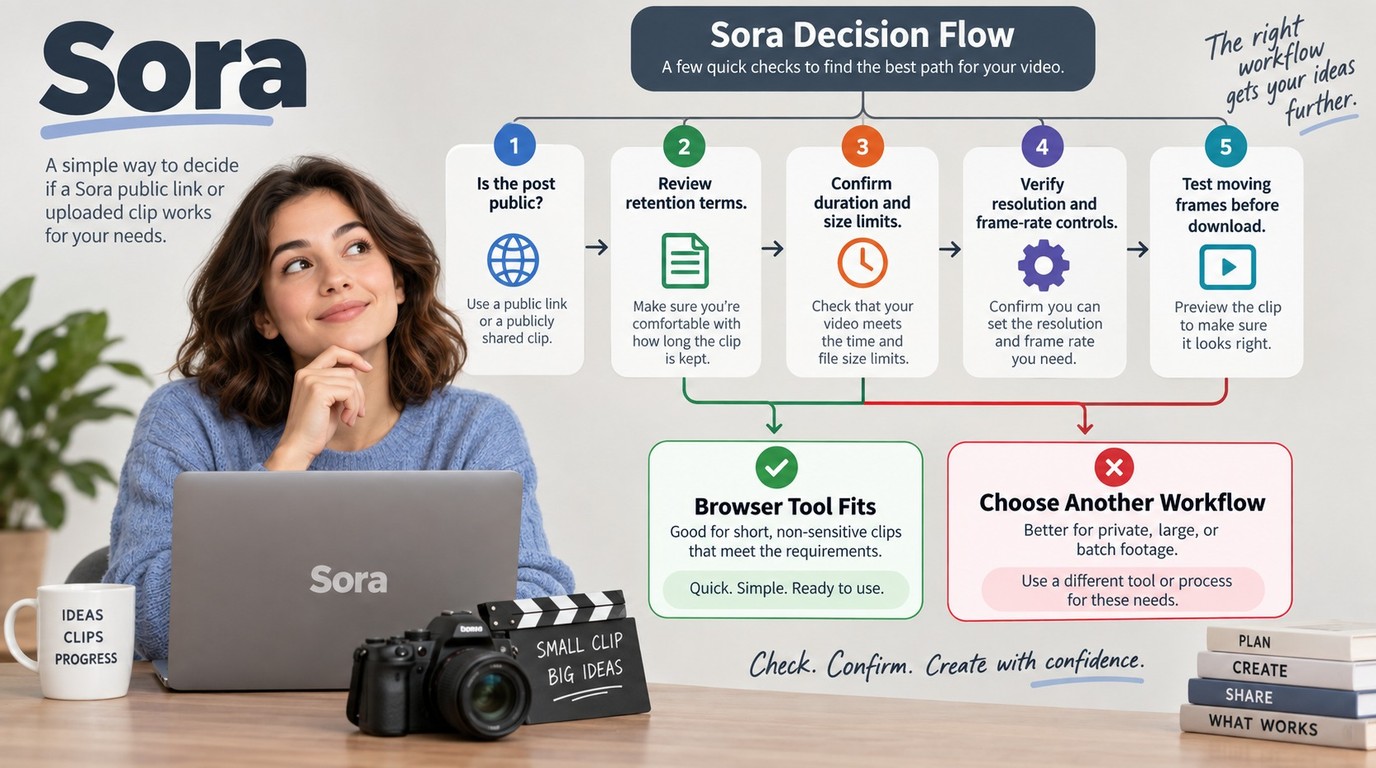
A free online Sora watermark remover can be useful for a short, non-sensitive clip, but convenience is not the same as fit. Before uploading a file or pasting a link, confirm input access, file limits, output quality, data handling, and whether the allowance covers the amount of video you need to process.
Public Links, Uploads, and Privacy Tradeoffs
Check these points before sending the clip:
- Link visibility: Public-link tools may reject drafts, private posts, expired links, or changed URL formats.
- Upload handling: Read how long uploaded files and generated results are retained or deleted.
- File limits: Confirm accepted duration, size, resolution, format, and daily or account quotas.
- Output controls: Look for resolution, frame rate, audio, and container settings before processing.
- Motion preview: Make sure the service lets you inspect repaired frames before the final download.
- Workload cost: A small allowance may suit one clip but not a batch or repeated revisions.
Privacy becomes part of the method when a browser service requires the full file. A Reddit user in r/SoraAi described the opposite preference plainly: "Everything runs fully offline on your own PC after the first model download — no cloud processing, no uploads, no accounts." The quote is not proof that every desktop app is private; it shows why upload location and deletion terms matter before you submit unpublished footage.
My take is that “free” often shifts the cost into smaller limits, waiting, uploads, or repeated quality checks. A browser tool fits a low-stakes clip with a simple background. It is a poor fit for confidential footage, a large file, batch work, or a mark crossing important moving detail.
When UniFab Watermark Remover AI Fits a Desktop Workflow
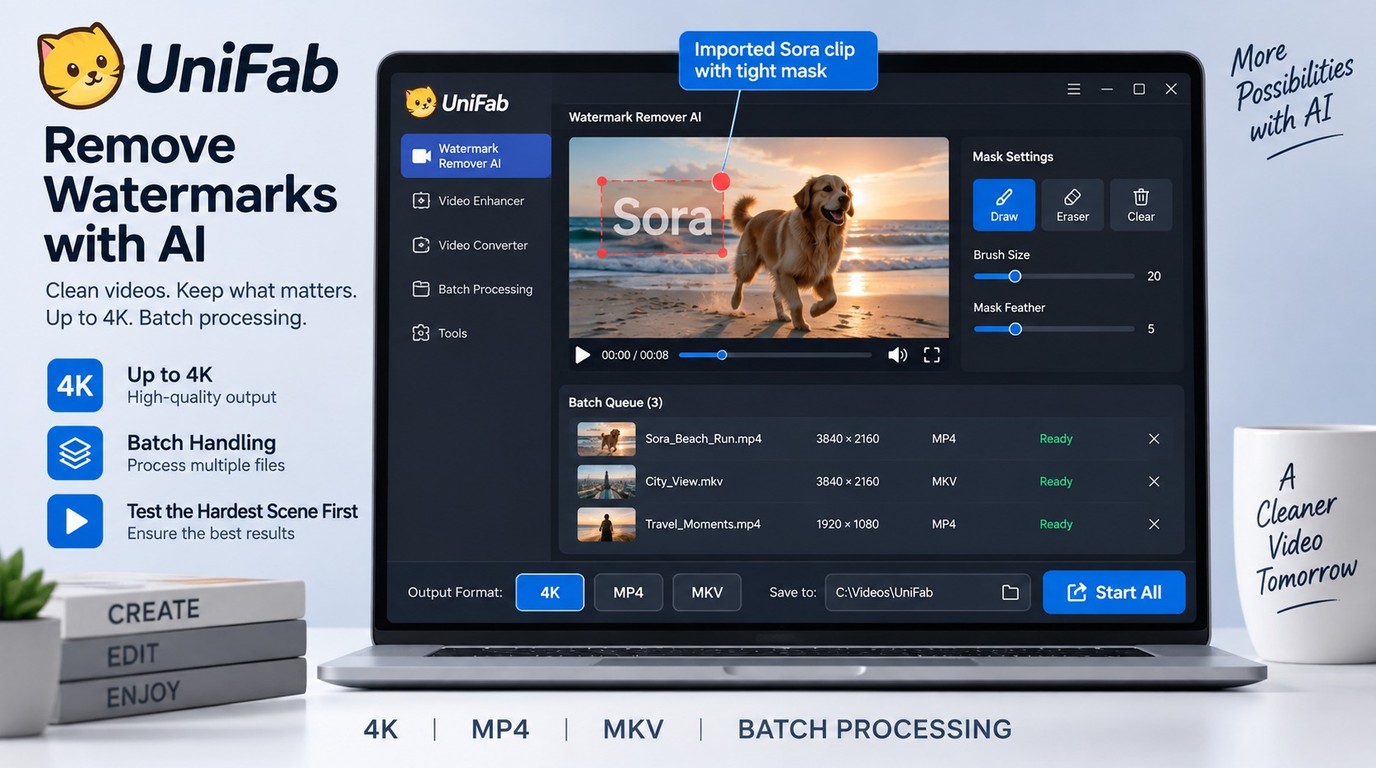
UniFab Watermark Remover AI fits when you want a Windows or macOS workflow for authorized local files and need defined output boundaries rather than a link-only browser form. UniFab Watermark Remover AI is available for Windows and macOS, outputs up to 4K in MP4 or MKV, supports batch downloads, and accepts files up to 10GB through FabCloud credits.
Verified Specs, FabCloud Credit Plans, and Practical Limits
The useful scope is compact: Windows and macOS support, output up to 4K, MP4 or MKV delivery, batch downloads, and a 10GB limit per file. It does not remove ads or download subtitles. Files above 10GB should be split before processing, while ad or subtitle tasks need the relevant platform or editing feature.
FabCloud pricing for U.S. readers was structured as follows as of September 2026:
| FabCloud plan | Annual price | Monthly option |
| 600 credits | $199.99/year | $20/month |
| 1,000 credits | $299.99/year | $30/month |
New accounts receive 30 FabCloud credits. Use those credits on a short section that contains the hardest motion or texture in your footage before committing the rest of a long file. That test tells you more than processing an easy static shot.
If you are comparing HitPaw Watermark Remover with UniFab, apply the same file-level questions to both: supported operating system, accepted size, output resolution, format, and workload cost. UniFab suits Windows or macOS creators who need batch downloads for authorized clips; it is not intended for ad removal, subtitle downloading, or unsplit files above 10GB.
The limitation worth accepting is credit-based cloud processing in exchange for a defined desktop workflow and published file boundaries. For one small clip, an online remover may be enough. For repeated jobs that need 4K, MKV, or batch downloads, start with the 30 introductory credits and judge the hardest scene before queuing the rest.
Sora Watermark Removal FAQ
The legal and technical questions are separate from the editing steps. Resolve ownership, platform terms, tool capability, and provenance before treating a visually clean export as a finished file.
Is It Illegal to Remove a Sora Watermark?
There is no universal yes-or-no answer. Editing a video you created or have explicit permission to modify is different from altering someone else's work and republishing it as your own. Sora's terms can restrict use even when a dispute would not amount to copyright infringement, while unauthorized distribution can raise separate copyright and attribution issues. Keep the file for the authorized purpose, do not conceal its AI origin, and follow the terms and law that apply to your use case.
Can ChatGPT Remove a Watermark From a Video?
ChatGPT is not a dedicated frame-by-frame video watermark remover. It can help explain masking, inpainting, export settings, or a script-based workflow, but the actual clip still needs a video editor, retrieval tool, or watermark-removal application. If only the downloaded file remains, use a tool that lets you mask the mark, preview moving frames, and export the full video in the required format.
Does Removing the Visible Watermark Erase AI Provenance?
No. A visible logo is an on-screen mark; C2PA is signed provenance metadata that records content origin and edits, while SynthID is an embedded signal used to help identify AI-generated media (OpenAI content provenance). Removing the visible mark does not prove that either provenance layer is gone. Keep an accurate disclosure that the video was AI-generated, preserve the original when possible, and do not use visual cleanup to misrepresent where the content came from.