If you are weighing HitPaw Watermark Remover against blur, price, and privacy concerns, the short answer is that it can erase static or moving marks from photos and videos, but a clean result depends on the background, motion, and version you choose. Preview the difficult frames before paying or exporting.
The search for a HitPaw online watermark remover usually starts with a small logo and becomes harder when that logo crosses a face, texture, or moving subject. The browser and desktop routes also place different limits on exports, credits, and file handling. A practical rule is simple: confirm that you can edit the media, judge how the mark moves, and then compare privacy and delivery requirements. This review applies that sequence to HitPaw's workflow, version choice, platform scenarios, and project-based alternatives.
HitPaw Watermark Remover Review: What It Does and How to Use It
Please note: Use watermark removal only on media you own or are authorized to edit. Follow the source platform's terms and keep any required attribution or provenance labels; do not redistribute the edited file without permission.
HitPaw Watermark Remover handles logos, text, date stamps, stickers, people, and unwanted objects in photos or videos. The correct workflow is to confirm your rights and file requirements, import the media, mark the unwanted area, process it with a suitable mode, inspect the preview, and export only after difficult frames look acceptable.
Before You Start: Rights, File Type, and Output Checks
Start with permission, not the removal box. Edit media you created or have authorization to modify, and preserve any attribution or provenance label required by a platform, client, license, or contract. HitPaw Online lists MP4, MOV, and AVI among its supported uploads; the installed app supports Windows 7 through 11 and macOS 10.13 or later.
Next, define the delivery target before processing. Check the required resolution, file type, and whether the watermark stays fixed or moves across the frame. A static corner logo over a flat wall is a simpler reconstruction job than translucent text passing over hair, fabric, subtitles, or camera motion.
The practical boundary is visible in the preview. Importing a file successfully does not mean a complex mark will disappear cleanly, so inspect the result at normal speed and full frame, then pause on edges, faces, and textured areas before export. If an authorized file still shows smearing or shifting texture, stop there rather than treating export access as a successful result.
The Five-Step HitPaw Workflow
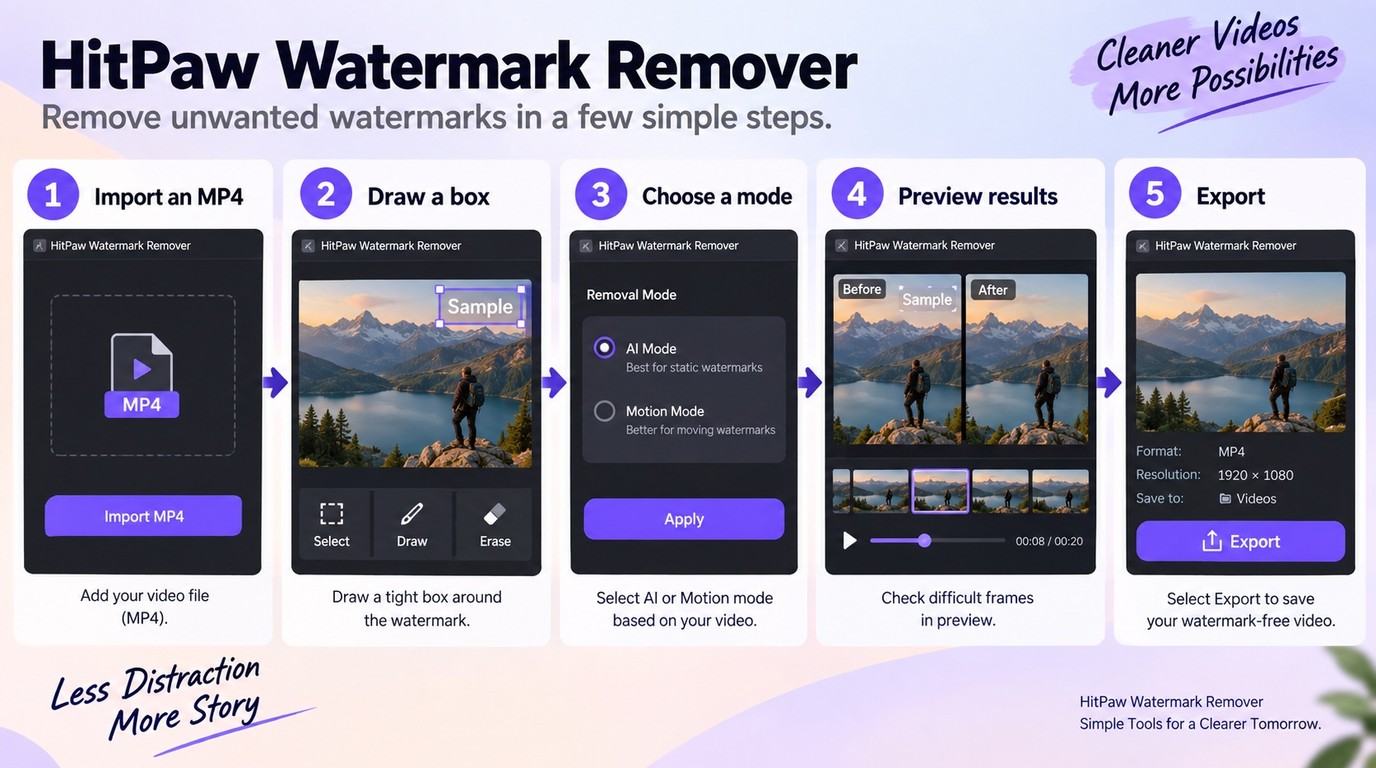
Use this five-step sequence for either version, with installation and sign-in added for the desktop app:
- Open HitPaw Online for a browser upload, or install the Windows or Mac app from HitPaw's official site.
- Import the authorized photo or video and confirm that the full frame, audio, and duration loaded correctly.
- Draw the selection tightly around the watermark. On desktop, choose a filling or AI mode that matches a static or moving mark.
- Process a representative section and preview the beginning, a motion-heavy middle frame, and the end.
- Export the file, then compare it with the source for blur, repeated texture, damaged text, or edge shimmer.
Keep the selection as tight as the motion allows. A large mask asks the software to invent more background, which raises the chance of a visible patch. For delivery work, the best checkpoint is not whether the mark vanished in one frame, but whether the repaired area remains unobtrusive through the whole shot.
HitPaw Online vs Desktop: Free Access, Quality, and Privacy
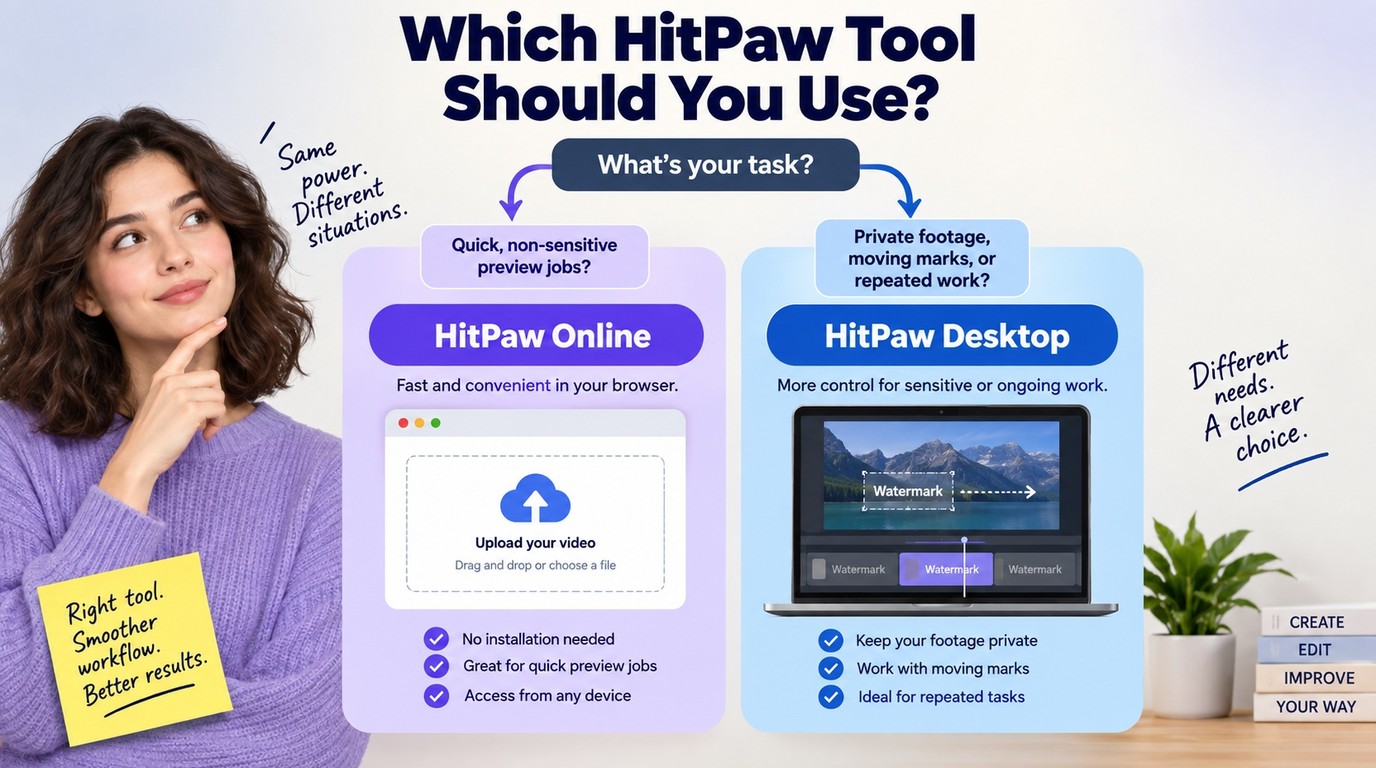
Use HitPaw Online for a quick, non-sensitive clip when you want no installation and only need to judge a preview. Choose the desktop app for moving marks, repeated work, or an installed workflow, but do not treat either download button as proof that unrestricted export is free.
Free Browser Access vs Desktop Licensing
HitPaw's free browser tier is a preview route. Export capacity and longer processing allowances sit in its online plans, while the desktop app uses licenses plus credits for Pro and Motion removal modes.
| Route | Displayed price | Watermark allowance | Main boundary |
| Online free | $0 | Preview only | No full export |
| Online weekly | $9.99 | Up to 900 seconds | 300 credits weekly |
| Online monthly | $24.99 | Up to 3,600 seconds | 1,200 credits monthly |
| Desktop monthly | $12.99 | 100 motion credits | One computer |
| Desktop perpetual | $39.99 | 600 motion credits | One computer |
These are displayed US prices before tax as of September 2026. HitPaw's official online and desktop checkout pages also list annual options, so the useful comparison is the allowance attached to a plan, not the discount badge beside it.
As one Reddit poster in r/VEO3 put it, "Most of the websites that remove watermarks either are too expensive for me or leave a blur around the watermark area after the removal." That tradeoff is the real purchasing question: a low price has little value if the repaired patch is visible in the final edit.
Quality, Privacy, and Large-File Tradeoffs
The online route sends the file through a browser upload, which is convenient for a short social clip but a poor fit for confidential client footage or unreleased media. The desktop route removes that browser-upload step and adds moving-watermark modes, although HitPaw's public product pages do not state a comparable maximum file size or output-resolution ceiling.
Once the media is authorized, footage sensitivity makes the version decision: keep confidential work off an upload path. For longer projects, compare the actual duration or file ceiling with the required deliverable before purchase. Browser convenience is useful only when it does not conflict with storage policy or delivery specifications.
Which Watermark Remover Fits TikTok, Sora, Gemini, or CapCut?

Choose by the mark's purpose and motion, not by a brand ranking. Confirm that the material and edit are authorized first. Then use a fast, tight selection for fixed corner marks, while moving marks over faces or textured backgrounds require stronger preview control; provenance labels on AI-generated media may need to remain in place.
Platform-use note: Keep required origin disclosures on TikTok, CapCut, Sora, and Gemini. Do not remove marks to impersonate a creator or conceal AI origin.
TikTok and CapCut Watermarks
TikTok and CapCut files can contain different kinds of marks: a fixed corner logo, a moving platform mark, a template label, or an editor-added end card. That distinction changes the path. A fixed mark over expendable edge space may be cropped; a fixed mark over a plain background suits a tight removal mask; a moving mark crossing the subject needs frame-by-frame previewing.
Private TikTok files also expose a workflow issue. As one Reddit poster in r/TikTok wrote, "With it being a private video there's no link to copy. Is there any website where i can upload the downloaded video to remove it?" An upload-based tool can accept a local file, but permission and privacy still come first.
Sora and Gemini Watermarks
Sora and Gemini marks can function as source or AI-generation disclosures, so this is not a section for concealment instructions. If the platform terms, publication context, or client policy requires the label, keep it. For an authorized internal asset where removal is permitted, judge the risk from motion, texture, and how much important content sits beneath the marked area.
The quality problem is concrete. A Reddit poster in r/SoraAi described it this way: "Sometimes you can notice the blurry spot where the watermark was, and sometimes the blur covers an area I want to be shown. How can I have the watermark removed and keep quality good?" When the mark crosses a face, product edge, fine pattern, or fast camera move, a short preview is more informative than a product label. If the repaired area alters the subject or weakens required provenance, do not process that shot.
When UniFab Watermark Remover AI Is the Better Fit
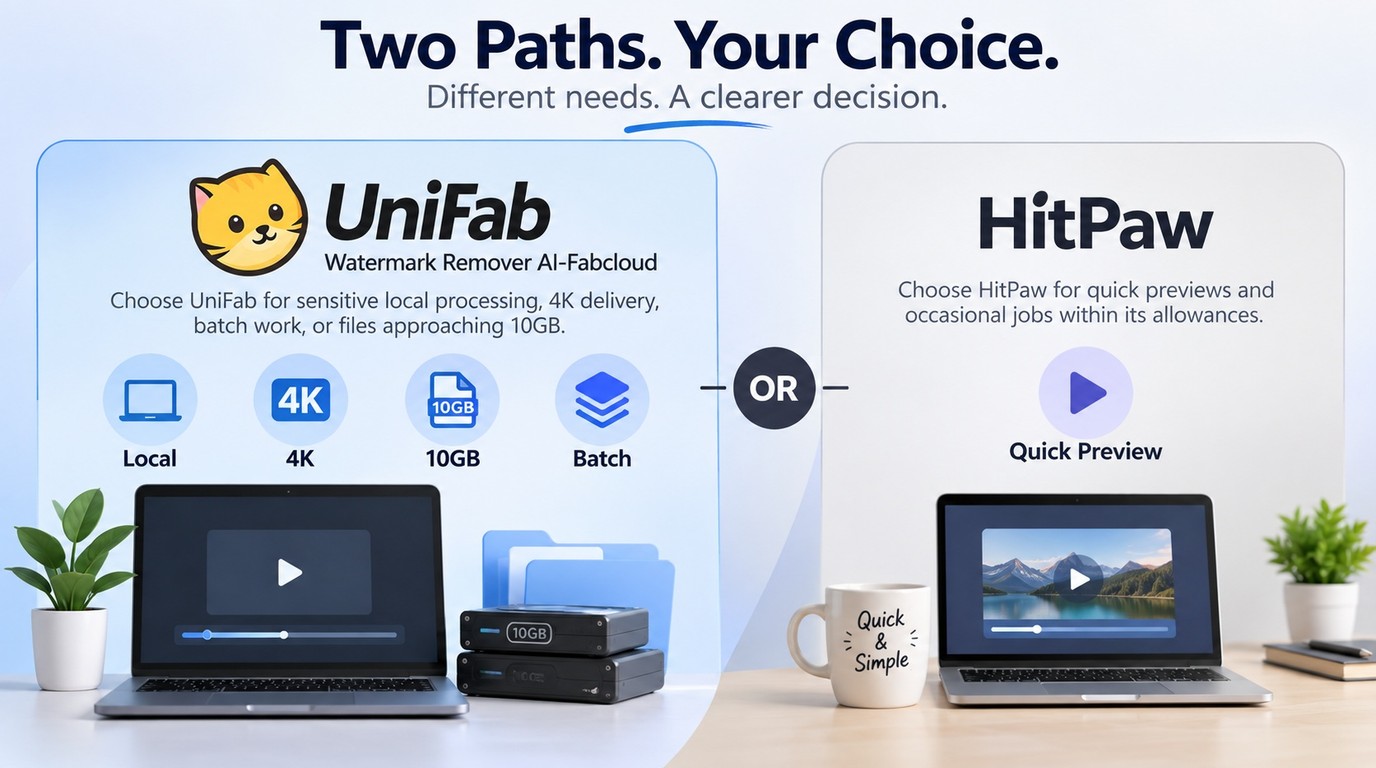
UniFab's Watermark Remover AI is the better fit when sensitive footage needs local desktop processing, the delivery brief calls for 4K, or a long, high-bitrate source approaches 10GB. HitPaw remains a reasonable choice for quick previews and occasional jobs covered by its published plan allowances.
Watermark Removal Specs That Affect Real Projects
| Decision factor | HitPaw Online | HitPaw Desktop | Watermark Remover AI-Fabcloud |
| Systems | Modern browser | Windows 7–11; macOS 10.13+ | Windows and Mac |
| Entry access | Preview only | Two demo exports | 30 starter FabCloud credits |
| Paid entry | $9.99 weekly | $12.99 monthly | $20 monthly |
| Published workload | 900 seconds weekly | Unlimited file count | Files up to 10GB |
| Output boundary | Resolution not stated | Resolution not stated | 4K; MP4 or MKV |
| Workflow | Browser upload | Installed; motion-credit modes | Desktop; local; batch |
Source: HitPaw's official product and pricing pages and UniFab's official Watermark Remover AI-Fabcloud product page, as of September 2026.
Those specifications define project fit, not a universal winner. After authorization is clear, process the most difficult moving or textured section first; no removal model can promise an invisible repair on every frame. The 30 starter FabCloud credits provide a practical first-project check, while the table supplies the system, privacy, and output boundaries needed for delivery.
HitPaw Watermark Remover FAQ
The buying decision follows the same sequence: confirm rights and platform rules, assess whether the mark moves across complex detail, then match file sensitivity and delivery specifications to the workflow. The answers below cover access, safety, motion, and installer trust without changing that order.
Is HitPaw Watermark Remover Actually Free?
HitPaw Online has a $0 tier, but Video Watermark Remover is preview-only there. Full online allowances begin with time-based plans, while the desktop download provides limited demo exports before a license is required. In other words, “free access” lets you evaluate the workflow; it does not mean unrestricted final exports.
Is HitPaw Safe for Private or Client Footage?
The official installer and browser service are the appropriate entry points, but the workflow still matters. HitPaw Online requires an upload, so do not place confidential footage there when a client agreement or internal policy forbids cloud transfer. For that material, use a product with an explicit local-processing path and keep the source, preview, and export inside the approved storage environment.
Can It Remove a Moving Watermark Without Blur?
It can process moving marks through HitPaw's desktop Motion models, but no clean result is guaranteed across every frame. Blur and texture errors become more likely when the mark crosses faces, hair, patterned clothing, subtitles, or fast movement. Preview the start, middle, and end at normal speed before spending more credits or approving the file.
Is a HitPaw Crack or MOD APK Safe to Download?
No unofficial build is worth using for paid or client work. A crack or MOD APK sits outside HitPaw's normal installer, licensing, update, and support chain, which creates avoidable security and project-continuity risk. Download the Windows or Mac installer from HitPaw's official product page, and use the browser version only through HitPaw's own domain.