If a Gemini corner mark blocks a thumbnail, slide, or edit, use Gemini's setting to prevent future visible marks and a Gemini watermark remover for the file you already have. Edit only media you own or are authorized to use, and follow the relevant platform terms.
A small corner mark is easy to erase badly: the result may look fine at a glance yet show smeared text, softer JPEG detail, or damaged motion. My rule is that a clean patch does not count as success if the export loses useful picture detail or audio. This guide separates prevention from file cleanup, then gives distinct paths for images and video. It also explains when a lightweight Gemini logo remover is enough and when file size, batch work, or output format changes the choice.
Before You Edit: Check Gemini's Watermark Setting and Provenance
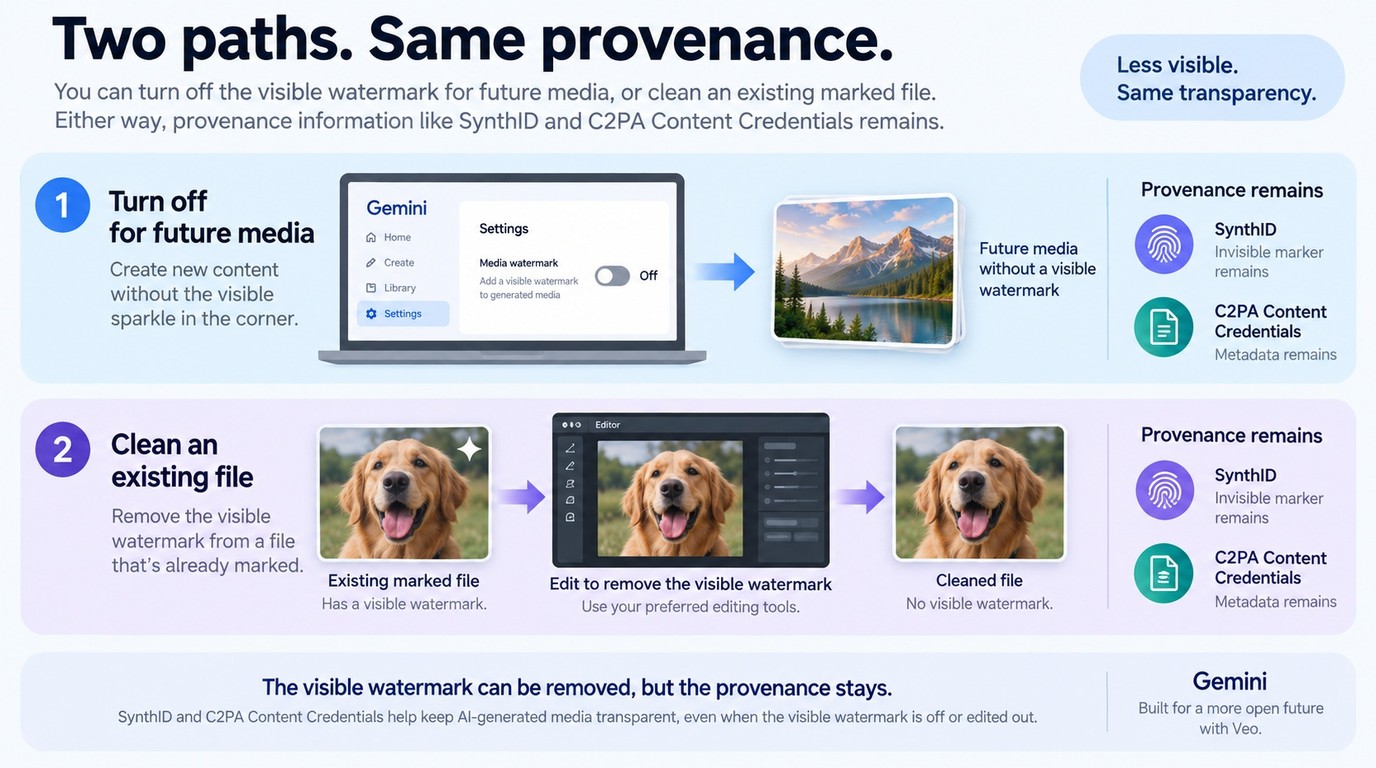
Turn off Gemini's visible-watermark setting before generating new eligible media, but use an editor or remover for a file that already contains the mark. The setting changes future visible output; it does not erase SynthID or Content Credentials, and it does not clean a downloaded file retroactively.
As one Reddit user in r/GeminiAI put it, "Check your settings menu, it might already be there. Settings > Media watermark > Off. SynthID and the C2PA metadata are still in there, this only removes the visible sparkle." The practical distinction is accurate: the visible control is separate from invisible provenance signals.
My editorial rule is to name these as two different operations. Prevention belongs in Gemini settings; cleanup belongs in an image or video workflow. A free watermark remover does not change that boundary, even when it removes the corner graphic cleanly.
Visible Watermarks vs. SynthID and Content Credentials
The visible watermark is the graphic you can see in the frame. SynthID is an imperceptible signal that Google can check in supported images, video, and audio, while Content Credentials can carry information about how media was created or edited.
Removing the visible mark therefore changes appearance, not authorship or usage rights. Keep the original file, preserve any accompanying credentials, and describe AI-assisted media accurately when a client, marketplace, employer, or publishing platform asks for disclosure.
How to Remove the Visible Gemini Watermark from an Existing File
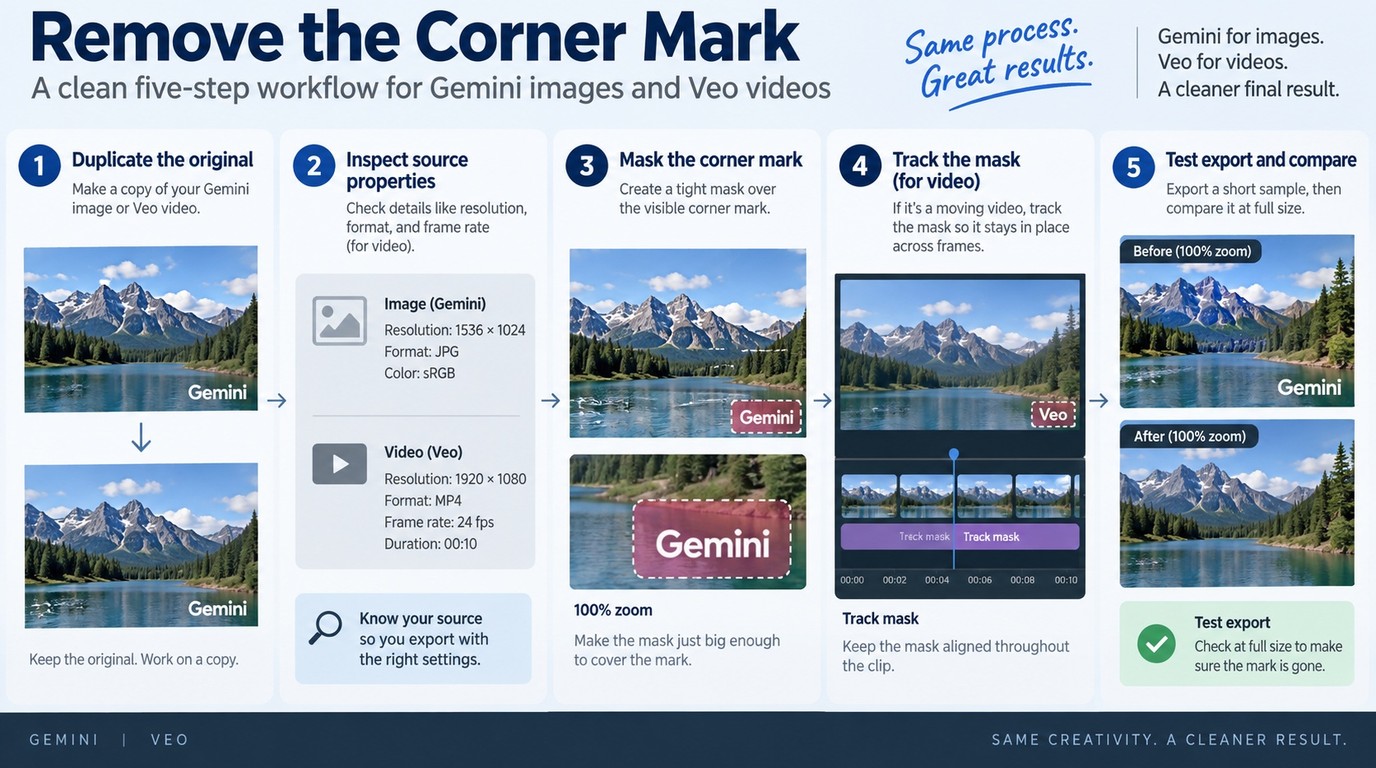
For an existing file, preserve the original, identify whether it is an image or video, select the visible mark as tightly as possible, process a copy, and inspect the export at full size. Images need edge and texture checks; videos also need motion, timing, resolution, frame-rate, and audio checks.
Use-rights note: Upload or edit only files you created or have permission to modify. Confirm the terms that apply to Gemini, the source material, and the destination platform, especially for advertising, resale, client delivery, or other commercial use.
Check the Source File Before You Upload
The safest first move is not editing. Duplicate the source and record its pixel dimensions, file format, and, for video, resolution, frame rate, duration, and audio-track count. Those values give you a reference when the export looks softer or sounds different.
Next, inspect what sits behind the mark. A flat sky or wall gives an inpainting tool room to rebuild texture. Fine type, faces, patterned clothing, product edges, or moving objects leave less room for error. If the watermark overlaps important text, manual cleanup may be more controlled than a one-click patch.
As one Reddit user in r/GeminiAI put it, "When I download it, it uses the JPEG format, which is terrible and also lowers the quality. I've looked for several, but all they do is ask you to pay, and instead of removing the watermark, they create a new one." The useful lesson is to judge the downloaded file and the final export, not the tool's landing-page label.
Remove the Gemini Mark from an Image
Use this short workflow for a still image:
- Duplicate the original and open the copy in a local editor or trusted browser tool.
- Zoom in and mask the visible Gemini mark with the smallest practical selection.
- Run the removal once, then compare nearby lines, letters, skin, and repeating texture.
- Undo and reduce the selection if the patch spreads beyond the original mark.
- Export at the source pixel dimensions and keep a lossless format when the workflow allows it.
At 100% zoom, look for a soft rectangle, repeated pixels, warped letters, or an edge that changes direction inside the repaired area. For a simple corner mark on a plain background, a free AI watermark remover can be sufficient. For typography or product detail, clone, heal, or content-aware tools provide more control because you can correct individual edges.
Remove the Gemini or Veo Mark from a Video
Start with the same idea, but evaluate the whole marked interval rather than one frame:
- Load a copy of the original clip and confirm the timeline matches its full duration.
- Mark the smallest area that contains the visible Gemini or Veo overlay.
- Track that area if the mark or underlying shot moves.
- Preview the start, middle, and end of each affected shot before export.
- Export a short sample, compare it with the source, and process the full clip only after it passes.
My practical preference is a short sample before a full render. Ten seconds that include camera motion, text, and a cut reveal more than a still preview. If the file is an editor export rather than Gemini media, the repair path differs.
How to Remove a Watermark from Gemini Video While Protecting Quality
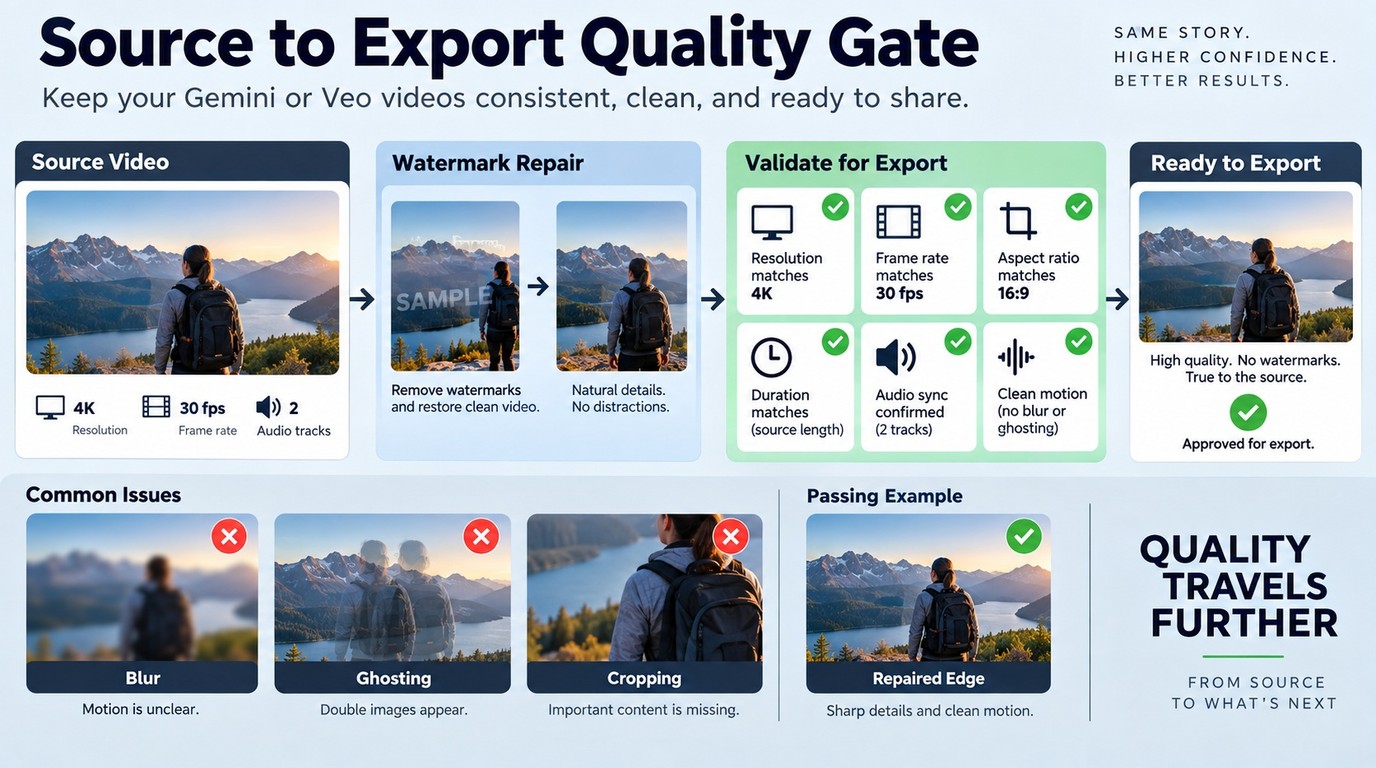
To remove a watermark from video without creating a second problem, match the source resolution and frame rate, preserve its audio tracks, and inspect moving detail frame by frame around the repaired area. The hard part is not hiding the corner logo; it is rebuilding what changes behind it without blur, ghosting, or cropped content.
My quality threshold is simple: if the repaired patch attracts attention during normal playback, the method has failed even when the logo is gone. Video cleanup should preserve the viewing experience, not merely produce a frame where the mark is absent.
Match the Export Resolution and Frame Rate
Keep the export dimensions equal to the source unless resizing is a separate, deliberate task. Upscaling during watermark removal cannot restore detail that was never present, while downscaling can hide a weak patch at the cost of the entire frame. If a 4K source matters to delivery, choose a workflow that accepts and exports 4K rather than converting it to a lower-resolution intermediate.
Match the source frame rate as well. Changing 24, 30, or 60 frames per second during cleanup adds interpolation or dropped-frame risk that has nothing to do with the watermark. Keep the same aspect ratio, avoid an accidental crop, and compare the duration before and after export.
Compression deserves the same discipline. Repeated lossy exports soften the whole image, so work from the highest-quality source available and avoid sending the result through several browser tools in sequence. One controlled pass is easier to judge than three unknown encodes.
Protect Audio and Moving Backgrounds
Audio should survive the workflow unchanged unless you intentionally edit it. Confirm that dialogue, music, ambience, channel layout, and synchronization remain intact in the sample. A video watermark remover that rebuilds pictures but drops a second audio track is not a usable result.
As one Reddit user in r/Bard put it, "Veo Video Watermark Removal: Strip watermarks from AI generated videos entirely in your browser using WebCodecs. Audio passes through untouched, and no files are ever uploaded to a server." Treat that as a clear list of reader priorities: local handling, preserved audio, and a visible result that holds up in motion. Verify those properties in the specific tool and file you choose.
Moving backgrounds are harder than static corners. Water, hair, leaves, fabric, particles, and camera pans change from frame to frame, so a patch that looks correct at one timestamp can shimmer at the next. Text is similarly unforgiving because small errors change letter shapes and spacing immediately.
For these cases, shrink the mask, divide the clip by shot, or use tracked manual repair. The extra control is worthwhile when the watermark crosses subtitles, product labels, or a face.
Inspect the Export for Blur, Ghosting, and Cropped Detail
Review the exported sample at normal speed, then step through the repaired interval frame by frame. Check these six points:
- The patch does not pulse, smear, or repeat a nearby object.
- Letters and straight edges keep their original shape.
- The frame dimensions and aspect ratio match the source.
- The frame rate and duration have not changed unexpectedly.
- All needed audio tracks play in sync.
- The file opens in the editor or player used for delivery.
If one check fails, change one variable at a time. Reduce the mask first, then split the shot, then change the removal method. That order protects the rest of the file from unnecessary re-encoding.
When UniFab Watermark Remover AI Fits the Job
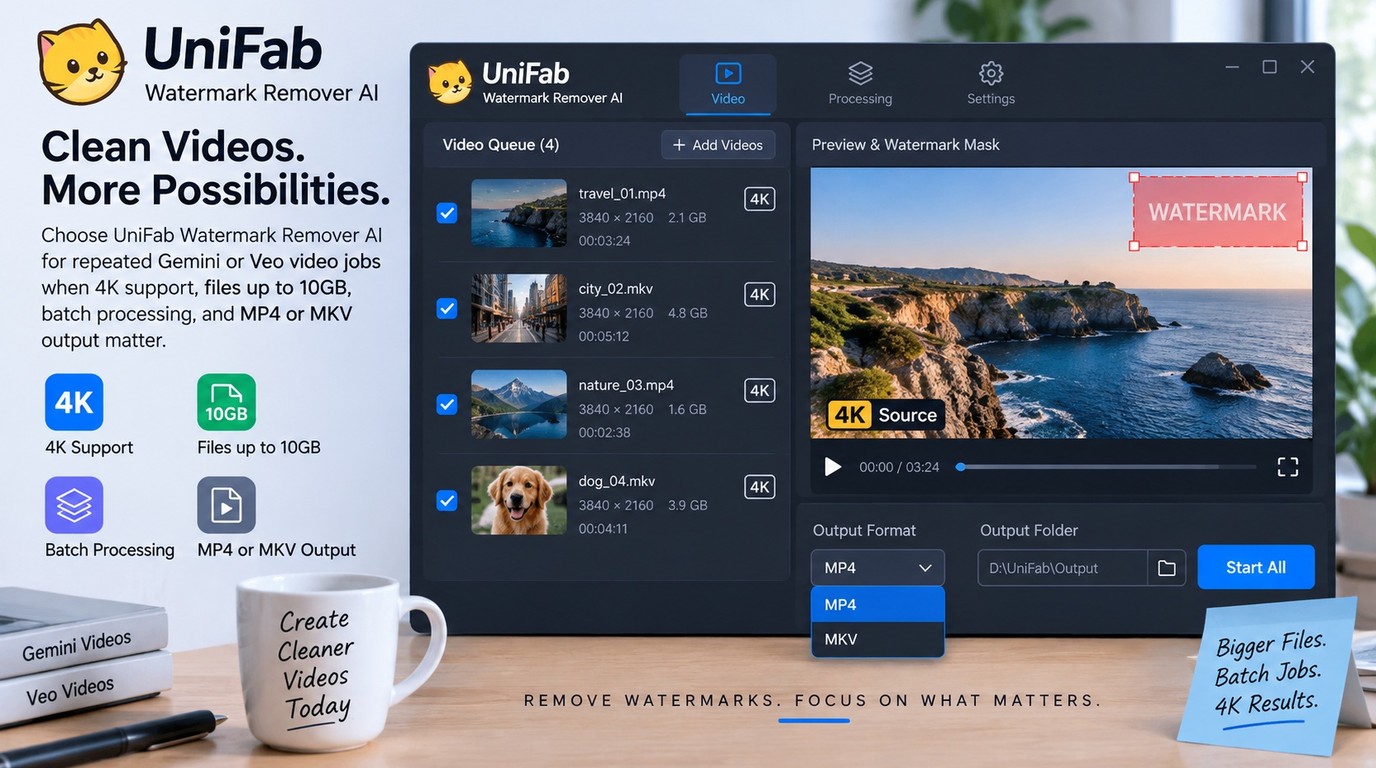
UniFab's AI Watermark Remover fits Windows or macOS video work when the source is up to 4K and 10GB, repeated files benefit from batch processing, and MP4 or MKV is an acceptable output. It is less suited to files above 10GB, output formats outside MP4/MKV, or any task that expects visible cleanup to remove SynthID. New users receive 30 credits for an initial fit check within those boundaries.
Fit Check: 4K, 10GB Files, Batch Jobs, and Output Format
| Method | Best for | Concrete limit or cost | Main caveat |
| Gemini watermark setting | Future eligible media | $0; future output only | Provenance remains |
| Browser or image tool | A few existing images | Often free entry | Privacy and export rules differ |
| Manual editor cleanup | Text or complex detail | Software plus editing time | Slower, skill-dependent |
| UniFab Watermark Remover AI | Large or repeated videos | 4K; 10GB; batch; MP4/MKV | Credits; visible layer only |
For a short, non-sensitive clip, a free online video watermark remover may be enough, but confirm its upload policy, export resolution, audio handling, and credit or download limits before committing the full file. Choose UniFab when 4K, files up to 10GB, batch processing, and MP4/MKV outputs matter.
Source: Google Gemini Help and UniFab's official Watermark Remover AI page, as of September 2026.
FabCloud's 600-credit plan is $20 per month or $199.99 per year; the 1,000-credit plan is $30 per month or $299.99 per year. New users receive 30 credits. That pricing makes UniFab a poor fit for a single tiny image when a local editor already solves the problem, but a clearer fit for repeated video work that needs the documented file and output boundaries.
The limits matter as much as the strengths. UniFab requires an upload-based FabCloud workflow, uses credits, caps a file at 10GB, and outputs MP4 or MKV. It also removes the visible area rather than SynthID or Content Credentials. If the source and delivery requirements fit those boundaries, proceed with UniFab; otherwise return to the lighter image or manual video path above.
Gemini Watermark Remover FAQ
The main questions beyond the editing steps concern permission, privacy, difficult backgrounds, and unsafe software packages. These answers are decision checks, not shortcuts around the source platform's rules or provenance systems.
Is It Legal to Remove the Gemini Watermark from Content You Created?
Removing a visible mark from media you created is not blanket permission for every use. Your right to edit, publish, sell, or deliver the result depends on the source material, Gemini's terms, the destination platform's rules, contracts, and local law. Keep the work to content you own or are authorized to modify, do not redistribute material you lack rights to, and retain required AI disclosures. Removing the graphic does not remove SynthID, Content Credentials, or the obligation to represent the file accurately.
Can a Gemini Watermark Remover Extension Keep Files Private?
An extension can process a file locally, upload it to a server, or combine both approaches. “Runs in your browser” does not by itself prove that the file stays on the device. Check the extension's permissions, privacy policy, network behavior, retention terms, and deletion controls before opening client or unreleased media. For sensitive files, a transparent local workflow is easier to contain than an unknown upload service; for cloud tools, remove confidential metadata and use the smallest necessary sample first.
Why Does the Removed Area Sometimes Look Blurry over Text?
Text leaves little room for approximation. A remover must reconstruct exact strokes, spacing, contrast, and background texture, so a broad mask can turn letters into soft shapes or duplicate nearby pixels. Reduce the selection to the visible mark, process one shot or image region at a time, and compare at 100% zoom. If the mark crosses important wording, switch to manual clone or healing work instead of stacking repeated automatic passes.
Are Cracked Watermark Removal Apps Safe to Install?
No unauthorized cracked package is a sensible editing shortcut. A search for “HitPaw watermark remover crack” points to unofficial distributions, not to HitPaw's official product, and this warning is not an assessment of its official software. Modified installers can carry malware, steal account details, disable updates, or replace one watermark with another. Use software from its official distribution channel and a valid license or documented no-cost offering; do not follow keygen, patching, or license-circumvention instructions.
Bottom Line: Match the Method to the File
Use Gemini settings to prevent future visible marks, then choose cleanup by file type. Use a tight image repair for stills, a resolution- and audio-matched workflow for video, and UniFab when 4K, 10GB, batch processing, and MP4/MKV match the job; none of these appearance edits remove provenance signals or expand your usage rights.
My final check is the same for every route: inspect source resolution, motion, text edges, audio, privacy, and delivery format before calling the file finished. The smallest method that passes those checks is the right one.