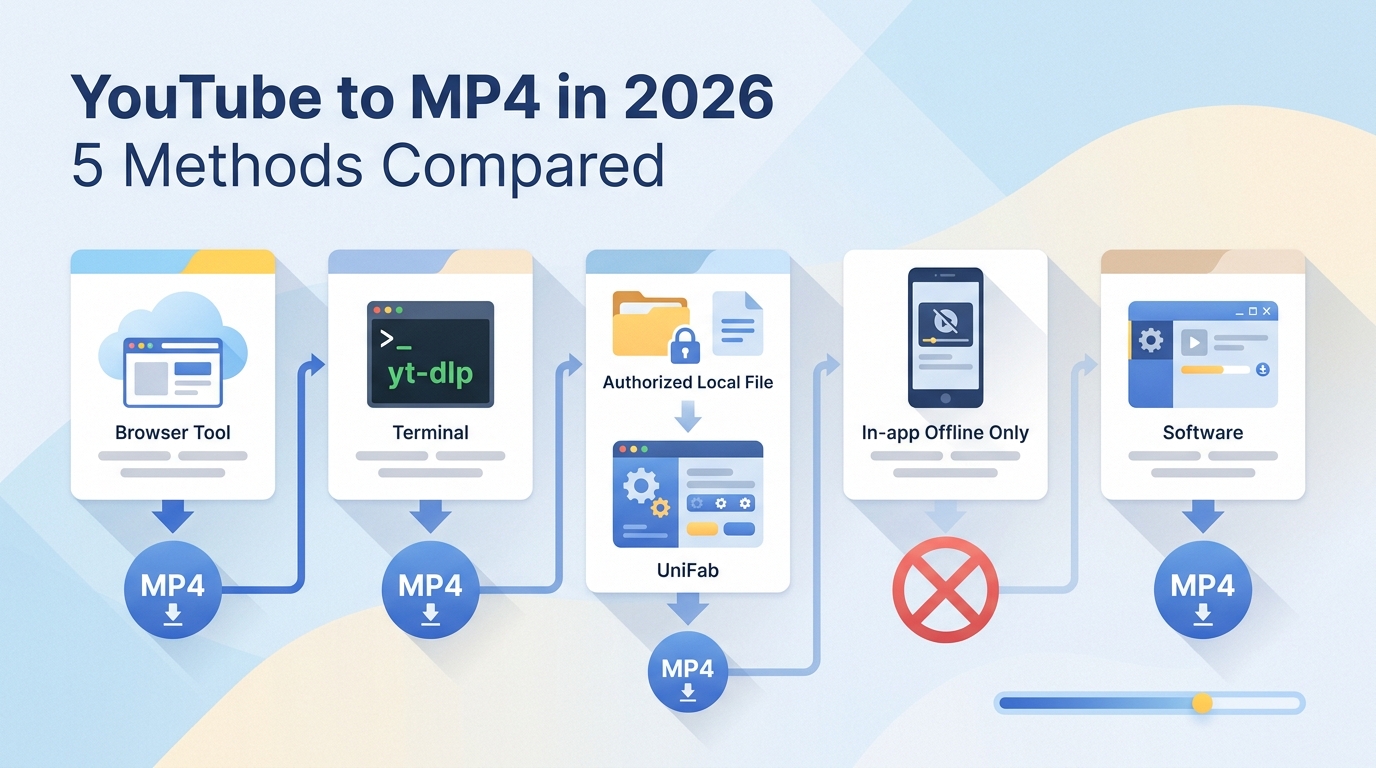
If you need to convert YouTube to MP4, start with permission, not a converter. Use a file you uploaded, YouTube's own download or export feature, or content whose license and platform terms clearly allow saving. Then choose the workflow by clip length, quality needs, technical comfort, and target player.
The practical decision is simple: official options are the first choice; a browser flow can handle an occasional permitted short clip; yt-dlp suits authorized material when command-line control is appropriate; and local conversion is useful after an authorized file is already on your computer. For larger jobs, reliability matters more than a nominal one-click shortcut.
Quick Answer: Choose by Length and Quality
A YouTube to MP4 converter is not one single kind of tool. The right path depends on whether you need an official offline copy, a quick permitted URL workflow, command-line control, or conversion of a local file.
- Official YouTube download or export: Start here when YouTube provides the function for your account or your own upload.
- Browser workflow: Consider it for one authorized short clip after checking the service, domain, prompts, and output.
- yt-dlp: Consider it for videos you own or are explicitly allowed to save when you are comfortable with a command line.
- Local conversion: Use it for an already-downloaded file when you need MP4, codec control, trimming, or batch processing.
- Mobile workflow: Prefer YouTube's in-app offline mode; move authorized local files to a computer when you need a standard MP4.
My editorial rule is to match the method to the job: a short, permitted clip does not need a desktop batch workflow, while a folder of long local videos should not depend on a fragile browser session.
Why Two-Step Conversion Protects Quality
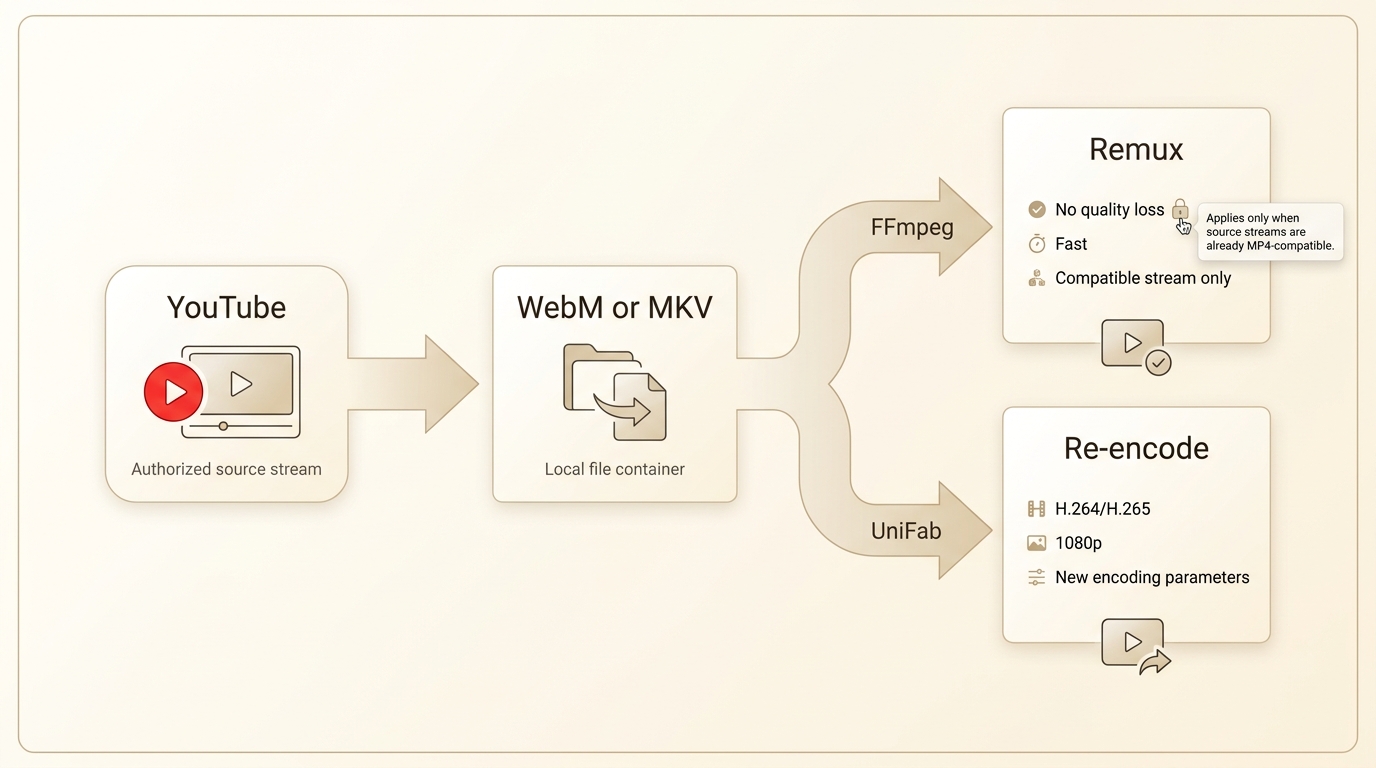
A two-step workflow is the stronger fit for quality-sensitive, long, or batch work because downloading and converting are separate tasks. It lets you inspect the authorized source file before choosing MP4 settings.
Remuxing changes the container without recompressing compatible video and audio. Re-encoding creates new streams, which is useful when the source codec will not play on the target device, but it takes longer and can reduce quality. The practical sequence is to remux first when possible, then re-encode only when compatibility requires it.
- Preserve the source file so you can make another version later.
- Choose H.264 with AAC when broad playback support matters.
- Choose H.265 when the target hardware supports HEVC and storage efficiency matters.
- Check one output on the destination player before converting a batch.
A good fit for: long local videos, repeated conversions, codec changes, and batch work. A poor fit for: someone who needs only YouTube's managed in-app offline viewing.
Method 1: UniFab for Local MP4 Conversion
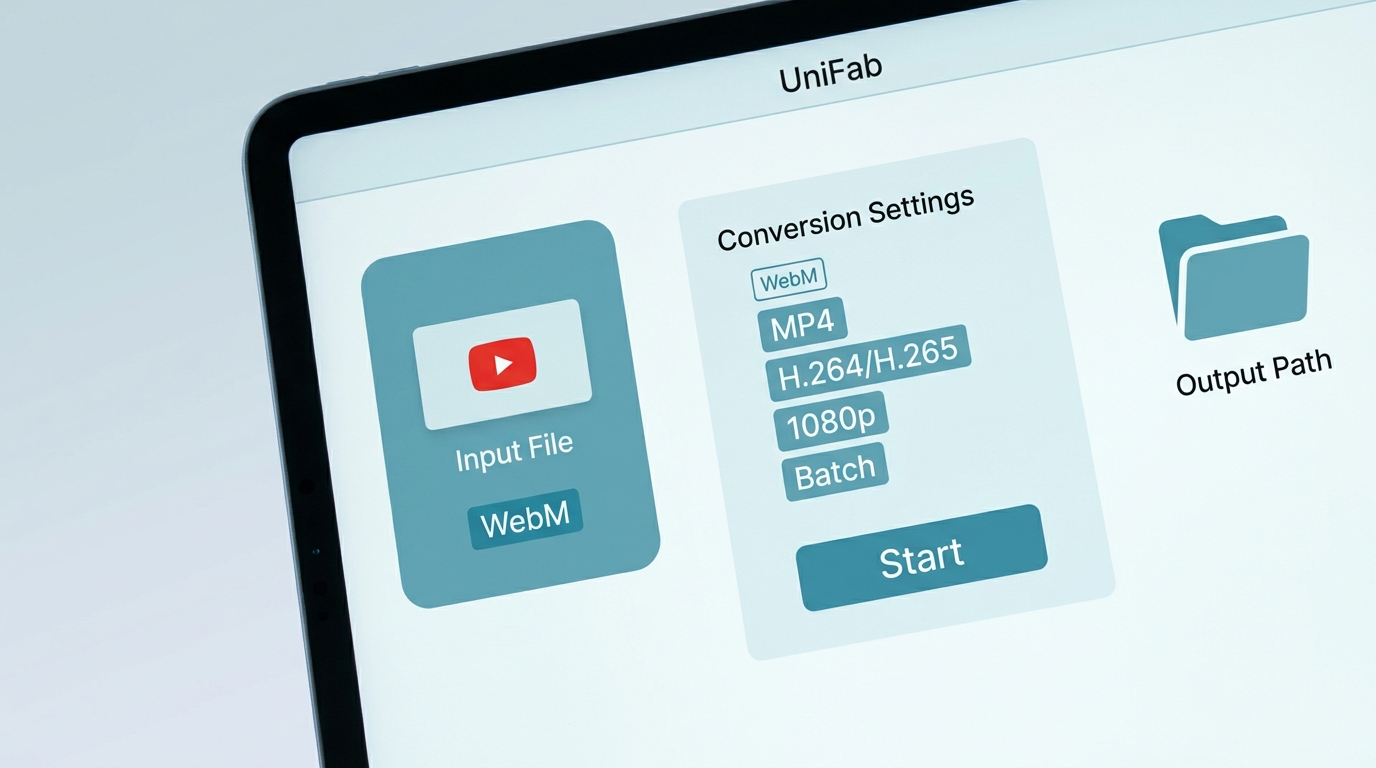
UniFab Video Converter handles local video files; it does not fetch a YouTube URL. For personal use with content you are authorized to access, where permitted by YouTube's terms and applicable law, it can convert an already-obtained file to MP4 on Windows or Mac.
The converter accepts 1000+ formats, supports batch processing and GPU acceleration, and provides MP4 output up to 4K. It is available at no charge and has no watermark. Those capabilities matter here only after the authorized source file exists locally.
Convert a Downloaded YouTube File with UniFab
Use this workflow only with your own upload, a platform-provided file, or material whose terms and license permit local saving.
100% free, fully featured, and watermark-free.
Open UniFab, choose Video Converter, and import your YouTube video.
Click "Choose other format..." from the output format dropdown.
Select MP4 as your output format and choose your preferred resolution. Click "Start" to begin the conversion.
For a single short local clip, this is more setup than a simple remux. For a long-video batch, the graphical queue and codec controls make the workflow easier to inspect before processing begins.
Where UniFab Fits and Where It Does Not
UniFab fits users who already have local files and need a free YouTube MP4 converter stage with no watermark, codec choice, trimming, or batch conversion. This supports a YouTube MP4 no watermark workflow after the file has been obtained through an authorized route. It is not a direct URL downloader.
- Good fit: folders of authorized local videos, repeatable output settings, and playback troubleshooting.
- Less suitable: direct YouTube URL retrieval, mobile-only use, or anyone who does not want to install desktop software.
- Practical limits: it processes local files, requires Windows or Mac installation, and complex conversion choices can take some learning.
For a broader explanation of containers and output choices, the existing YouTube Video Converter guide covers adjacent formats without turning this page into a product catalog.
Method 2: Browser-Based URL Conversion
An online YouTube MP4 converter can be convenient for one authorized short clip, but service availability, limits, and safety can change quickly. Do not assume an old ranking or familiar name proves that a current endpoint is working.
Three-Step Browser Workflow
Before these steps, confirm that the video is yours, YouTube provides a download path, or the platform terms and license expressly permit saving it. Do not use browser conversion for third-party videos merely because the URL is public.
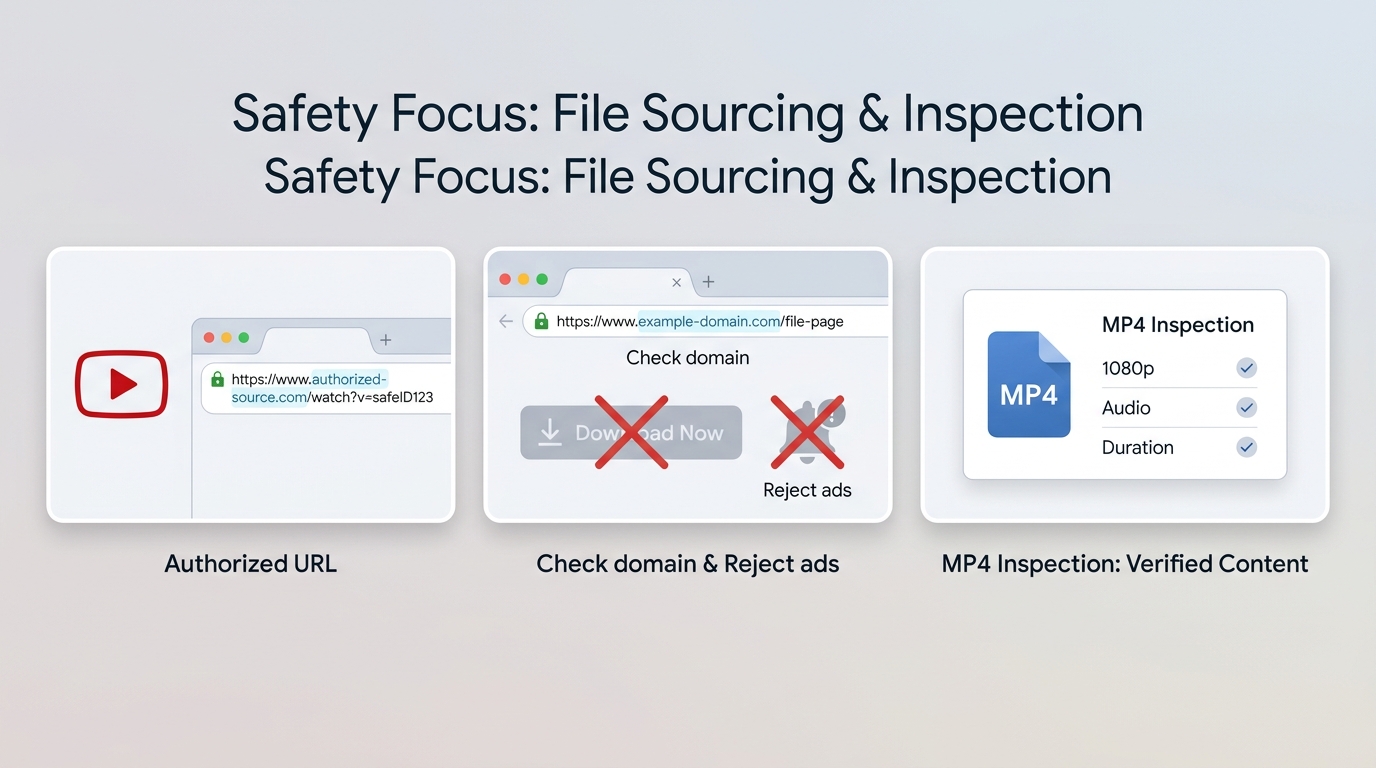
- Open a currently verified service by typing or using its confirmed domain directly; avoid ads, sponsored lookalikes, and redirected copies.
- Paste the authorized video URL, select MP4, and choose only a resolution the service clearly offers.
- After the file arrives, verify resolution, audio, and total duration, then scan unexpected file types before deleting the source or closing the original page.
Common free tiers may stop at 720p or impose length and file-size limits. A browser workflow is therefore most reasonable for an occasional short clip when the domain and output can be validated. The detailed online converter testing guide owns the broader site-by-site comparison.
When to Switch to a Local Workflow
Switch when the clip is long, YouTube MP4 1080p quality is required, the service produces inconsistent audio or duration, or several files need the same settings. First obtain the files through an authorized route, then remux or convert them locally.
I would abandon a browser service after the first unexplained redirect, notification demand, executable download, or malformed file. Convenience is not worth losing control of the browser or the output.
Method 3: yt-dlp and FFmpeg
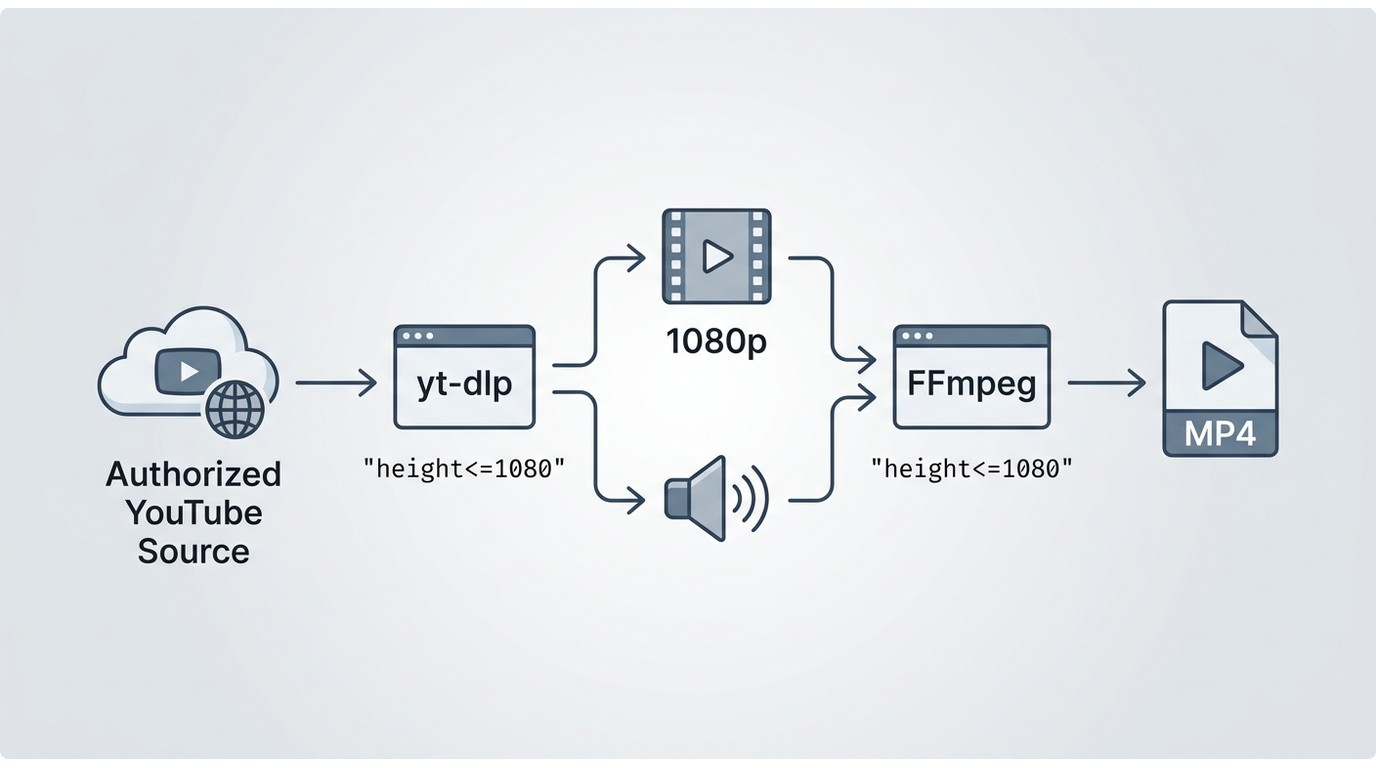
yt-dlp and FFmpeg offer direct control for authorized material, including a YouTube playlist to MP4 workflow, but they should not be used to save third-party content contrary to YouTube's terms or the copyright holder's permission.
For your own upload or content with explicit download permission, yt-dlp can obtain the authorized streams and merge compatible audio and video into an MP4 container. FFmpeg can then remux a compatible local file or re-encode it when a target player needs another codec. Keep command choices tied to the permission and file you actually have rather than copying parameters intended to defeat platform controls.
- A good fit for: users comfortable with commands, repeatable workflows, and detailed format inspection.
- Not ideal for: readers who want a simple graphical workflow or who cannot confirm that downloading is permitted.
- Editorial preference: remux a compatible local file before considering re-encoding; avoid a second generation of compression without a playback reason.
For deeper command coverage after a lawful local file is available, use the site's dedicated WebM-to-MP4 FFmpeg tutorial rather than expanding this comparison into a general command manual.
Method 4: Browser Extensions
A safe YouTube MP4 converter extension cannot be judged by its button alone. Publisher identity, recent updates, requested permissions, and store-removal history matter because extension behavior and availability can change.
- Confirm the publisher and inspect recent version notes.
- Reject extensions that request access unrelated to the stated job.
- Review whether the extension has disappeared and returned under another publisher.
- Remove it if it injects redirects, ads, search changes, or notification prompts.
Extensions may be convenient for a permitted occasional task, but the trust decision is harder than with a transparent local-file workflow. If the publisher or permissions cannot be established, use YouTube's official feature or process an authorized local file instead.
Method 5: Mobile Options
On mobile, YouTube Premium's download feature provides managed offline viewing inside the app, not an exported MP4. That distinction makes it the appropriate default for ordinary offline watching.
NewPipe remains an active Android project, but availability outside official app stores and the rules for a specific video still require care. This article does not provide steps for downloading third-party YouTube content. On iPhone or Android, a cleaner workflow for an authorized MP4 is to obtain the file through the creator or platform, then move it to a computer for conversion if the phone cannot handle the required codec.
- A good fit for: official in-app offline viewing or playback of an authorized file already stored on the phone.
- Not ideal for: large batches, detailed codec control, or converting a long folder of files.
Five Methods Compared by Use Case
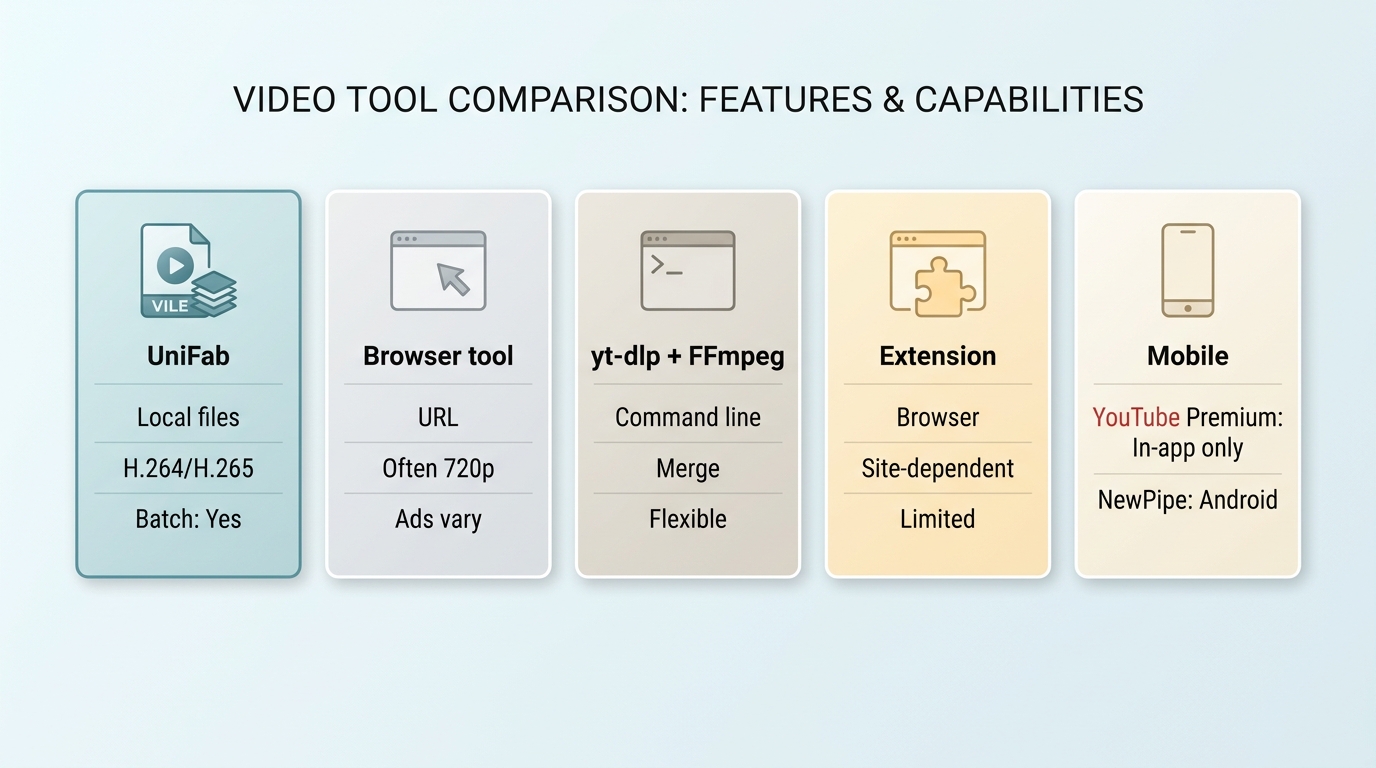
The five YouTube to MP4 workflows differ mainly in input path, control, and trust. Current availability notes below are time-sensitive as of July 2026.
| Method | Input workflow | Good fit | Poor fit | Verified resolution | Codec control | Long-video reliability | Batch support | Safety considerations | Current status |
| UniFab Video Converter for already-downloaded files | Authorized local file | Format changes, trimming, and repeated local jobs | Direct URL downloading and mobile-only use | Up to 4K output | H.264 or H.265 MP4 | Suitable for local desktop processing | Yes | Install the desktop app and validate the output | Available for Windows and Mac |
| Browser-based URL converter | Permitted URL pasted into a web service | One short authorized clip | Long videos, sensitive browsing, or repeat jobs | Often limited to 720p; varies by service | Usually limited | Variable | Usually no | Lookalike domains, redirects, fake buttons, and unexpected files | Endpoints change; no named service is endorsed here |
| yt-dlp with FFmpeg | Authorized URL, then local merge or conversion | Command-line control and repeatable permitted workflows | Simple graphical use | Depends on the permitted source and selected streams | Detailed | Good when the workflow and source remain available | Yes | Confirm permission and obtain software from official projects | Active projects |
| Browser extension | Browser-integrated action | Occasional permitted use after a permission review | Users who cannot verify publisher or access requests | Varies | Limited | Variable | Rare | Broad permissions, publisher changes, redirects, and store removals | Availability changes frequently |
| Mobile workflow | Official in-app offline mode or authorized local file | Offline viewing in YouTube or playback on a phone | Exporting official downloads as MP4, batches, or detailed conversion | Official mode is managed by YouTube; local-file output depends on the app | Limited | Reasonable for playback, less suited to conversion jobs | Limited | App provenance, sideloading, permissions, and platform terms | YouTube offline mode is current; other apps vary |
The practical upshot is to separate downloading from conversion in your decision. UniFab is a local converter, browser tools and yt-dlp begin from a URL, extensions add browser trust concerns, and mobile official downloads remain inside YouTube.
Resolution, Codecs, and Player Compatibility
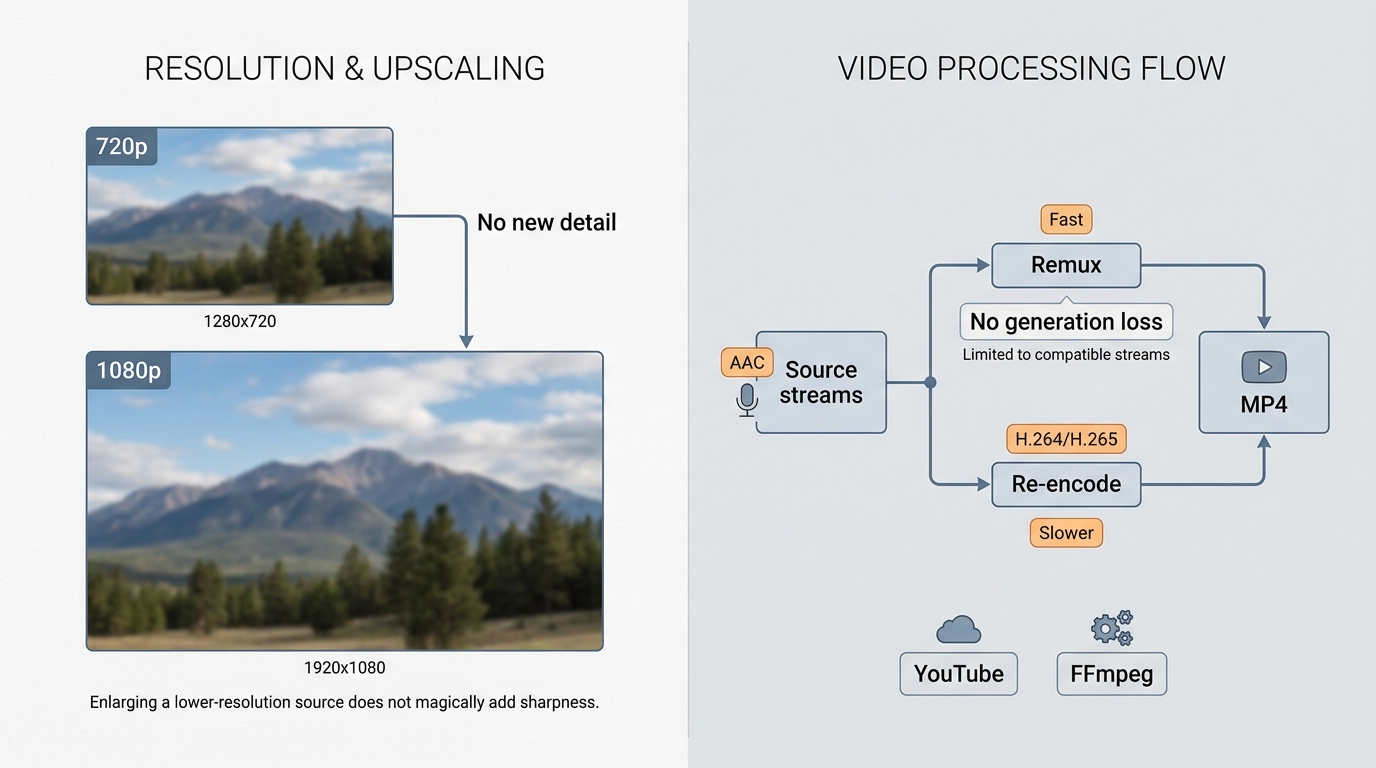
YouTube MP4 1080p is a useful target only when the authorized source includes that detail and the target player supports the chosen codec. Raising the output resolution does not add missing detail.
| Target player | Safer MP4 choice | When H.265 may fit |
| Windows PC | H.264 video with AAC audio | When the installed player and hardware support HEVC |
| Mac | H.264 with AAC for broad app compatibility | For modern macOS hardware and apps that support HEVC |
| iPhone or iPad | H.264 with AAC for easy sharing and playback | For newer devices when smaller files matter |
| Android phone or tablet | H.264 with AAC when device support is uncertain | After testing HEVC playback on the specific model |
| Smart TV or streaming box | H.264 with AAC as the compatibility baseline | When the device specifications explicitly list HEVC |
| Older device or presentation system | H.264 with AAC | Usually avoid unless playback has been tested |
A YouTube MP4 player problem is often a codec problem rather than a broken container. Test the target player before a batch starts; choosing compatibility first is faster than redoing a full folder later.
Legal and Platform Rules to Know
YouTube's platform terms and copyright permission are separate requirements. A user may own the copyright yet still need to follow the platform's allowed download paths, while a visible download button does not grant permission to redistribute the file.
- Use your own uploads, creator-provided files, or material whose license clearly allows the intended use.
- Use YouTube's official download or export functions when they are provided.
- Follow license conditions for attribution, editing, commercial use, and redistribution.
- Do not share, sell, or republish a saved file without the necessary rights.
Public-domain and Creative Commons labels can lower copyright risk, but their exact terms still matter. This guide provides general information, not legal advice.
Safety Checks and Common Failure Modes
A safe YouTube MP4 converter workflow avoids surprise domains and validates the final file. Treat a redirect, permission mismatch, or inconsistent output as a reason to stop.
- Navigate directly to the expected official project, product, or verified service domain.
- Reject browser notification prompts and unrelated extension permissions.
- Distinguish the real action from sponsored or imitation download buttons.
- Do not open an unexpected executable, archive, or installer when an MP4 was requested; scan suspicious files.
- Verify the output's resolution, audio, duration, and playback before trusting it.
- If audio is silent or duration is wrong, obtain the authorized source again and try remuxing before re-encoding.
When an online service starts redirecting or returns different files for the same job, leave it rather than chasing a lookalike domain. A consistent local-file process is easier to audit for long or repeated work.
Conclusion: Pick the Least Risky Workflow
Choose the workflow by permission, input type, length, quality, and technical comfort. There is no universal winner for every YouTube to MP4 task.
Use YouTube's official route when it meets the need. For a permitted short one-off clip, a verified browser workflow may be enough after safety checks. For authorized material and direct command-line control, yt-dlp with FFmpeg is the technical option. For local files that need MP4 conversion, codec choice, trimming, or batches, UniFab is the desktop option, but it does not download YouTube URLs.
The least risky process is the one whose permission, source, software, and output you can all verify. That principle matters more than whether a page promises one click.
Frequently Asked Questions
Can UniFab download a YouTube URL directly?
No. UniFab Video Converter processes a local file after it has been obtained through a platform-provided or otherwise authorized source. It can convert that file to MP4, but it does not retrieve a YouTube URL.
Can I trim the MP4 while converting it?
Yes. A local converter such as UniFab can trim an authorized file during conversion. Browser tools may provide editing controls, but their availability and consistency vary.
Why does my converted MP4 have no sound or the wrong duration?
The download may be incomplete, the audio and video may not have merged correctly, or the browser service may have produced a malformed file. Obtain the authorized source again, inspect it, and try remuxing before re-encoding.
What should I do when an online converter suddenly stops working?
Do not follow copycat domains or unfamiliar redirects. Return to an official YouTube option, use an active official project for content you are permitted to save, or convert an authorized local file when only the format needs to change.