
Prism Video Converter is a Windows and macOS desktop converter for common local formats, but its free-edition terms, installer source, and output verification determine whether it fits your workflow. Test one representative file before committing a batch, especially when reliability matters.
I treat Prism as a fit-for-purpose converter, not a blanket safe-or-unsafe verdict. The useful question is not whether it is universally safe or unsafe. It is whether the current installer, license, and output behavior match the files you need to process. This review follows that decision from setup and safety checks to the point where switching tools makes sense.
Prism Video Converter Review: Features, Cost, and Setup
Prism Video Converter is a desktop tool for converting common formats such as AVI, MP4, WMV, MOV, MPEG, and FLV. It supports batch jobs and controls for compression, frame rate, resizing, captions, effects, and preview, but the free edition is intended for non-commercial use and exposes fewer encoding formats than Prism Plus.
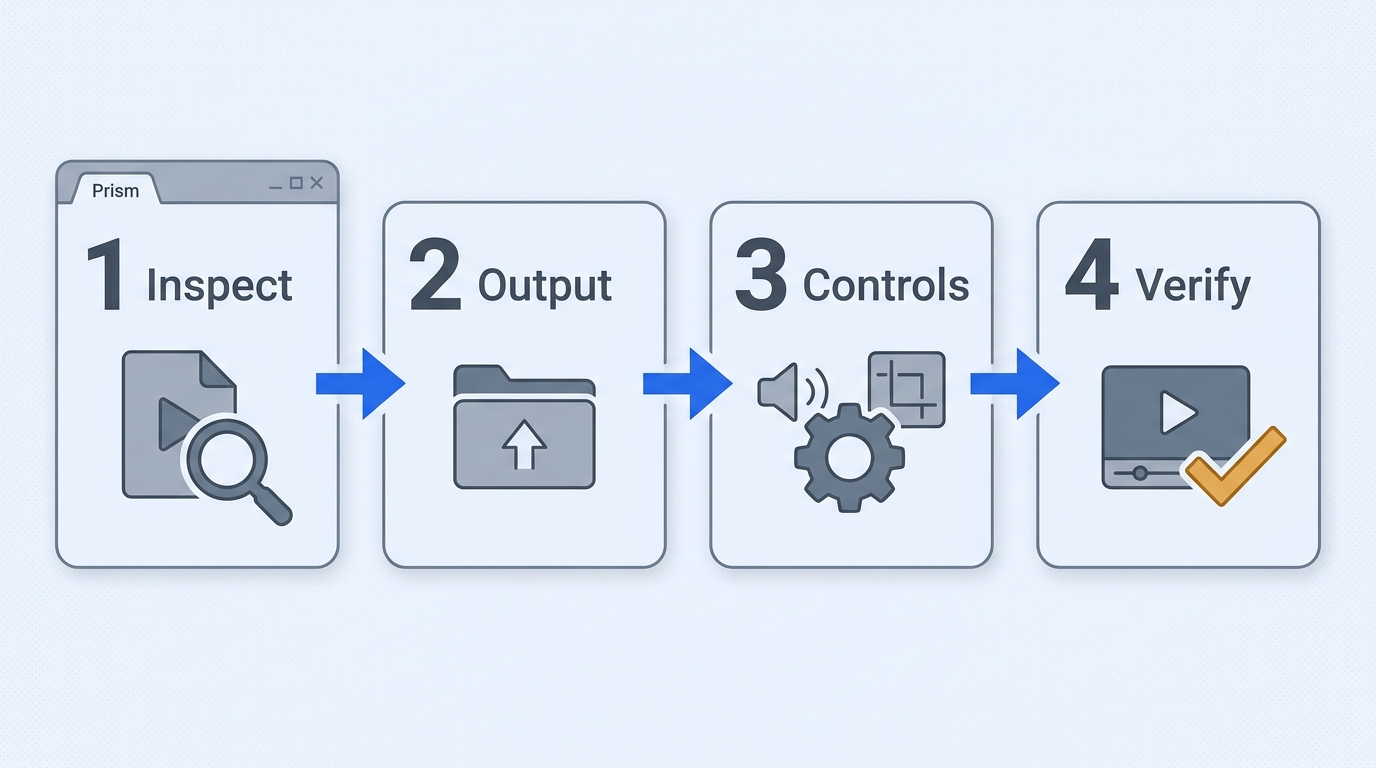
The most reliable workflow is simple: confirm the license, inspect the source, choose a playback-friendly output, and verify a short result before committing a large queue. That sequence matters more than a long list of codec options.
Quick Verdict and Prerequisites
Prism suits Windows or macOS users who need familiar desktop conversion and occasional batches. It is less suitable when commercial licensing, a clearly stated output ceiling, or predictable hardware acceleration is the deciding factor.
Before opening the converter, have these basics ready:
- A supported Windows or macOS system and the installer from an official NCH channel or the relevant app store.
- A source file you own or are authorized to convert, plus enough free storage for the destination copy.
- A playback target, such as a phone, television, editing app, or browser, so the container and codec choice has a purpose.
- A short sample file for the first run. Keep the original until the converted file passes a full playback check.
Free Edition, Prism Plus, and Platform Access
The free Prism edition is positioned for non-commercial use and has fewer encoding formats. Prism Plus expands the available encoding options. Windows and macOS download routes appear separately. The Microsoft Store listing uses the name “Prism Video Converter Express Edition,” so compare its capability list with the edition you intend to install.
That distinction is important for businesses, client work, or monetized channels. A file may convert successfully while the license still does not match the intended use. Do not rely on an old installer, mirror, or registration code to work around a current license decision.
Formats, Batch Conversion, and Output Controls
Prism covers the formats most people search for in a prism video file converter. Its common inputs and outputs include AVI, MP4, WMV, MOV, MPEG, and FLV. Batch conversion helps when a folder shares one target profile. Compression, frame rate, dimensions, captions, effects, and preview controls give you room to tune a file without opening a full editing suite.
Treat “4K” carefully. The available product language describes 4K input and resizing support. That is not the same as a verified 4K output promise for every source and profile. That wording should not be read as a verified 4K export promise. Until NCH documents the output ceiling, validate the exact profile with a sample. A resize can change the frame dimensions without adding real detail.
Step 1: Add and Inspect the Source Files
Add one file first, or a small group with the same source characteristics. Check the duration, resolution, video codec, audio track, and aspect ratio before choosing a profile. If Prism cannot preview the file or reports an unusual stream, solve that input problem before building a queue.
Mixed batches are where convenience can hide errors. A phone clip, a screen recording, and a camera master may all end in MP4 but need different frame-rate or audio settings. Keep unlike sources in separate jobs.
Step 2: Choose the Output Format and Destination
Choose the container for the device or application that will play the result. MP4 is a practical general-purpose target, while an editor may require a specific codec or audio format. Set a destination folder that is writable and easy to inspect, not a temporary directory you may clear later.
If the destination drive is nearly full, a conversion can fail at the final write stage even when the video processing itself is complete. Leave the original in place until the output opens and seeks correctly.
Step 3: Set Resolution, Compression, and Frame Rate
Keep the source resolution when compatibility allows. Lowering resolution reduces storage, while increasing it mainly changes dimensions unless the workflow includes a genuine enhancement stage. Match the frame rate to the source when possible; an unnecessary change can introduce judder or duplicate frames.
Compression is a tradeoff, not a quality switch. A smaller file can be useful for messaging or a phone, but aggressive compression may soften text and fine detail. Start with a moderate profile, then adjust after checking the result on the intended screen.
Step 4: Convert, Preview, and Verify the Result
Run the short sample and inspect the complete file. Confirm that video and audio are present, the duration is close to the source, the aspect ratio is correct, and the timeline can seek from beginning to end. Only then expand the queue.
This final check is not busywork. One r/techsupport post described a conversion stopping before completion, which reduced the user's willingness to continue with the software. That is a reason to verify a single representative file, not proof that every current build will fail.
Is Prism Video Converter Safe? Risks and Reliability Limits
There is no responsible one-word answer to “is Prism Video Converter safe?” Use an official download route, scan the installer, and treat file-association changes or broken output as separate troubleshooting questions. Historical reports about NCH toolbars should not be treated as proof about the current installer, but they do justify careful installation habits.
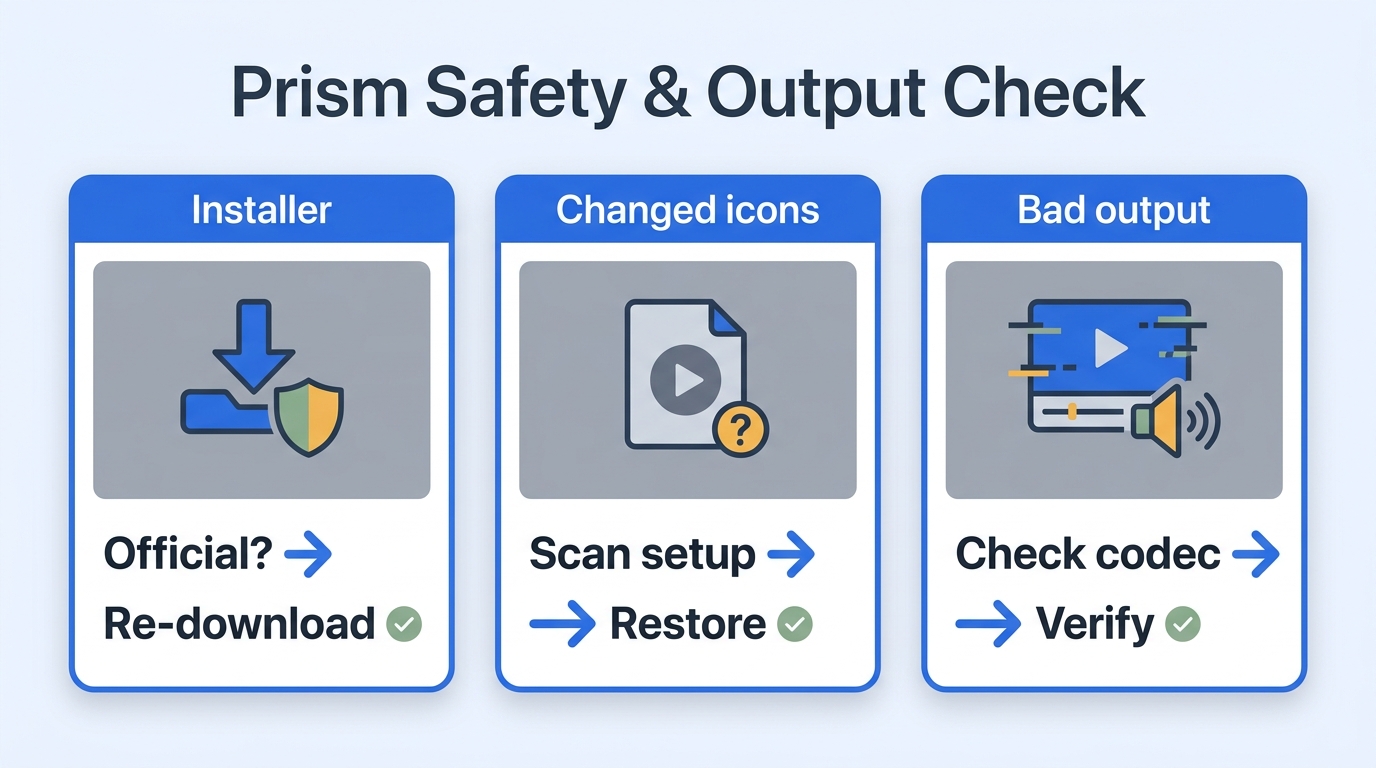
The practical safety boundary is observable behavior: what the installer offers, what permissions it requests, and what remains after removal. Conversion reliability is a second boundary and deserves its own test file. Use a four-part decision path: verify the installer source, validate one representative file, confirm that the license matches the intended use, and switch only when the remaining uncertainty is too costly.
Use Official Download Channels and Scan the Installer
Download from NCH or a recognized store listing, then let the operating system security tools scan the installer before opening it. Read each setup screen for optional components, file-association changes, and default-app choices. A restore point or current backup is sensible before installing any desktop utility that integrates with media files.
Avoid repackaged installers from download mirrors. A clean result from one source does not validate a modified copy from another source.
Historical Toolbar Reports Versus Current Concerns
Historical coverage of Prism includes toolbar offers, antivirus alerts, and bundled-suite concerns. That material describes older packages, not a guaranteed property of the current installer. The useful response is to check the current package rather than to repeat an old “safe” or “unsafe” label.
If the installer shows an offer you did not expect, decline it and note the publisher and file path. If security software blocks the executable, keep the alert details and obtain a fresh installer from the official channel instead of disabling protection.
File Associations, Thumbnails, and Uninstall Cleanup
Changing a media icon or losing thumbnails is frustrating, but it is not by itself evidence of malware. As one Reddit user in r/WindowsHelp wrote, “I used an app called prism video converter to convert a video VLC couldn't, and it worked but after I did it I see this on my MP4 files that don't display any thumbnails. I tried uninstalling Prism and reinstalling MPC, but nothing worked, and as of right now I'm full scanning my PC in case it's a virus.” The immediate checks are to restore the default app, rebuild the thumbnail cache if needed, and review installed NCH components after uninstalling.
Look for residual suite entries and startup items, then restart before judging the cleanup. If the behavior affects unrelated files or persists after a clean uninstall, use the operating system’s security logs and a second scan rather than guessing from the icon alone.
Unfinished, Audio-Only, or Stuttering Output
When a result is incomplete or plays audio without video, work through the fault in this order:
- Open the source in another player and confirm that its video stream is intact.
- Try a standard container and a device profile that matches the target player.
- Keep the source aspect ratio and frame rate unless there is a clear compatibility reason to change them.
- Disable optional hardware settings for one test file, then compare the result before restoring them.
- Verify the one-file output before adding more items to the batch.
This sequence addresses separate source, profile, and playback failures. As one Reddit user in r/iPodHacks put it, “I've tried some converters and the closest I got was with an NCH converter called Prism, but it only shows audio, like it thinks it is a song almost.” That report comes from one setup, not a universal diagnosis; it points to checking the video stream before changing several output controls.
Who Prism Suits and When to Switch
Keep Prism when the official installer is verified, the job is a straightforward desktop conversion, the non-commercial license fits, and a sample output passes verification. Switch when you need clearer commercial-use terms, a wider confirmed format list, a named acceleration path, or a workflow that handles large mixed-format queues with fewer manual checks.
The dividing line is not brand familiarity. It is how much uncertainty your workflow can absorb before an unfinished or incompatible file costs more time than the conversion itself.
UniFab Video Converter as a Prism Alternative
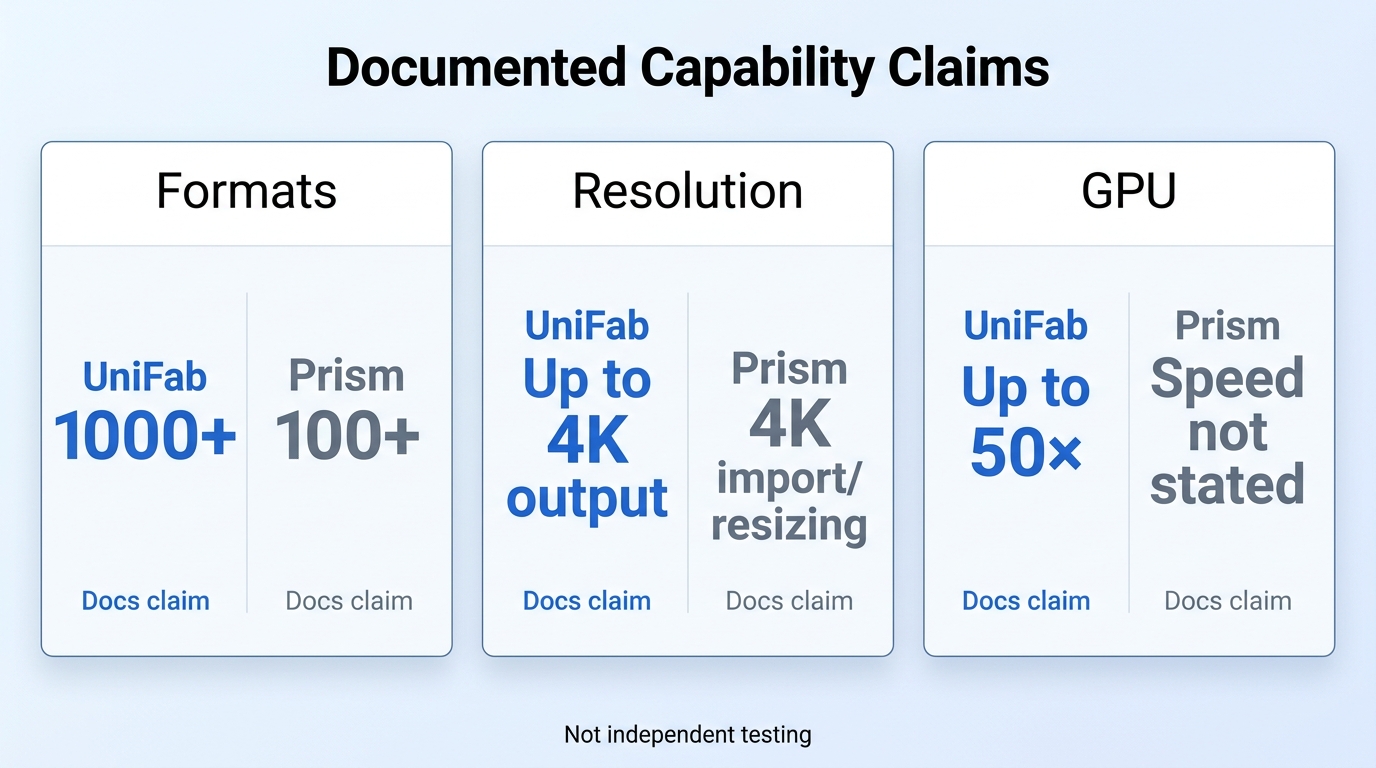
When mixed-format queues, a 4K output ceiling, or GPU acceleration are the actual constraint, UniFab Video Converter is a $0 local desktop app for Windows and macOS, available at that price since December 2024, with 1000+ format conversions, up to 4K output, and NVIDIA, AMD, and Intel GPU acceleration up to 50×.
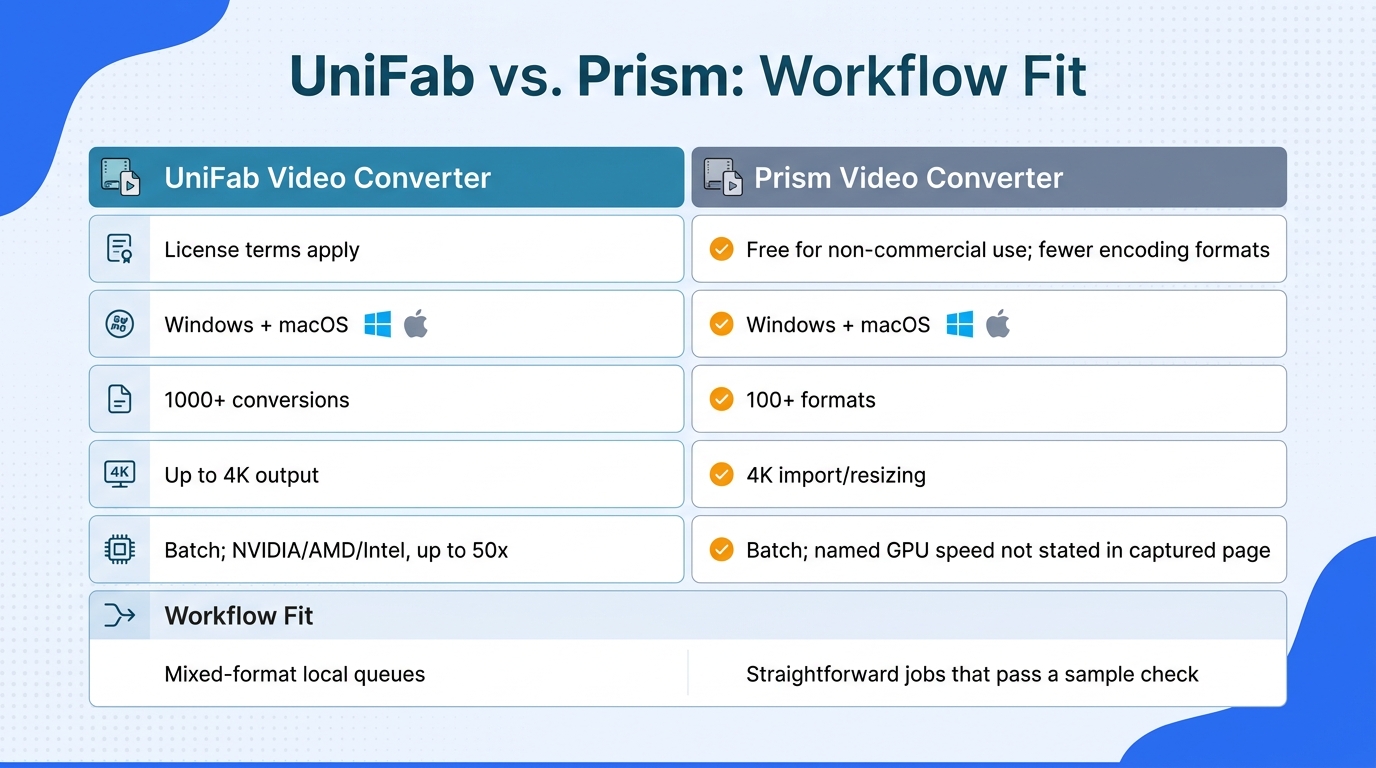
Across Prism Video Converter software reviews, the useful comparison is workflow fit, not a blanket claim that one product is stronger in every task.
Prism and UniFab at a Glance
| Criterion | Prism Video Converter | UniFab Video Converter | Choose when |
| License basis | Non-commercial free; fewer encoders | $0 since Dec. 2024 | Match terms to intended use |
| Operating systems | Windows, macOS | Windows, macOS | Either desktop fits |
| Format breadth | 100+ formats | 1000+ conversions | Mixed-format queues |
| Resolution language | 4K import/resizing | Up to 4K output | Output ceiling matters |
| Batch and acceleration | Batch; GPU claim not stated | Batch; NVIDIA/AMD/Intel, up to 50x | Large queues, supported GPU |
Product details as of August 2026.
When mixed formats and acceleration are real bottlenecks, UniFab is the more suitable option because it documents 1000+ format conversions and NVIDIA, AMD, and Intel acceleration. For occasional non-commercial jobs that pass a sample check, Prism remains the leaner choice.
Choose by Scenario, Not by Feature Count
Prism suits light-duty conversion when its available encoders cover the job. UniFab fits mixed-format desktop queues that benefit from a documented 4K ceiling.
Convert a File with UniFab in Four Steps
- Install the Windows or macOS Video Converter from the official UniFab product channel.
- Add a source file or a batch with matching characteristics.
- Choose the output format, destination, resolution, and compression level for the playback target.
- Convert the sample, preview it, and then process the remaining queue.
Limits to Weigh Before Switching
UniFab requires local installation, tops out at 4K, and does not include AI enhancement in the converter.
Prism Video File Converter FAQ
Use the same decision path for these narrow lookups: confirm the source, test one file, match the license, then decide whether switching solves the actual problem. The short answers below focus on edition names, file types, and cases where a converted file opens incorrectly.
Can Prism convert a DAV file to MP4?
Possibly, but support can vary by build because DAV is commonly produced by security-camera systems. Open the file in the current Prism build first; if it loads with a video stream, select MP4, keep the original frame size for the first attempt, and verify the result. If Prism rejects it, do not rename the extension and assume the container changed. Use a converter that explicitly documents DAV input.
Is there an online version of Prism Video Converter?
Prism is a desktop product for Windows and macOS, not the same thing as a browser-based converter. An online service may accept similar formats, but it has separate upload, privacy, size, and licensing terms. Choose it only when uploading the file is acceptable and the service states how it handles the result.
What is Prism Video Converter Express Edition?
“Express Edition” is the name used by the Microsoft Store listing. Treat it as a distribution label, then compare the listed formats, platform support, and purchase options with the desktop edition you intend to use. Store packaging can expose a different feature mix from a direct installer, so do not infer Prism Plus access from the name alone.
Can I safely install an older version of Prism?
Use an official archive only if NCH provides one for your operating system. Check the publisher signature, scan the installer, and run it in a controlled environment before opening personal media. Avoid mirrors that bundle a registration code or modified setup; an old license does not make an unverified package trustworthy.
Why does a converted file play audio without video?
The usual causes are an unsupported video codec, a device profile that accepts the audio but not the video stream, or a container mismatch. Reopen the source, choose a standard MP4 profile, keep the original aspect ratio, and test one short output. Check the video stream before changing several settings at once.
Bottom Line
Keep Prism for simple desktop conversions when its non-commercial terms fit and a one-file test passes. Choose UniFab when a $0 local converter available since December 2024 better fits mixed-format batches, while accepting local installation and no AI enhancement inside the converter.