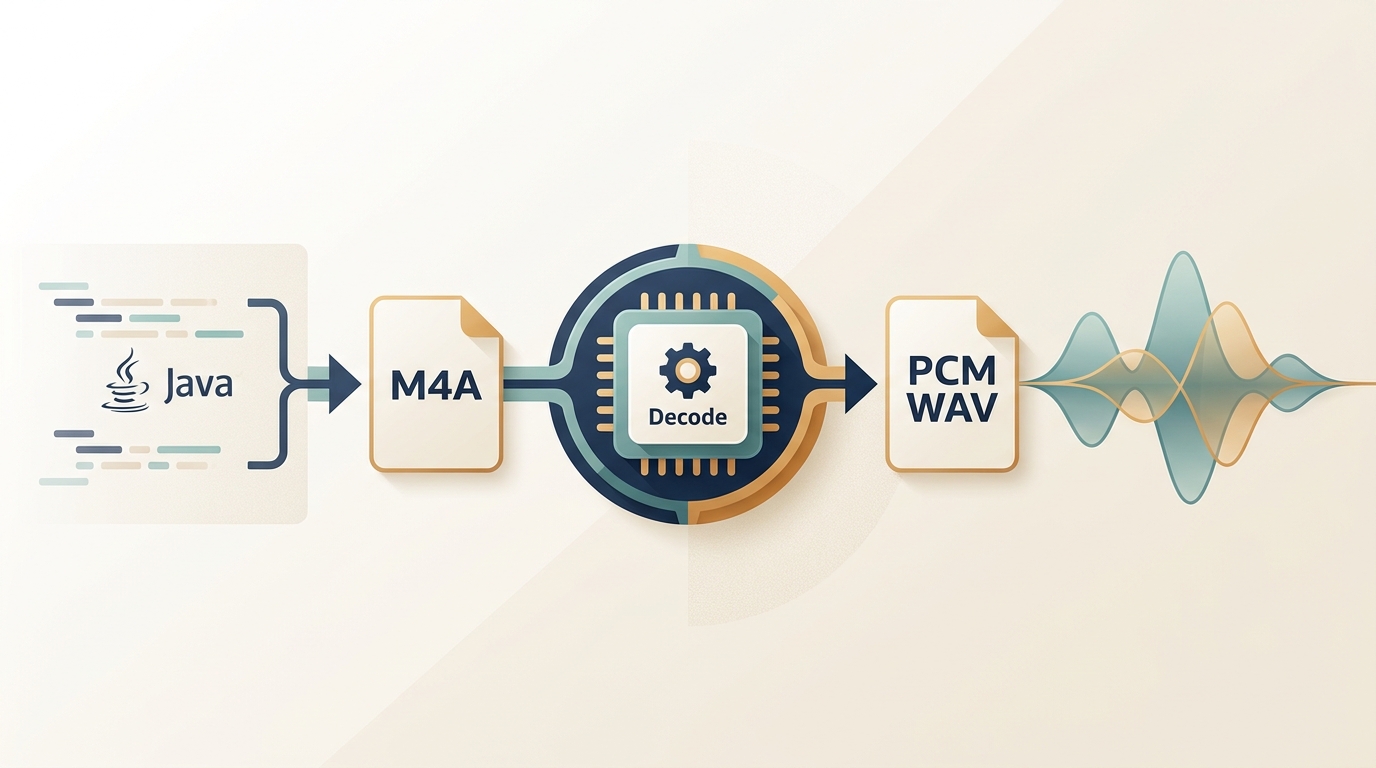
Java audio conversion M4A to WAV example code works reliably when Java launches an FFmpeg-backed decoder for its AAC or ALAC payload and writes pulse-code modulation (PCM) WAV. Use Java Sound only when an installed provider supports that payload; renaming the extension or retrying AudioSystem does not add a decoder.
I treat this as a codec-and-deployment decision, not a one-line conversion trick. The snippets that look simplest usually hide the boundary between decoder support and native deployment. My editorial preference is to inspect the payload first, then choose the least abstract path that still exposes failure details. This guide therefore moves from direct FFmpeg to JAVE2 and, only when Java integration is unnecessary, a desktop fallback.
Why Java Sound Rejects M4A Files
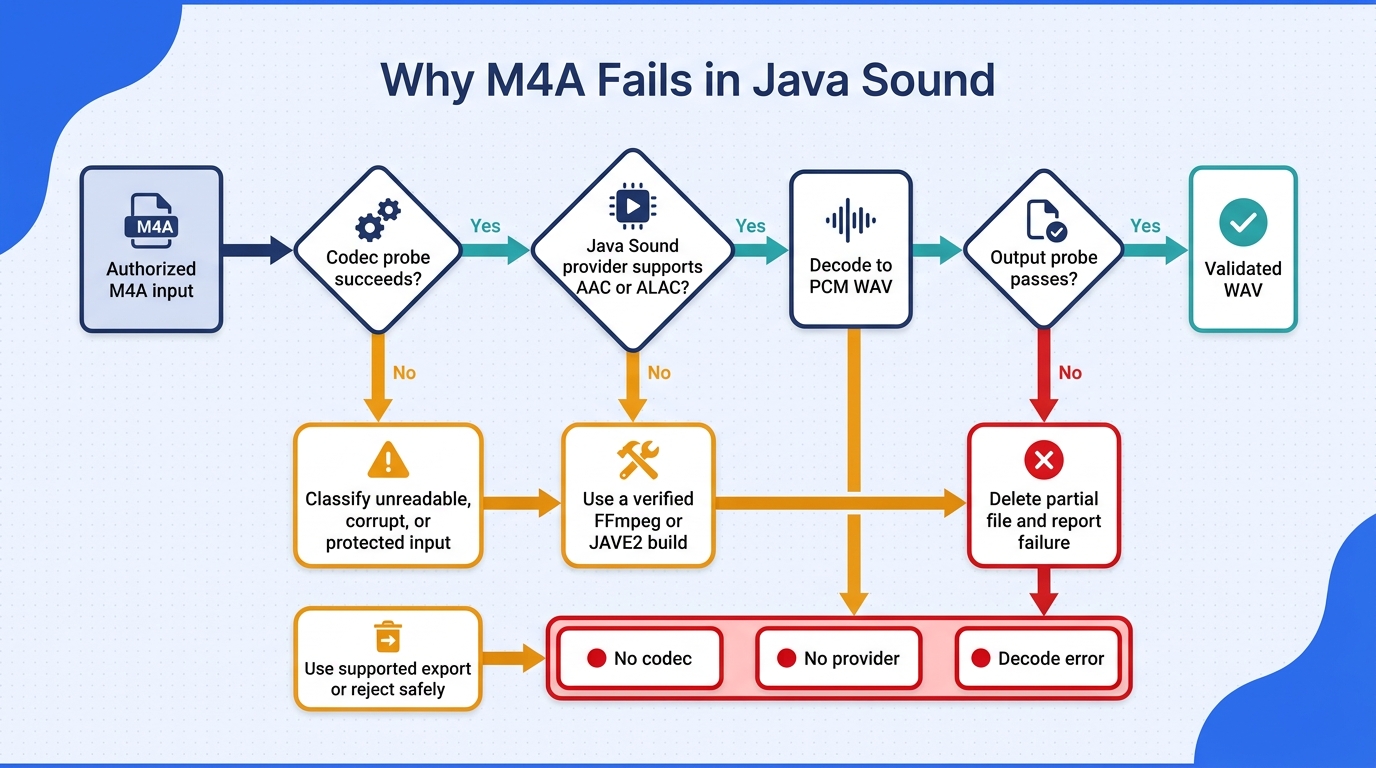
AudioSystem.getAudioInputStream(...) rejects M4A when the installed Java Sound providers cannot identify and decode the file's actual payload. The extension only suggests a container; it does not install an AAC or ALAC decoder. In practice, diagnose the codec first, then select a library that owns that decoder.
Scope note: Apply the inspection and conversion paths below only to files you own or are authorized to process, under the terms that govern the source and the software. Keep access-controlled media within its supported export path.
M4A Is a Container, Not a Single Codec
M4A is commonly an ISO Base Media container carrying AAC, ALAC, or another audio stream. Two files ending in .m4a can therefore require different decoder support. A file can also contain metadata or a protection scheme that changes what a normal local decoder can read. Renaming .m4a to .wav changes none of those bytes, so it cannot turn compressed audio into PCM.
That distinction explains why a conversion may work for one phone recording and fail for another. It also explains why a WAV output is not a quality upgrade: decoding AAC to PCM changes the storage format, but it cannot recreate detail already discarded by lossy compression.
How Java Sound Discovers Decoders
Java Sound uses service providers to advertise file readers, writers, and format conversions. Oracle's Java Sound tutorial describes the conversion flow as a search for a provider that supports both the source and target formats. If no provider claims the source type, AudioSystem stops before your conversion code can do anything useful.
The resulting exception is therefore a capability signal, not proof that the file is corrupt. As one Reddit user in r/dwarffortress put it, “Every time it tried to play a sound file I get an error like: javax.sound.sampled.UnsupportedAudioFileException: could not get audio input stream from input file.” Treat that message as a missing-provider or unsupported-payload branch in your decision tree.
Why JLayer Does Not Solve General M4A Decoding
JLayer is designed around MPEG Layer III playback and related MP3 workflows. Adding it to a project that needs AAC or ALAC decoding does not make Java Sound a general M4A reader. The java sound api m4a to wav conversion codec jlayer search is understandable, but the useful question is whether the provider advertises the codec inside this particular container.
Preflight the Input Before Choosing a Library
For files you own or are authorized to convert, inspect the payload before selecting an API. A small preflight step saves more time than changing libraries at random:
- Read the container and stream codec with a media inspector such as
ffprobe. - Record duration, sample rate, channel count, and bit depth when available.
- Note whether the stream is AAC, ALAC, or another codec your chosen path supports.
- If the file is protected or access-controlled, use the service's supported export route; do not attempt to defeat its controls.
The editorial rule is simple: an unsupported codec and a protected input are different failures. Keep those branches separate in logs and user-facing errors.
Working Java M4A-to-WAV Paths and Runnable Code
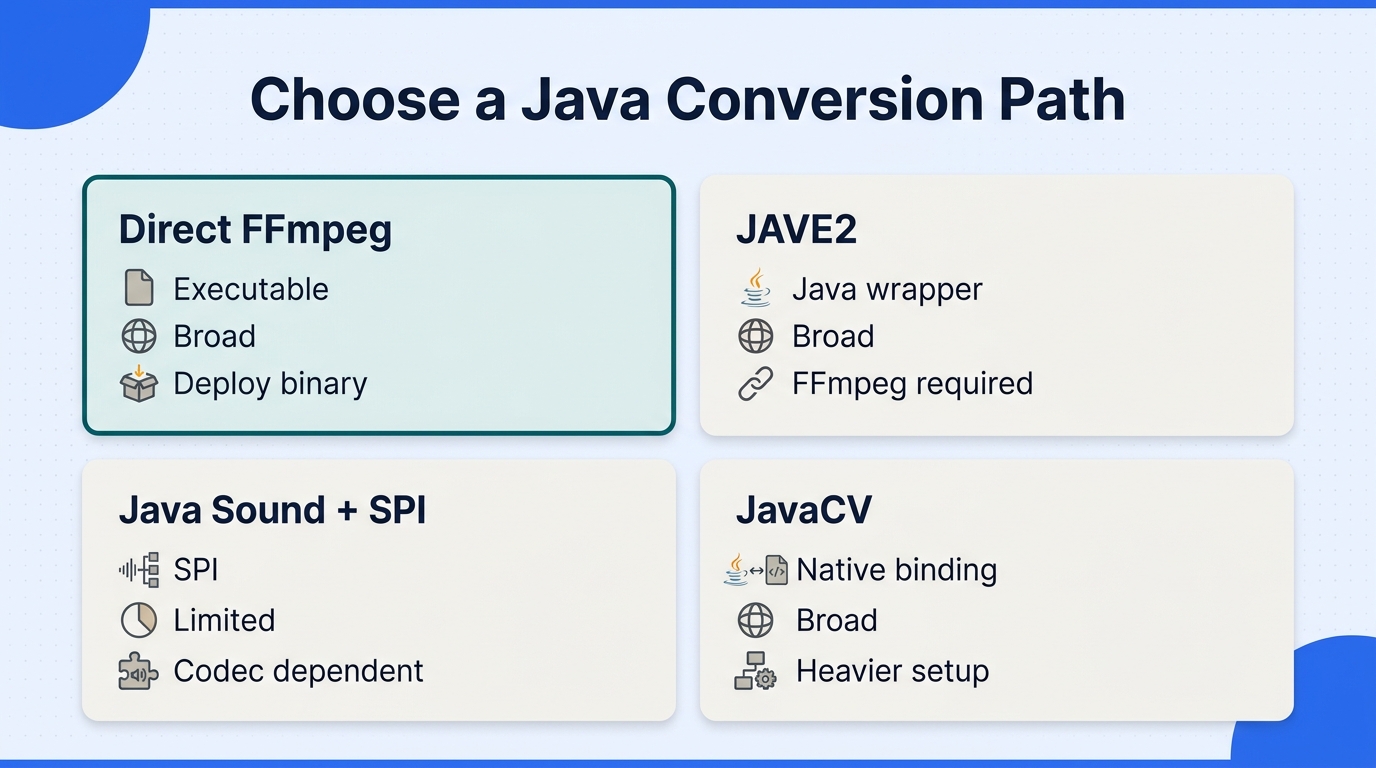
For a dependable java audio conversion m4a to wav example code implementation, direct FFmpeg through ProcessBuilder gives the clearest control over codecs, paths, timeouts, and exit codes. Java Sound plus a compatible service-provider interface (SPI) is viable only when the provider is already part of your deployment. JAVE2 and JavaCV reduce some boilerplate, but they still depend on native FFmpeg packaging.
Choose a Path with the Decision Matrix
| Path | Dependency model | Codec coverage | Best fit | Main tradeoff |
| Java Sound plus SPI | Java API plus provider | Provider-dependent | Existing Java Sound app | M4A support varies |
| Direct FFmpeg | External or packaged executable | Broad AAC/ALAC support | Maximum process control | You own binary deployment |
| JAVE2 | Java wrapper plus native binary | Bundled FFmpeg build | Less command boilerplate | Native compatibility remains |
| JavaCV | FFmpeg bindings | Broad through bindings | Existing JavaCV stack | Heavy for one conversion |
Source: Oracle's Java Sound “Using Files and Format Converters” documentation; FFmpeg-backed codec coverage depends on the build and native artifact you deploy.
The practical decision starts with three branches: whether the input is access-controlled, whether the deployed decoder covers its payload, and who owns the native binary in production. Choose Java Sound when a tested provider already handles your input. Choose direct FFmpeg when you need explicit command construction, predictable process lifecycle, or a service that must expose precise diagnostics. Choose JAVE2 when those controls matter less than reducing wrapper code. JavaCV makes sense when the rest of the application already uses its frame and native-media APIs.
Direct ProcessBuilder is the better fit than JAVE2 when a service must expose exact exit codes and timeouts, because both paths still require a native FFmpeg binary and the wrapper does not remove that deployment burden.
Set the Runtime Preconditions
Before running the example, make these assumptions explicit in your deployment:
- Use a supported JDK and pass input and output as separate arguments, not a shell string.
- Make the FFmpeg executable discoverable by an absolute path or a controlled
PATH. - Validate that the input exists, is a regular file, and is readable by the service account.
- Create the output directory before starting the process.
- Decide whether the application preserves the source sample rate and channels or standardizes them.
- Put a time limit around the native process and define what happens to a partial output.
Native packaging is often the harder part. As one Reddit user in r/CodingHelp put it, “Most converter libraries and packages use FFMPEG. I've tried to download it through Termux and PyDroid3, but that doesn't work. I've tried to compile it for Android with NDK, but I am so lost in what I am supposed to be doing.” That is why the executable path and artifact selection belong in deployment configuration, not inside a copied snippet.
Build a Complete ProcessBuilder Conversion
This Java 11+ example accepts an input path and output path, handles spaces without shell quoting, drains FFmpeg diagnostics, and removes a partial WAV when the process fails. It leaves the source sample rate and channel count unchanged; add -ar and -ac only when your downstream contract requires them.
import java.io.ByteArrayOutputStream;
import java.io.OutputStream;
import java.nio.charset.StandardCharsets;
import java.nio.file.Files;
import java.nio.file.Path;
import java.util.List;
import java.util.concurrent.*;

public final class M4aToWav {
    public static void main(String[] args) throws Exception {
        if (args.length != 2) {
            throw new IllegalArgumentException("Usage: M4aToWav input.m4a output.wav");
        }
        Path input = Path.of(args[0]).toAbsolutePath().normalize();
        Path output = Path.of(args[1]).toAbsolutePath().normalize();
        if (!Files.isRegularFile(input)) throw new IllegalArgumentException("Input is not a file: " + input);
        if (Files.exists(output)) throw new IllegalArgumentException("Refusing to overwrite: " + output);
        Files.createDirectories(output.getParent() == null ? Path.of(".") : output.getParent());

        List<String> command = List.of(
            "ffmpeg", "-nostdin", "-hide_banner", "-loglevel", "error", "-n",
            "-i", input.toString(), "-map_metadata", "0", "-vn",
            "-c:a", "pcm_s16le", output.toString()
        );

        Process process = new ProcessBuilder(command).redirectErrorStream(true).start();
        ByteArrayOutputStream diagnostics = new ByteArrayOutputStream();
        ExecutorService drain = Executors.newSingleThreadExecutor();
        Future<?> drainTask = drain.submit(() -> {
            try (OutputStream sink = diagnostics) { process.getInputStream().transferTo(sink); }
            catch (Exception ignored) { /* the exit code remains authoritative */ }
        });

        try {
            if (!process.waitFor(5, TimeUnit.MINUTES)) {
                process.destroy();
                if (!process.waitFor(5, TimeUnit.SECONDS)) process.destroyForcibly();
                throw new IllegalStateException("FFmpeg timed out");
            }
            drainTask.get(10, TimeUnit.SECONDS);
            String detail = diagnostics.toString(StandardCharsets.UTF_8).trim();
            if (process.exitValue() != 0) {
                throw new IllegalStateException("FFmpeg failed (" + process.exitValue() + "): " + detail);
            }
            if (!Files.isRegularFile(output) || Files.size(output) == 0) {
                throw new IllegalStateException("FFmpeg returned success without a WAV output");
            }
        } catch (Exception failure) {
            Files.deleteIfExists(output);
            throw failure;
        } finally {
            drain.shutdownNow();
        }
    }
}
The -map_metadata 0 flag asks FFmpeg to carry compatible metadata forward, but WAV and M4A do not share identical tag models. The output is PCM signed 16-bit little-endian audio, a practical interchange choice for editors and Java DSP code. If your consumer requires 24-bit PCM, a fixed 44.1 kHz rate, or mono, make those choices explicit and document them beside the job configuration.
Select PCM Format, Sample Rate, and Channels
Keep the source rate and channel count when the WAV is an intermediate representation and the next tool accepts them. Standardize to 48 kHz stereo when a known video, broadcast, or analysis pipeline requires that contract. Upsampling does not restore high-frequency detail lost in AAC, and changing stereo to mono is a content decision, not a neutral format conversion.
Handle Output, Exit Codes, Timeouts, and Cleanup
A zero exit code is necessary but not sufficient. Check that the output exists, has nonzero size, and can be opened as a WAV. Record the input path, selected settings, exit code, and a bounded diagnostic message. Those records make native-binary failures distinguishable from bad input and file-system permission errors.
JAVE2 M4A-to-WAV Example for a Production Workflow
For a jave2 convert m4a to wav example code workflow, JAVE2 reduces Java-side process boilerplate but does not remove the native FFmpeg dependency. Use it only when the matching native artifact supports the deployment platform and input codec, and keep resource limits visible.
Use note: Keep this workflow for files you are authorized to convert, and follow the terms that apply to the source and the software package.
Add JAVE2 and the Native Binary Dependency
The JAVE2 family uses ws.schild:jave-core plus a platform-native ws.schild:jave-nativebin-* module at the same release. A Maven skeleton can look like this:
<dependency>
  <groupId>ws.schild</groupId>
  <artifactId>jave-core</artifactId>
  <version>JAVE2_VERSION</version>
</dependency>
<!-- Add the matching ws.schild:jave-nativebin-* module for the target OS. -->
Set JAVE2_VERSION to the same release for jave-core and the matching jave-nativebin module after verifying the official Maven Central artifact page. In Gradle, use implementation("ws.schild:jave-core:<JAVE2_VERSION>") and add the matching native module for the deployment platform. Keep the artifact selection in your build profile instead of downloading binaries at runtime.
Create the Audio Attributes and Encode to WAV
The following example is intentionally small. It validates the input, requests PCM WAV output, and leaves the sample-rate and channel choices visible in code:
import ws.schild.jave.Encoder;
import ws.schild.jave.MultimediaObject;
import ws.schild.jave.encode.AudioAttributes;
import ws.schild.jave.encode.EncodingAttributes;
import java.io.File;
import java.nio.file.Files;
import java.nio.file.Path;

public final class JaveM4aToWav {
    public static void convert(Path input, Path output) throws Exception {
        if (!Files.isRegularFile(input)) throw new IllegalArgumentException("Missing input: " + input);
        Files.createDirectories(output.toAbsolutePath().getParent());

        AudioAttributes audio = new AudioAttributes();
        audio.setCodec("pcm_s16le");
        // Set these only when the receiving pipeline requires a fixed contract.
        audio.setSamplingRate(48000);
        audio.setChannels(2);

        EncodingAttributes encoding = new EncodingAttributes();
        encoding.setOutputFormat("wav");
        encoding.setAudioAttributes(audio);

        new Encoder().encode(new MultimediaObject(input.toFile()), output.toFile(), encoding);
        if (!Files.isRegularFile(output) || Files.size(output) == 0) {
            throw new IllegalStateException("JAVE2 produced no usable WAV");
        }
    }
}
If preserving the source rate and channels matters, remove the two fixed settings and validate the resulting WAV instead. A wrapper should make the policy easier to express, not hide it.
Separate Codec, DRM, and File-System Failures
Catch EncoderException at the job boundary, but classify its cause before showing a message. A missing native binary points to packaging; an unsupported AAC or ALAC stream points to codec coverage; a permissions error points to the input or output path. A protected input is a separate access-control case and should be reported without suggesting a way around it.
Batch with Bounded Concurrency and Per-File Isolation
Native encoders consume CPU, memory, and temporary storage. Use a fixed executor sized for the host rather than launching one process per file. Submit one task per input and write to a unique temporary output. Move it into place only after validation, then return a result object with the input, status, duration, and error category. One bad file should complete as a failed item while the queue continues.
Verify the Output Instead of Trusting a Zero Exit
After JAVE2 returns, open the WAV with AudioSystem.getAudioFileFormat(output.toFile()) or a second media probe. Check the reported frame rate, channels, and duration against the source preflight. A job is successful only when the file exists and the decoded properties fit the contract. A process that exits cleanly can still produce an unexpected channel layout or a truncated artifact.
A JAVE2 job should not be marked successful from its return alone; a second probe earns its cost by catching truncated output and unexpected channel layouts.
UniFab as a Local No-Code Fallback
A video converter software is a better fit when the requirement is a one-time conversion, editorial preparation, or a local batch job rather than an embeddable Java API. It removes application packaging and process supervision from the project, but it does not replace a codec-aware integration when conversion is part of a service.
Who the No-Code Route Suits
Use this route for a small set of files, a human-reviewed handoff, or a batch that does not need to run inside your product. Local processing also keeps source media on the workstation. For a broader desktop workflow, the MP4-to-WAV converter guide shows the same kind of format-selection decisions in a non-Java context.
Verified UniFab Capabilities
UniFab Video Converter runs on Windows and macOS, supports local processing and batch jobs, and lists 1,000+ output formats with no watermark. Those capabilities fit a local, human-operated workflow; they do not imply a Java SDK or a server-side API.
Confirm M4A Input Before Relying on This Route
The verified input-format list names MOV, MP4, AVI, MPEG, WMV, F4V, MPG, TS, and FLV. M4A is not listed there, so do not treat UniFab as a confirmed M4A reader without separate product confirmation. That guardrail is important: the desktop path is useful only after the input format is established.
Where the Desktop Fallback Does Not Fit
UniFab is not the right choice when conversion must be embedded in a Java application, triggered by an API, or audited through per-file service logs. It also cannot be presented as the answer for every M4A file while its verified input list omits M4A. In those cases, the direct FFmpeg or JAVE2 paths keep codec and deployment decisions visible.
FAQ
Java M4A-to-WAV deployments usually fail at platform packaging, metadata mapping, protected inputs, or output validation after the core conversion works. The answers below isolate those edge cases so each can be checked without reopening the whole implementation decision.
Can the Same Java Conversion Code Run on Windows, macOS, and Linux?
The Java control flow can stay the same, but the FFmpeg executable or JAVE2 native artifact is platform-specific. Resolve the binary from configuration, test it in each release image, and keep the path out of user-provided command text.
How Do I Add JAVE2 in Gradle Instead of Maven?
Use implementation("ws.schild:jave-core:<JAVE2_VERSION>") and add the matching ws.schild:jave-nativebin-* module for the target operating system. Set JAVE2_VERSION to the same release for both modules after verifying the official Maven Central artifact page, then verify the binary during application startup.
Can WAV Preserve All Metadata from an M4A File?
No. Compatible tags can be copied, but the container models differ and fields such as artwork, chapters, loop data, or custom atoms may not map cleanly. Treat audio samples and metadata as separate validation targets.
How Can Java Detect a Protected M4A?
Start with a media probe and the decoder's explicit error. A missing AAC or ALAC provider usually reports a codec or format problem; an access-controlled file may fail before normal stream metadata is available. In either case, use an authorized export path and do not attempt to alter the protection.
Why Is the WAV Much Larger Without Sounding Better?
WAV commonly stores uncompressed PCM, so it expands the decoded samples instead of retaining the compact AAC representation. That larger file can be easier for an editor or DSP library to process, but it does not restore detail removed before conversion. As one Reddit user in r/Beatmatch put it, “Convert them to .wav with the Audacity ffmpeg thing. Will this method keep the quality of the song?” The answer is preservation of the decoded signal, not recovery of lost information.
Bottom Line
Choose by deployment constraint: use direct FFmpeg when process control matters, JAVE2 when a compatible native package can reduce wrapper code, and a desktop tool only when Java integration is unnecessary and M4A support is confirmed. Diagnose the payload before selecting the path, because codec support—not the file extension—determines whether conversion can start. Treat the job as complete only after the WAV is validated, not merely when a process returns zero.