A free AI caption generator is useful only when its allowance and export format produce a file you can actually use. For free AI captions, choose an editable SRT for reuse or captions rendered into an MP4 for permanent display, then compare credits, watermarks, signup requirements, and correction effort.
Written social media captions are post text; timed video captions synchronize text with speech.
The clearest conclusion is that there is no universal best caption generator: UniFab is a direct SRT option, Kapwing suits hands-on editing, VEED and Flixier emphasize styled video, and Vizard fits an integrated social-video workflow.
Caption Generator Outputs and Review Priorities
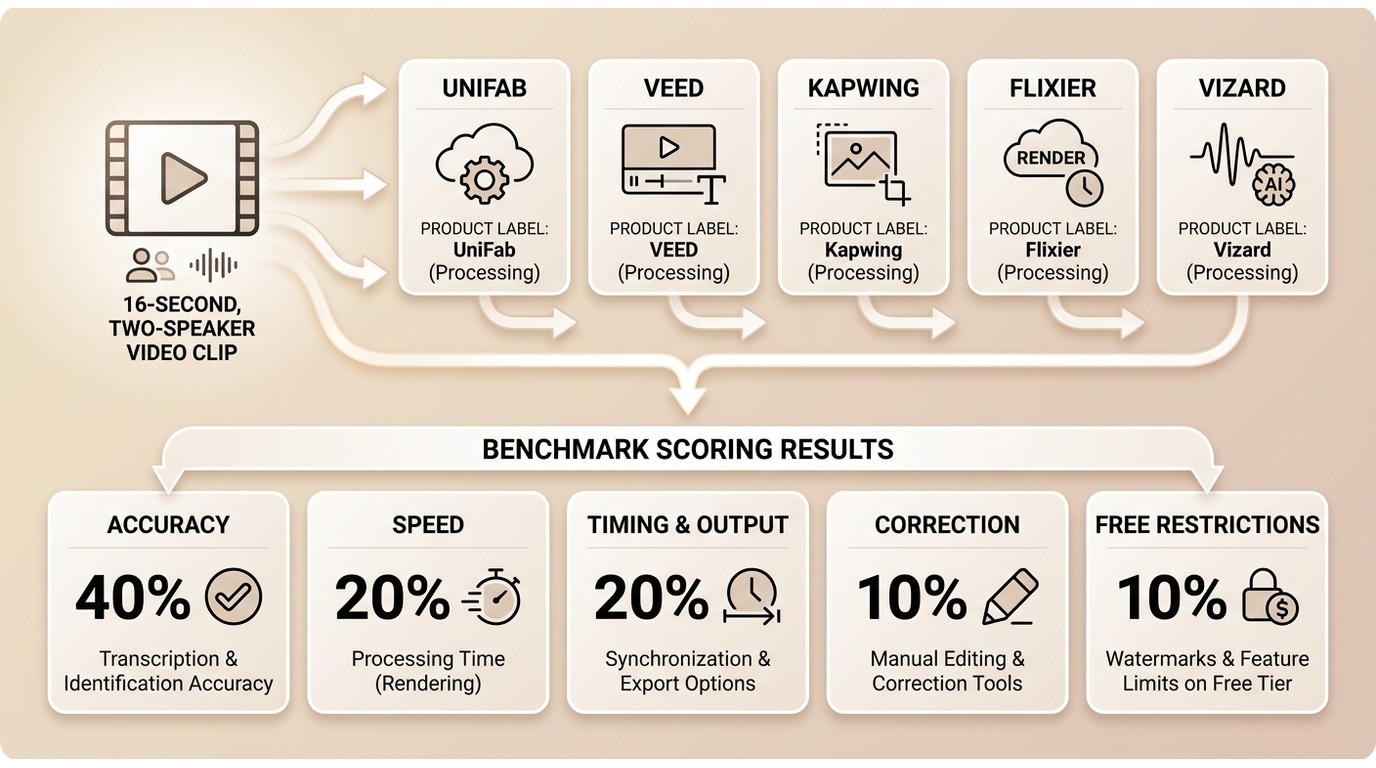
I prioritize the final deliverable before feature count: decide whether you need an editable subtitle file or captions rendered into video, then assess correction effort and free-use limits. Names, timing, and export previews matter because a generated draft still needs review before publication.
Caption Quality and Export Priorities
Evaluate each tool against the same practical requirements: transcript quality, caption timing, required output, correction workflow, and free-use boundaries.
- Accuracy: Check names, numbers, accents, and specialist terms.
- Processing and export: Confirm that the workflow produces the required file.
- Timing and output quality: Review synchronization, line breaks, and the exported result.
- Ease of correction: Consider how quickly text and timing can be revised.
- Free-use restrictions: Check generation allowances, export limits, resolution, and watermarks.
Vendor figures such as a language count or an “up to” accuracy percentage are labeled as product claims. Practical fit depends more on the finished deliverable and correction effort than on a decimal-point ranking.
Accuracy Needs Human Review
Names, accents, background noise, overlapping speakers, specialist terms, and long recordings can all increase the correction burden.
Manual review remains necessary before captions are published, especially when accuracy affects accessibility or client approval.
Free-Tier and Export Comparison
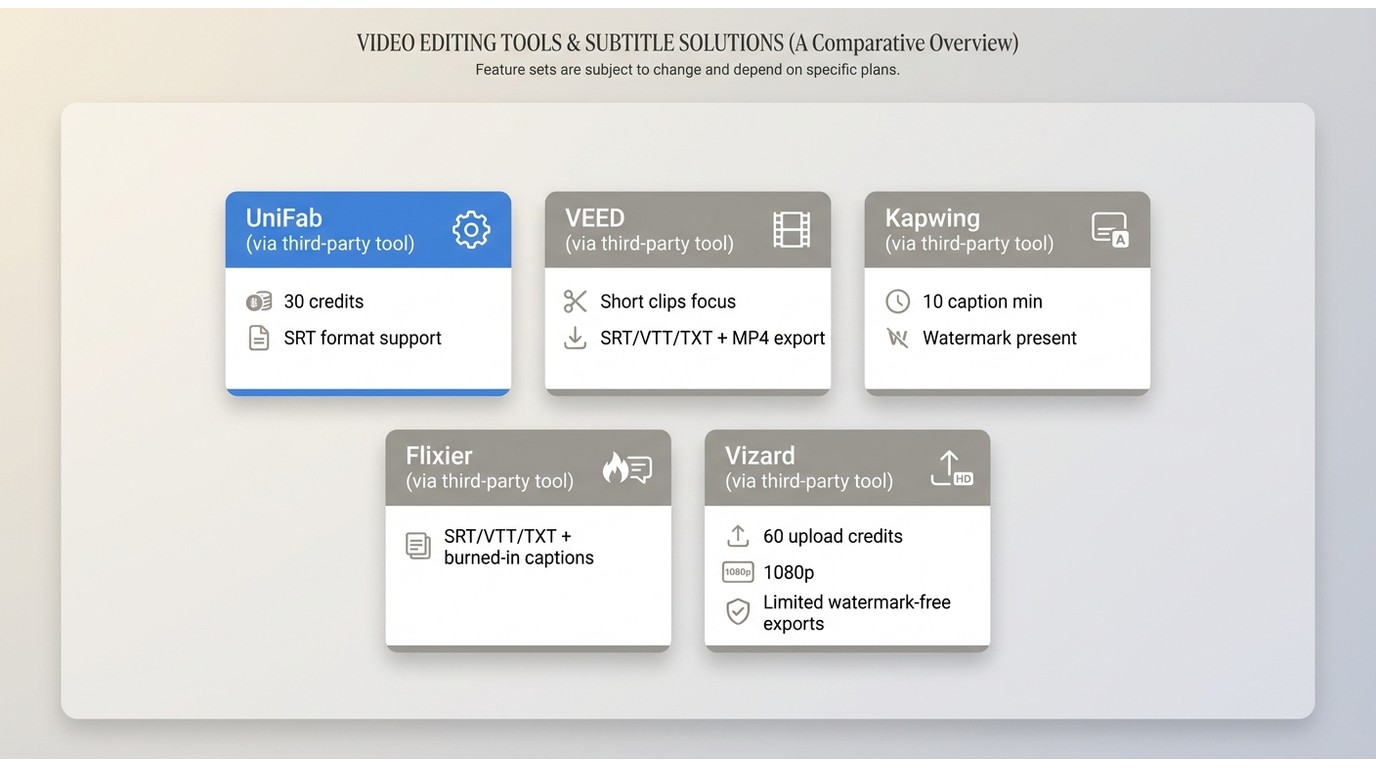
The best free AI caption generator depends on whether “free” produces the file you need. An SRT caption generator, a caption generator no watermark requirement, and an MP4 caption export workflow are different buying decisions.
| Tool | Free generation allowance | Free video resolution | Free video export budget |
| Kapwing | Up to 10 subtitle minutes | 720p | 30 minutes/month; 4 minutes/video |
| Flixier | 5 subtitle minutes/month | 720p | 10 minutes/month |
| Vizard | 60 upload credits/month | 720p | 10 minutes/export |
Plan data: Kapwing, Flixier, and Vizard official pricing pages, as of October 2026.
Vizard accepts uploads at up to 1080p on its free plan, but exported video is limited to 720p. UniFab’s Subtitle Generator AI-Fabcloud provides a cloud-to-SRT path rather than a rendered-video export, while VEED combines subtitle editing and styling with hardcoded video output.
Five Free AI Caption Generators Compared
These AI caption generator tools cover different outputs, so the useful comparison is based on the required deliverable and editing workflow rather than a composite score. The profiles below focus on output formats, free-use boundaries, correction effort, and practical fit.
Subtitle Generator AI-Fabcloud
Subtitle Generator AI-Fabcloud is a cloud AI subtitle generator focused on SRT download. It provides 30 credits, supports 30+ languages, and claims up to 98% accuracy.
- Current allowance and outputs: 30 credits and SRT download. Completed cloud tasks are retained for 15 days, so save the SRT to your project storage.
- Review priority: Check names, terminology, punctuation, and timing against the original audio before using the subtitle file.
- Best for: Users who want a straightforward SRT caption generator without a full video editor.
- Rendered-video boundary: The verified deliverable is SRT, so use the target video editor to render captions into the finished video.
The practical advantage is focus: it generates an editable subtitle file without surrounding the task with a large editor. Because processing occurs in the cloud, obtain organizational clearance before uploading confidential media.
VEED Video Caption Generator
VEED combines AI video captions with browser editing, styling, and subtitle and transcript downloads. It supports 125+ languages and suits multilingual projects where visual presentation matters.
- Current allowance and outputs: A short-clip free use path is described; SRT, VTT, TXT, and hardcoded video output are available.
- Review priority: Check substitutions during faster speech, along with names, timing, and line breaks, before export.
- Best for: Multilingual social or marketing video that needs styled captions.
- Not ideal for: Anyone who needs the free allowance, resolution, and watermark terms stated before beginning a project.
Its strength is the edit-to-publish path. For a closer look at the surrounding editor and alternatives, the VEED review adds context without turning this comparison into a full platform audit.
Kapwing AI Caption Generator
Kapwing provides a detailed editing workflow among these affordable AI caption generators. Free accounts include up to 10 subtitle minutes, while SRT, VTT, and TXT downloads remain available.
- Current allowance and outputs: Kapwing’s free plan includes up to 10 subtitle minutes, a four-minute limit per video, 720p video output, and 30 export minutes per month. Free-account video exports carry a watermark.
- Review priority: Its transcript and timeline editor supports detailed corrections to wording, timing, and line breaks before export.
- Best for: Creators who expect to revise text, timing, and visual style before export.
- Not ideal for: A clean free AI video captions workflow when a watermark is unacceptable.
I would choose Kapwing when correction control matters more than a one-click result. The subtitle allowance does not equal the maximum length of one exported video, so check both limits before starting a longer project.
Flixier AI Caption Generator
Flixier supports SRT, VTT, and TXT downloads as well as burned-in video export. That makes it more flexible than a captioned-video-only tool, with styling and translation integrated into the browser editor.
- Current allowance and outputs: Flixier’s free plan includes five subtitle minutes per month and 10 video export minutes per month. Free video exports are 720p and carry a Flixier watermark.
- Review priority: Check transcript accuracy, timing, caption visibility, and styling in the exported video before publishing.
- Best for: Users who want animated caption styling plus separate subtitle files.
- Not ideal for: Time-sensitive delivery where the rendered file cannot be checked before publishing.
Preview the final file to confirm that the generated captions appear as intended. The broader Flixier review is more useful if editing features beyond captions drive the decision.
Vizard AI Caption Generator
Vizard connects captioning to short-form video repurposing.
- Current allowance and outputs: 60 upload credits per month, free TXT transcript download, 720p video export, a 10-minute export-length limit, and three-day storage; SRT download is included on paid tiers.
- Correction focus: Review overlapping speech, speaker changes, and timing before exporting captioned clips.
- Best for: Users turning longer recordings into captioned clips within one editor.
- Not ideal for: High-volume publishing that exceeds the credit, export-length, or storage limits.
Vizard makes more sense as a video workflow than as a standalone transcription utility. The fit improves when clipping, reframing, caption styling, and publishing belong in the same project.
Choosing the Right Caption Workflow
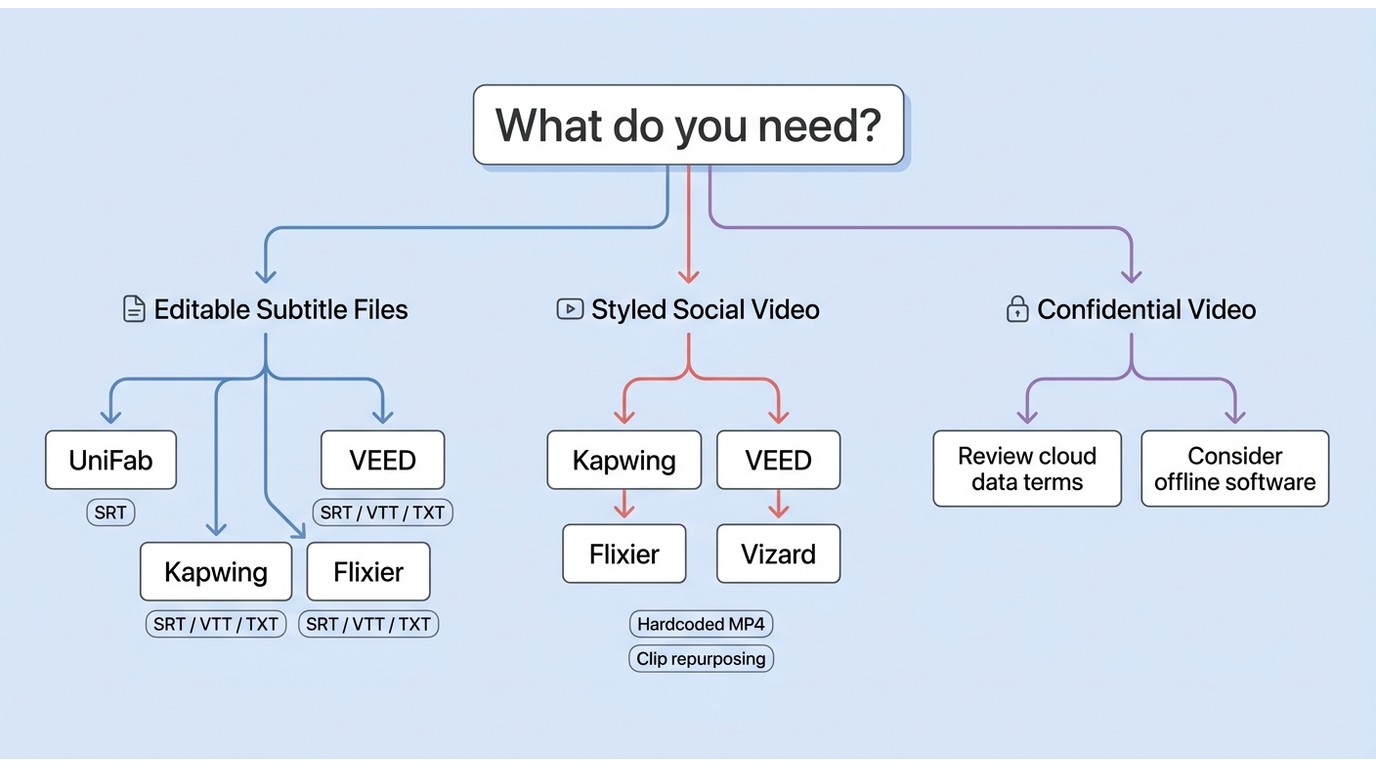
The best AI caption generator is the one that reaches the required deliverable with acceptable review effort. A nominally free tool is still a poor fit if credits, watermarks, signup friction, or export restrictions block that result.
Editable Caption Files
Choose an SRT caption generator when captions need to move into a video editor, media player, localization system, or accessibility workflow. UniFab offers a focused SRT path; VEED, Kapwing, and Flixier add VTT subtitle and TXT transcript choices for broader handoff needs.
Styled Social Video
For best free AI video captions with visual styling, compare the rendered output rather than the transcript alone. Kapwing offers detailed editing but watermarks free video exports, while VEED and Flixier combine styling with hardcoded video output; Vizard adds clip repurposing. Start with clear audio, then compare plain captions with a style that highlights the currently spoken word. For vertical video, use high-contrast text, split lines at natural phrase boundaries, keep captions above the interface area, and preview the final render before publishing.
Business and Confidential Video
Cloud tools reduce setup, but uploads leave the local device during processing. For confidential business video, compare the provider’s data-handling terms with an offline category of captioning software, and upload only media you own or are authorized to process.
Human review is essential for names, figures, contractual language, medical wording, and accessibility-sensitive captions. Convenience should not replace an approval step when a transcription error could change meaning.
Caption and Subtitle Generators Compared
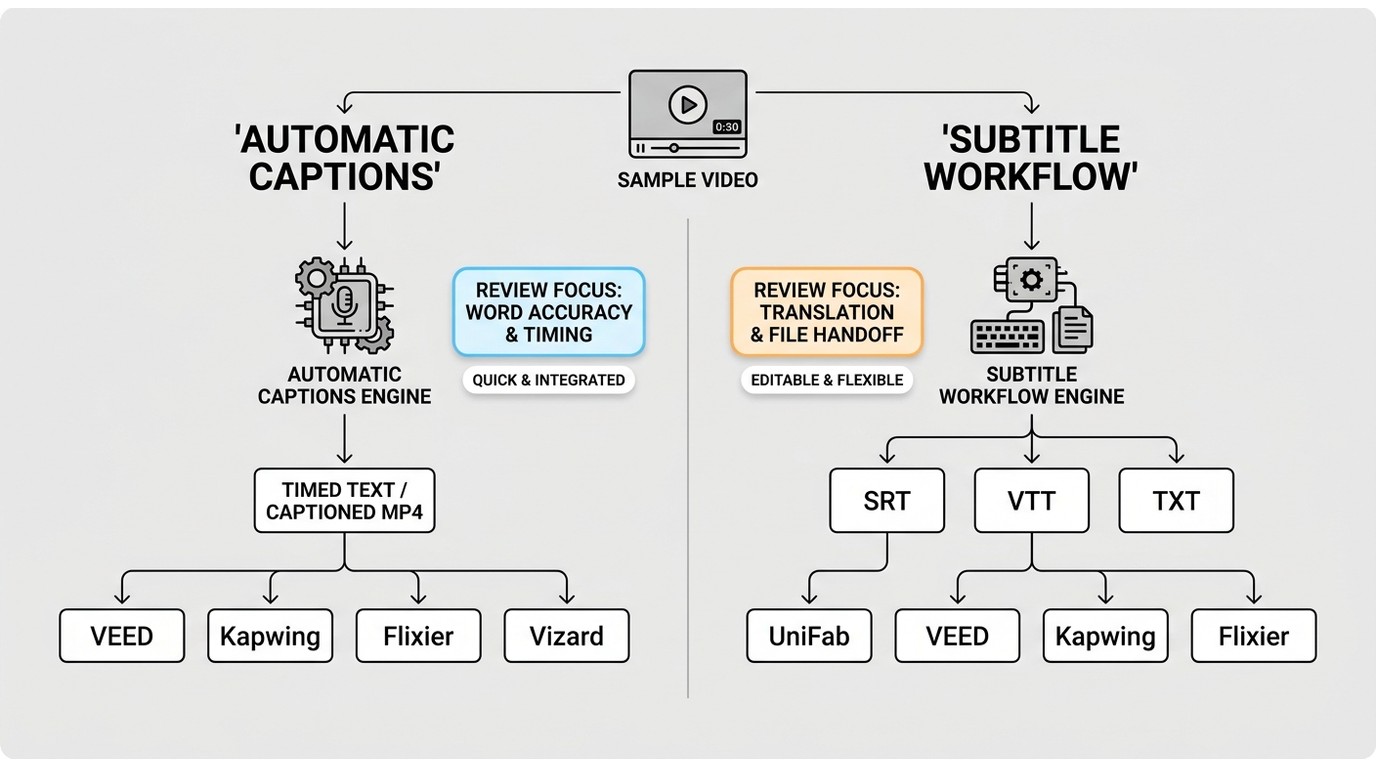
AI caption generators emphasize speech recognition and timing, while subtitle workflows emphasize editable text tracks and localization. Many current tools do both, so the useful distinction is the exported deliverable. Speech transcription converts spoken words into text, translation renders that text in another language, and accessibility captions may also identify meaningful sounds or speaker changes.
| Workflow | Typical output | Useful for | Main review task |
| Automatic caption generation | Timed transcript or styled captions | Fast first drafts, social video, accessibility preparation | Names, missed words, speaker changes, synchronization |
| Subtitle-file workflow | SRT or VTT; TXT transcript | Editing, translation, players, localization handoff | Reading speed, line breaks, timing, terminology |
| Captioned video workflow | Rendered video with visible text | Social platforms and fixed visual presentation | Safe areas, style, readability, watermark, final render |
The practical upshot is simple: choose subtitle files for portability and captioned video for presentation. If both are needed, confirm both capabilities before committing correction time.
Generate, Review, and Save Captions
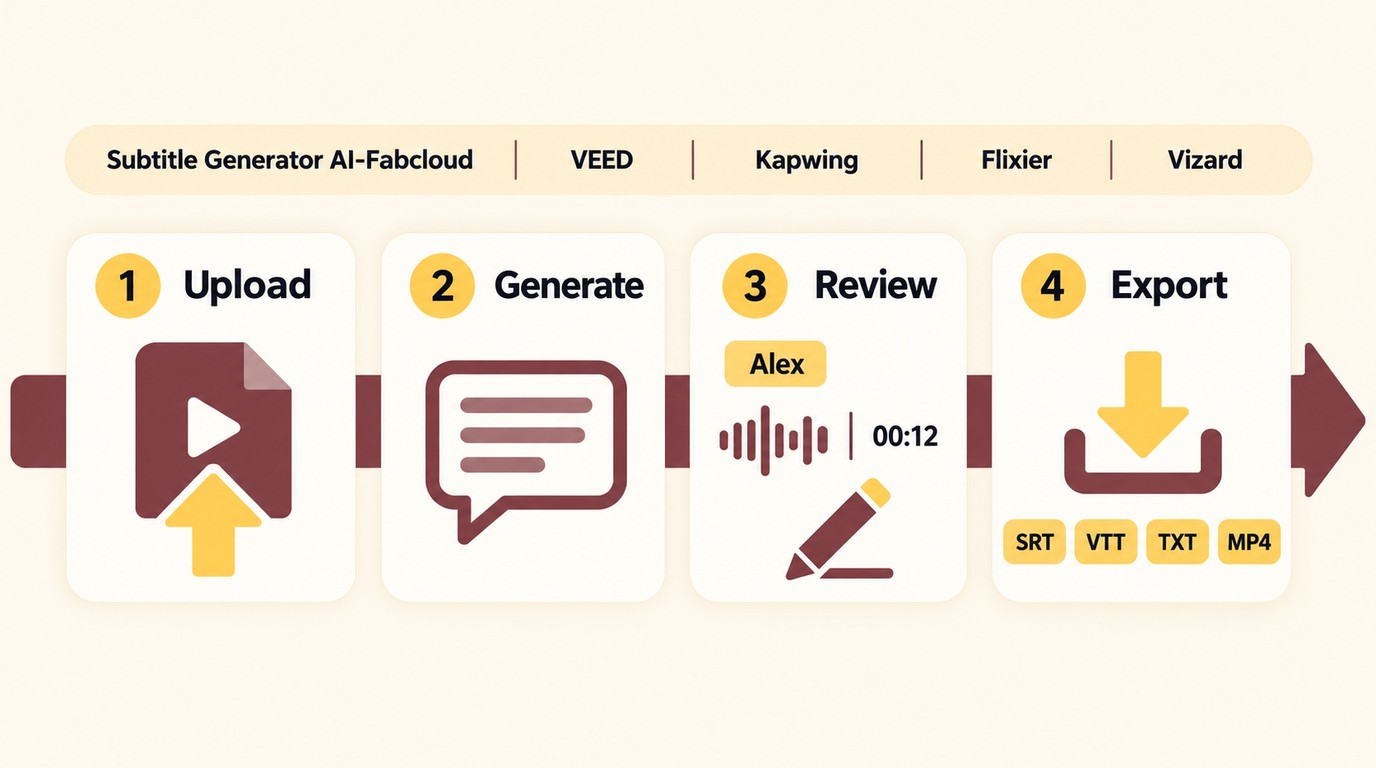
A reliable caption workflow has four stages: upload, generate, review, and export. The generation step is usually the fastest; checking meaning and synchronization is where quality is decided.
Upload Video or Audio
- Choose a tool that accepts the media source and produces the required final format.
- Upload only media you own or have permission to process, follow applicable law and platform terms, and remain responsible for copyright and content compliance. Keep the media private unless sharing is authorized.
- Use the cleanest available audio track when the file contains multiple mixes.
Generate and Detect Speech
Start automatic captions and select the spoken language when detection is uncertain. Keep the original media available so the generated transcript can be checked against the actual audio.
Review Names and Timing
Edit AI captions for names, accents, overlapping speakers, numbers, punctuation, and line breaks. Play the video around each correction to confirm timing rather than reviewing the transcript as plain text.
Export SRT or Captioned Video
Export an editable SRT when another system will control display. Choose MP4 caption export when the text must appear consistently in the rendered video, then watch the exported file once before publishing.
Final Recommendations by Use Case
No single tool fits every free AI caption project. The right choice among AI video creation tools follows the required output, current allowance, editing burden, watermark policy, and privacy expectations.
- Choose UniFab when the required deliverable is an editable SRT file for use in another editor or media workflow.
- Choose Kapwing when transcript and timing edits are central and a free-video watermark is acceptable.
- Choose VEED for multilingual styled captions when its current export terms suit the project.
- Choose Flixier when subtitle-file choice and animated captions matter, with a final-export check built into the workflow.
- Choose Vizard when captioning is part of turning recordings into short social clips.
I would prioritize UniFab when the deliverable is a portable SRT file, and Kapwing when a social video requires detailed transcript and timing edits.
Free AI Caption Generator FAQs
These questions cover decisions not resolved by a feature checklist alone.
Does Captions AI Offer a Useful Free Option?
Captions offers a limited free version for basic editing. The plans displayed on its pricing page are for iOS. Captions AI can be considered alongside the tools above, but the right choice depends on whether its current free output matches the project rather than on the label alone.
What Can I Use Instead of Captions AI?
Use UniFab for a direct SRT workflow, Kapwing for detailed caption editing, VEED or Flixier for styled captioned video, and Vizard for clip repurposing. These AI caption generator tools solve different output problems, so there is no useful one-size-fits-all substitute.
Can ChatGPT Create and Export Video Captions?
ChatGPT can help revise transcript wording, terminology, or punctuation, but it does not replace a media captioning workflow. When revising timed captions, preserve the existing timestamps, verify synchronization against the media, and then export the required SRT file or captioned video through the media workflow.
Which Workflow Fits Confidential Business Video?
Prefer a workflow whose data handling matches the organization’s policy. Cloud captioning is convenient, while local processing keeps media on the device; either way, require human review for names, figures, legal terms, and accessibility-sensitive text before distribution.