CyberLink PowerDirector Review 2026: 3 Edition Choices addresses three buyer questions: which license makes sense, whether the editor stays reliable on your projects, and how PowerDirector AI credits affect the real cost. Here, 2026 is the review year and historical edition context, while PowerDirector 2027 is the current perpetual edition. The short answer is that PowerDirector remains approachable for solo editing, but the right plan and platform matter.
This CyberLink PowerDirector review separates official features from user-reported problems, explains the current Windows purchase paths and Mac service suspension, covers export choices, and shows where the software fits against Adobe Premiere and a dedicated enhancement workflow.
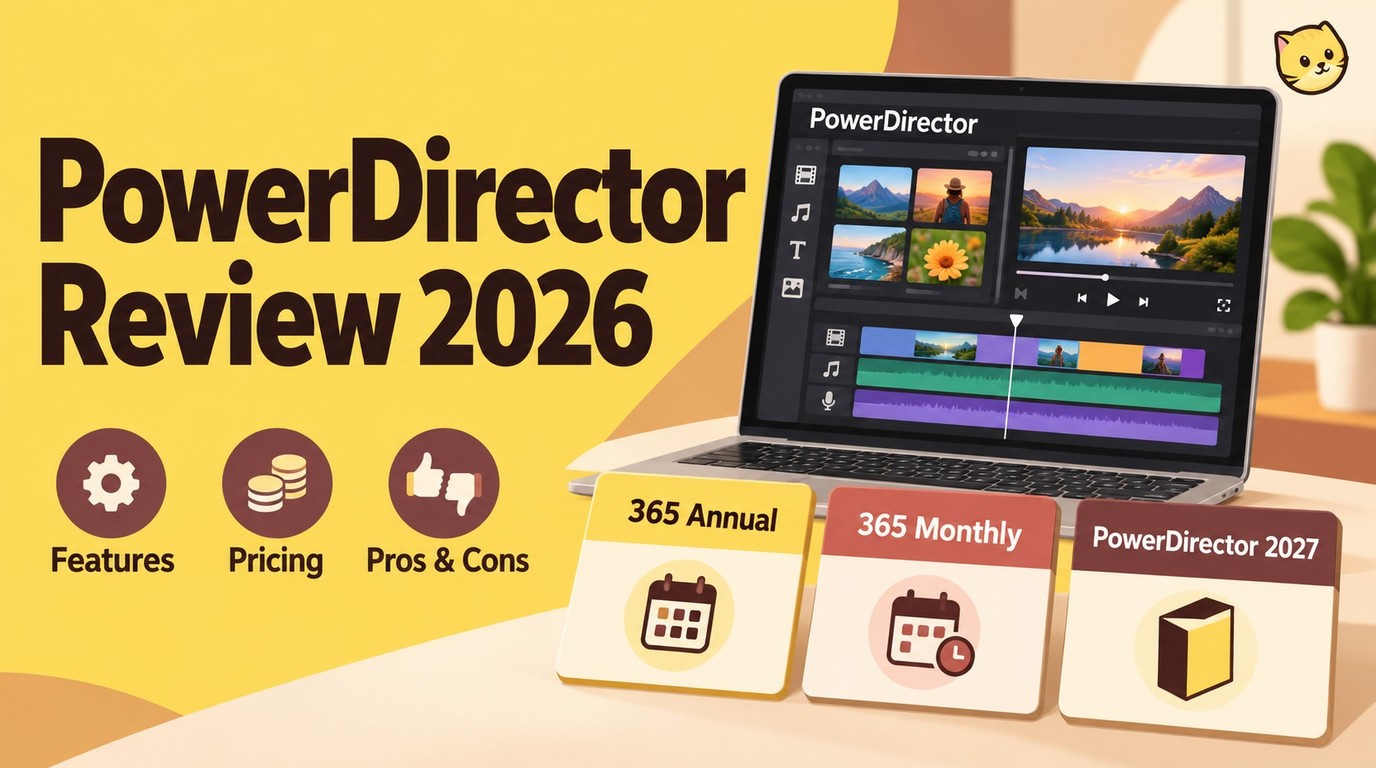
What Is CyberLink PowerDirector?
CyberLink PowerDirector is a timeline-based CyberLink video editor aimed mainly at beginners, hobbyists, and solo creators who want fast access to effects, titles, audio tools, and assisted editing without starting in a studio-oriented interface.
The desktop software combines a conventional multitrack timeline with guided modes and task-focused tools. It covers cutting, compositing, motion tracking, chroma key work, audio cleanup, screen capture, effects, and common delivery formats. Its strength is breadth and accessibility rather than the deepest color, collaboration, or finishing workflow in each category.
My editorial view is straightforward: PowerDirector is easiest to recommend when one person needs to move from raw clips to a finished social, instructional, or YouTube video without managing a large production system. Buyers with specialized finishing requirements should judge it by the exact workflow they need, not the length of its feature list. In this review, 2026 identifies the review year and historical PowerDirector 2026 context; the current perpetual Windows edition is PowerDirector 2027.
PowerDirector Versions and Pricing
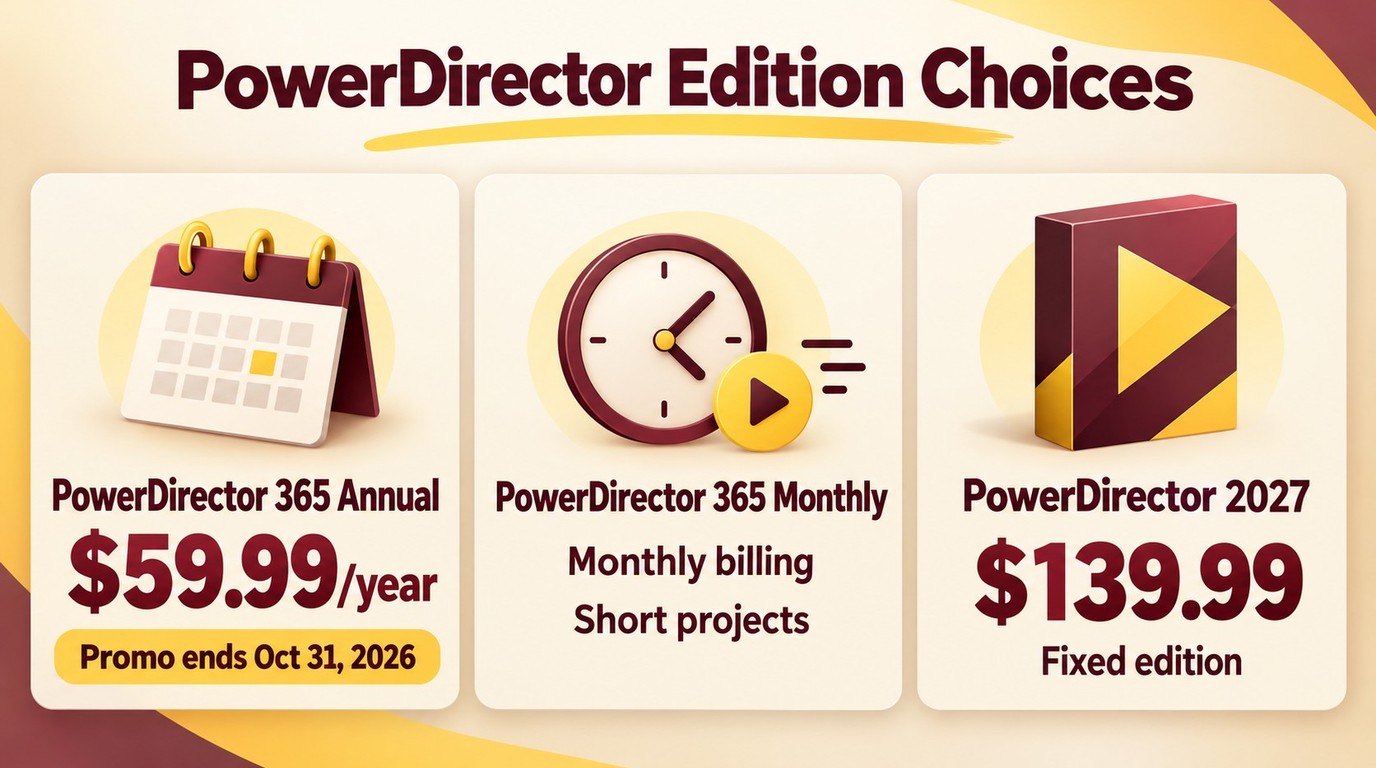
PowerDirector price comparisons now come down to three practical edition choices: PowerDirector Essential, PowerDirector 365, or the perpetual PowerDirector 2027 edition. PowerDirector 2026 remains relevant as a historical purchased edition, not the current perpetual product.
Subscription vs Perpetual License
A PowerDirector 365 review should distinguish access from ownership. The subscription receives ongoing feature updates and downloadable content while active; the annual plan includes 100 AI credits per month. The PowerDirector 2027 one-time purchase covers that major edition, includes 500 one-time AI credits valid for one year, and does not include future major-version upgrades.
- Annual subscription: suited to people who edit regularly and want updates, stock content, and recurring AI access at a lower monthly equivalent.
- Monthly subscription: suited to a short production period or a buyer who wants limited commitment, though continued use costs more than annual billing.
- PowerDirector 2027: suited to editors who prefer a fixed version and can work without ongoing feature drops, subscription content, or recurring AI-credit refills.
Current US Pricing
On October 27, 2026, CyberLink's US listing showed PowerDirector 365 at a promotional $59.99 for annual billing, against a displayed $79.99 list price; the offer ends October 31, 2026. PowerDirector 2027 is $139.99 as a one-time purchase, and monthly 365 billing is also available.
| Version | Billing cycle | Update access | Included AI credits |
|---|---|---|---|
| PowerDirector 365 for Windows | Annual billing | Updates while subscribed | 100 per month |
| PowerDirector 2027 for Windows | One-time purchase | Fixed major version; no future major-version upgrades | 500 one-time; valid one year |
AI Credit Costs
PowerDirector AI credits can turn frequent generative or cloud-assisted tasks into a usage decision, not just a feature decision. Annual PowerDirector 365 includes 100 credits per month, while PowerDirector 2027 includes 500 one-time credits valid for one year.
Credit use depends on the tool and current build, so a universal per-operation estimate would be misleading. The practical question is whether AI music, image generation, assisted effects, or similar tasks are occasional conveniences or a routine part of every project.
Best for frequent AI use: the annual subscription, which refreshes 100 credits each month and stays current.
Not ideal for heavy AI use: a fixed edition if the included allocation would become a recurring constraint.
Which Version Fits You?
The annual PowerDirector 365 plan has the clearest value for regular editors who benefit from ongoing updates and 100 AI credits per month. Monthly access fits a defined production window, while PowerDirector 2027 suits fixed-version work and includes 500 one-time AI credits valid for one year.
- Choose annual billing if you publish throughout the year and use stock assets or AI tools often enough to benefit from refills.
- Choose monthly billing if the software is needed for a short campaign, class, or contract rather than an ongoing channel.
- Choose PowerDirector 2027 if your projects rely on standard timeline editing and you accept staying on the licensed major version.
- Start with PowerDirector Essential for simple cuts and titles when its available no-cost tools cover the full workflow.
PowerDirector Essential
PowerDirector Essential is the ongoing no-cost edition for simple timeline jobs such as basic cuts and titles, making it a sensible starting point when its available tools cover your entire workflow. It is not a substitute for every 365 or 2027 feature. Move to PowerDirector 365 when regular editing makes ongoing updates, stock content, and 100 AI credits per month useful. Choose PowerDirector 2027 instead when you prefer a one-time purchase, a fixed major edition, and 500 one-time AI credits valid for one year. If Essential does not cover the work you need, consider a dedicated restoration or enhancement pipeline for severely noisy, low-resolution, or interlaced footage, rather than expecting a basic editor to solve a specialized finishing task. That distinction keeps the choice focused on the job, not the longest feature list.
System Requirements
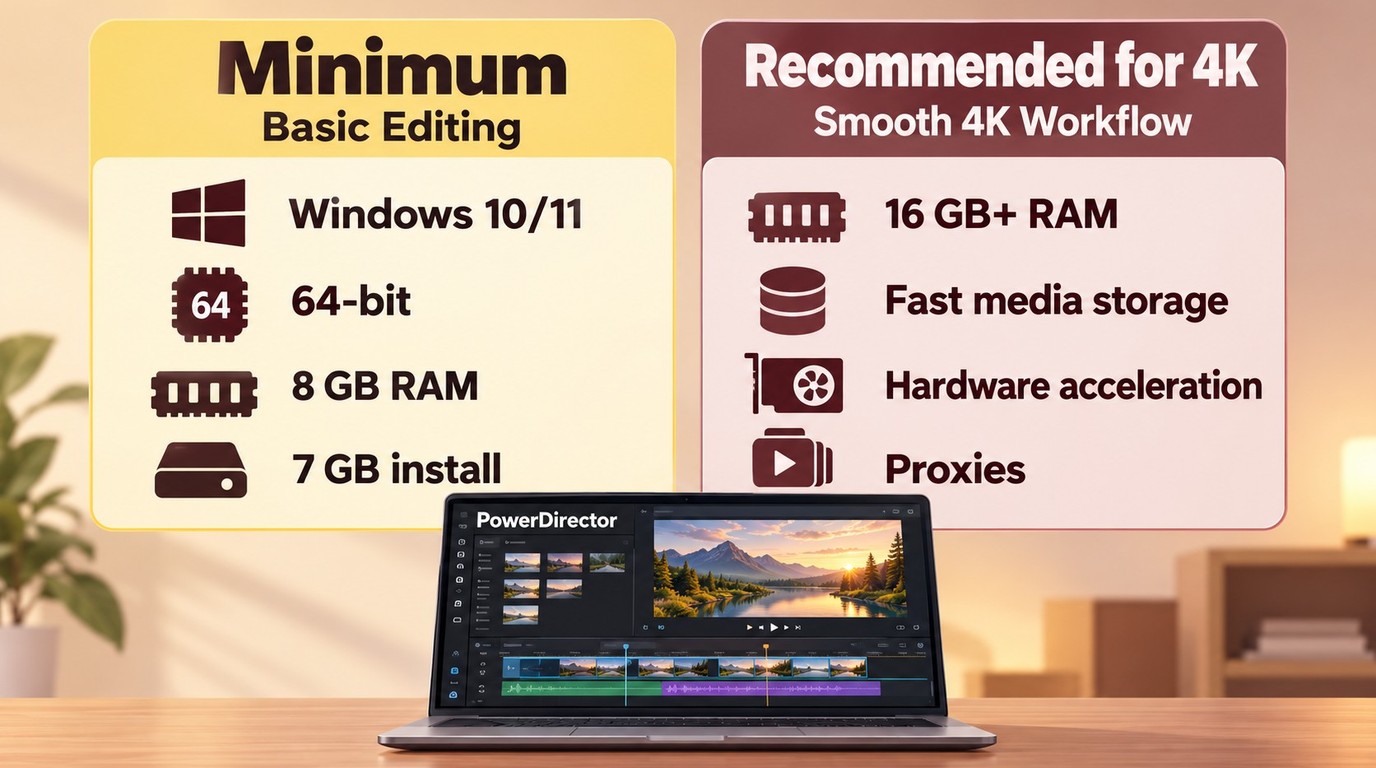
PowerDirector system requirements are modest for basic editing, but smooth preview and export behavior depend heavily on footage, effects, resolution, storage speed, GPU support, and the software build.
| Requirement | Windows |
|---|---|
| Operating system | Windows 11 or Windows 10, 64-bit |
| Processor | Compatible Intel or AMD processor |
| Memory | 8 GB minimum; 16 GB or more recommended |
| Storage | 7 GB for installation, plus project media space |
| Internet | Needed for activation and connected AI features |
For long-form 4K work, prioritize memory headroom, fast media storage, and supported hardware acceleration. Proxy files can make a bigger day-to-day difference than a headline render claim because they improve the editing stage where most time is spent.
User Interface and Workflow
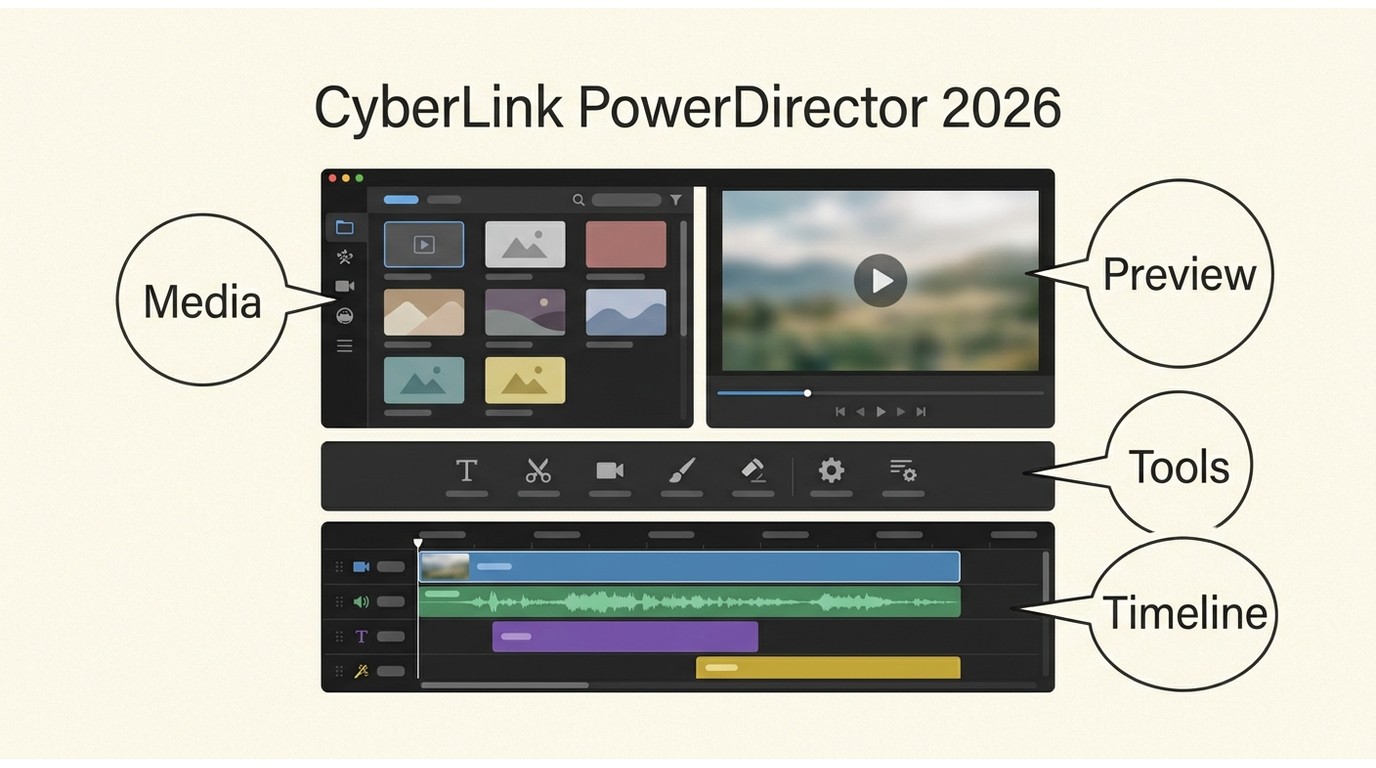
PowerDirector for beginners works because it offers guided entry points without removing the full timeline. In the 2026 edition, the interface organized common tasks more clearly, although preferences and project-performance controls still required some exploration.
The launcher can open a focused task such as trimming, merging, recording, or creating a slideshow. The full editor then provides the familiar media library, preview monitor, tool panels, and multitrack timeline. Storyboard and automated modes reduce setup for quick edits, while the main timeline supports layered video, audio, titles, and effects.
The useful distinction is not whether the interface looks simple, but how quickly it exposes the controls needed for a real project. PowerDirector keeps routine cuts and templates close at hand; deeper proxy, keyframe, and export decisions sit one level further in.
Key PowerDirector Features
This PowerDirector review groups features by the jobs that affect a buying decision, with current capabilities distinguished from the historical 2026 edition where relevant. The CyberLink video editor covers a wide range, but not every tool has the same depth or cost model.
Use the feature list as a workflow check: subscription access is more content-rich, the perpetual edition is a better match for people who maintain their own media library, and Windows is the current purchase path for desktop access.
Video Effects and Transitions
PowerDirector provides a large visual toolkit for titles, transitions, overlays, masks, blending, keyframes, and object-based effects. It is most useful when speed and variety matter more than building every element from scratch.
AI Tools
AI tools can shorten repetitive tasks, but their value depends on both output quality and credit use. The current US plan comparison includes Agentic Editor and Video Edit by Chat, with availability varying by edition.
These features are better treated as first-pass helpers than automatic final decisions. Speech cleanup may reduce manual audio work, while generated music or imagery still needs an editorial check for tone, timing, and visual consistency.
Content and Editing Tools
Titles, templates, stock assets, stickers, vertical previews, and task-oriented editing controls support quick production. Subscription access is more content-rich, while the perpetual edition is a better match for people who already maintain their own media library.
Format behavior can change between builds. A July 2026 user report described a WebM audio regression after an update, which is a useful warning about build-specific compatibility rather than evidence that all WebM workflows fail. The current Windows specification still lists WebM VP9 import, so it remains the baseline for planned inputs and outputs.
Fix and Enhance Footage
PowerDirector handles common correction tasks inside the edit: stabilization, lens and fisheye correction, color adjustments, LUTs, split toning, pan and zoom, and general noise cleanup.
These controls are suitable for making footage consistent enough for an edit. PowerDirector also offers AI-assisted correction, 10-bit HDR/SDR encoding, and SDR-to-HDR conversion, with availability varying by edition. A dedicated restoration or enhancement pipeline remains more specialized when the source is severely noisy, low resolution, or interlaced.
Audio Editing
PowerDirector covers the audio work most solo video projects need, including dialogue cleanup, noise reduction, vocal separation, ducking, timing adjustments, voice effects, and generated narration options.
Automatic ducking and music fitting can save keyframing time, but speech clarity should still be checked against the full mix. My editorial preference is to use automation for setup, then listen through transitions and dialogue overlaps before export.
360° Video Editing
PowerDirector includes 360° editing tools for importing spatial footage, adjusting the viewing direction, stabilizing movement, placing titles, and reframing a spherical source into a conventional view.
This is a useful specialty feature for creators who already own a 360° camera. It should not drive the purchase for a standard two-dimensional workflow.
Multicam Editing
Multicam tools synchronize clips and let an editor switch between angles during playback before refining the cuts on the timeline. The workflow is well suited to interviews, demonstrations, performances, and event coverage.
Audio synchronization works best when each camera captures a clear shared reference. For difficult recordings, a manual sync point or dedicated timecode workflow remains more dependable than expecting automatic alignment to solve every mismatch.
Motion Tracking and Chroma Key
Motion tracking attaches text, graphics, blur, or effects to a moving subject, while chroma key controls remove a selected background color. Both tools are accessible enough for quick social and instructional edits.
Clean contrast and controlled lighting matter more than the number of sliders. Fast motion, occlusion, fine hair, and uneven green-screen illumination still create Edge work that needs manual review.
Plugins and Performance
PowerDirector supports screen capture, connected plugins, and hardware-assisted processing, but performance cannot be reduced to one render-time number. Project complexity, codec, effects, media location, preview settings, GPU, and build can all change the result.
User reports include both smooth operation and cases of lag, freezes, or export failures. For a typical buyer, stable editing and a successful final export on representative footage matter more than a single benchmark.
Export Formats and MP4 Output
PowerDirector MP4 export supports H.264 AVC and H.265 HEVC, alongside listed outputs such as MKV, MPEG-2, WMV, XAVC S, and relevant audio formats. The current Windows format list also includes WebM VP9 import, Rec.2100 HLG/PQ HDR output through MP4 HEVC, and AAC encoding in stereo or 5.1.
| Output choice | Practical use | Editorial guidance |
|---|---|---|
| MP4 with H.264 AVC | YouTube, general sharing, and broad device support | Choose compatibility first |
| MP4 with H.265 HEVC | Efficient 4K delivery when the destination supports HEVC | Choose smaller files or higher efficiency |
| MKV, MPEG-2, WMV, or XAVC S | Workflow-specific delivery and archiving needs | Match the receiving app or device |
- Open the Produce or Export workspace after the timeline is locked.
- Select MP4, then choose H.264 for wider compatibility or PowerDirector H.265 export for a compatible high-efficiency workflow.
- Set the video resolution and quality for the destination, export a short sample, and inspect motion, audio sync, text, and color before rendering the full project.
PowerDirector 2026 and the Current Release
The 2026 edition focused on a reorganized interface, quicker task entry, and more assisted media tools rather than changing the basic identity of the editor.
- A redesigned tools panel reduces reliance on the older room-based navigation.
- The launcher opens common editing tasks without requiring a full project setup first.
- AI-assisted music, speech enhancement, wind-noise cleanup, image generation, and image-to-video tools broaden the quick-production workflow.
- Sky adjustment and related assisted effects receive refinements intended to reduce manual setup.
The interface changes are the most broadly relevant improvement because they affect nearly every project. The AI additions matter mainly to editors who will use them often enough to justify the credit model. PowerDirector 2027 is the current one-time-purchase edition, and the current US 365/2027 comparison lists Agentic Editor, Video Edit by Chat, 10-bit HDR/SDR encoding, and SDR-to-HDR conversion with edition-specific availability.
PowerDirector on Mac vs Windows
As of October 27, 2026, PowerDirector 365 for Mac downloads and updates are suspended while CyberLink coordinates with Apple. Windows is therefore the current purchase path for buyers who need PowerDirector desktop access.
Windows has historically received a wider selection of specialty tools and plugins. Affected subscribers should sign in to their CyberLink account and review the support notice for eligible MyEdit access or refund options. Keep the .PDS project file and all source media, and contact CyberLink about project continuity before changing systems.
- Windows is the safer fit for: buyers who want the broadest feature coverage and access to more plugins.
- Mac access is currently suspended: PowerDirector 365 downloads and updates are unavailable while CyberLink works with Apple.
PowerDirector Pros and Cons
PowerDirector's advantages are accessibility, range, and fast solo production. Its drawbacks center on AI-credit economics, build-to-build reliability reports, the current Mac service suspension, and less depth in professional collaboration and finishing.
Pros
- Guided modes and a conventional timeline support both first projects and more layered edits.
- Effects, templates, titles, audio tools, screen capture, and export options cover many solo-creator needs in one app.
- PowerDirector 365 subscriptions and the one-time PowerDirector 2027 edition suit different project schedules.
- H.264 and H.265 MP4 output provides practical delivery choices for common platforms.
- Assisted tools can reduce setup time for speech, music, images, and routine corrections.
Cons
- Frequent credit-based AI use can exhaust the included allocation and make a fixed edition less suitable for recurring AI tasks.
- Users report lag, freezes, export failures, update regressions, removed behavior, and uneven support experiences, though these reports are not universal.
- PowerDirector 365 for Mac downloads and updates are suspended; affected subscribers should use their CyberLink account and the support notice for eligible MyEdit access or refund options.
- Color finishing, team collaboration, codec depth, and plugin breadth do not match every professional production requirement.
- Export and performance settings may feel dense after the otherwise approachable interface.
Who Should Use PowerDirector?
PowerDirector for beginners and independent creators makes sense when quick solo production is more important than shared project systems, deep finishing, or a large post-production pipeline. For Windows users, Essential is the no-cost starting point for basic editing, PowerDirector 365 fits regular work that benefits from ongoing updates, and PowerDirector 2027 fits fixed-version projects. Mac buyers should not purchase PowerDirector 365 while downloads and updates remain suspended.
Best Fit
- Beginners who want guided entry points plus room to grow into a multitrack timeline.
- YouTube, social, education, and small-business creators producing frequent videos without a dedicated post team.
- Windows users who need a broad mixture of effects, capture, audio, and delivery tools.
- Editors who value templates and assisted setup but still want manual timeline control.
Not the Best Fit
- Production teams that depend on shared projects, formal review systems, and deep Creative Cloud integration.
- Colorists and finishing specialists who need a more extensive grading environment.
- Mac buyers while PowerDirector 365 downloads and updates remain suspended as CyberLink coordinates with Apple.
- Heavy AI users who do not want their workflow tied to recurring credits.
- Editors who need dedicated restoration or upscaling rather than cuts, titles, transitions, and general correction.
For that last use case, a dedicated video quality enhancer is a more focused category than a timeline editor.
PowerDirector vs Adobe Premiere
PowerDirector vs Adobe Premiere is a workflow choice, not a universal ranking. PowerDirector favors faster learning and solo production; Premiere favors collaboration, deeper post-production control, and integration with a wider professional ecosystem.
| Decision factor | PowerDirector | Adobe Premiere |
|---|---|---|
| Audience | Beginners to intermediate solo creators | Professional editors and production teams |
| Learning curve | Guided and task-focused entry | More concepts and workspace configuration |
| Collaboration | Primarily solo-project oriented | Stronger shared and team workflows |
| Color and codec depth | Suitable for common creator delivery | Better suited to demanding professional pipelines |
| Platform fit | Broadest feature set on Windows | Professional Windows and Mac workflows |
| Pricing model | Subscription or perpetual edition | Subscription |
Choose PowerDirector for approachable solo editing and rapid turnaround. Choose Premiere when collaboration, codec handling, color workflow, and a connected professional toolchain outweigh the steeper setup; understanding the roles of After Effects and Premiere Pro can also clarify an Adobe-based workflow.
What PowerDirector Users Report
Dated PowerDirector user reports are mixed: a historical 2025 account and a 2026 comment praise ease of use, while two October 2026 accounts describe update-related freezes and a Mac launch failure. These are individual experiences, not a measure of how often either outcome occurs.
Recurring Strengths
- In a historical 2025 Reddit post, a user who switched from Adobe Premiere described PowerDirector Ultra 2025 as “very user-friendly.”
- In 2026, another Reddit commenter comparing video editors wrote, “You can get up and running very quickly.”
Recurring Problems
- In October 2026, a Reddit user describing a newly purchased update wrote, “the software froze 3 times lagged during playback.”
- In a separate October 2026 Mac account, the user reported, “PowerDirector 365 will no longer launch.” This individual report does not establish the technical cause.
- A July 2026 Reddit post described a WebM update regression that removed audio from imported files, while the current Windows specification still lists WebM VP9 import.
- Other July 2026 individual accounts described lag on a high-spec PC and difficulty resolving performance concerns through support.
Individual reports cannot show how common a problem is. My editorial recommendation is to use representative source clips, effects, and an actual delivery preset during the evaluation period; a simple sample project may not expose the bottleneck that matters to your work.
UniFab for Post-Production Enhancement
Timeline editing and finished-file enhancement solve different tasks: cuts, titles, and sequencing belong in the editor, while severely noisy, low-resolution, or interlaced completed footage may call for a dedicated enhancement workflow.
UniFab All-In-One complements PowerDirector by upscaling a finished low-resolution edit.
Local Processing for Finished Footage
UniFab offers local modules and FabCloud; this workflow uses the local UniFab All-In-One AI Video Upscaler after editing in PowerDirector. It cannot assemble a multitrack project, and local processing uses computer resources, so follow its hardware guidance and output presets.
PowerDirector vs UniFab
| Tool | Primary task |
|---|---|
| PowerDirector 365 for Windows | Solo video creation |
| PowerDirector 2027 for Windows | Fixed-version solo editing |
| Adobe Premiere | Professional editing and finishing |
| UniFab All-In-One | Finished-file upscaling |
For Windows, PowerDirector 365 is a subscription-based service, while PowerDirector 2027 is a one-time purchase.
A Practical Two-App Workflow
- Edit and export in PowerDirector, choosing an appropriate 4K bitrate when the delivery format is 4K.
- Upscale the finished file in UniFab.
- Check artifacts and playback compatibility.
Use only authorized footage and follow applicable CyberLink and UniFab terms.
PowerDirector FAQs
These answers cover the buying and delivery questions that most often determine whether PowerDirector fits a project.
Is PowerDirector 365 worth the annual price?
It is worth considering for editors who work throughout the year and benefit from updates, stock content, and 100 AI credits each month. Occasional editors should compare that convenience with monthly access or PowerDirector 2027, which includes 500 one-time credits valid for one year.
Can PowerDirector export MP4 files for YouTube?
Yes. PowerDirector can export MP4 using H.264 AVC or H.265 HEVC. H.264 is the safer compatibility choice for YouTube and general sharing; H.265 is useful when efficient 4K delivery matters and the destination supports it.
Does the lifetime PowerDirector edition include future upgrades?
The perpetual license covers the purchased major edition rather than future major releases. An existing PowerDirector 2026 license does not include PowerDirector 2027 or all features added to PowerDirector 365.
Why can PowerDirector feel slow on some computers?
Slowdowns can come from high-resolution media, demanding codecs, stacked effects, slow storage, limited memory, unsupported acceleration, or a build-specific regression. The current Windows requirements specify 8 GB RAM and recommend 16 GB or more. A July 2026 report of lag on a high-spec PC was an individual user account, not a general performance result. Proxies, updated drivers, simplified previews, and a short sample export help isolate the cause.
Is PowerDirector Essential just a 30-day trial?
No. CyberLink describes PowerDirector Essential as an ongoing no-cost edition with core editing and selected AI tools. It does not include unrestricted access to every PowerDirector 365 or PowerDirector 2027 feature.
Final Verdict
PowerDirector remains a sensible choice for beginner and intermediate solo creators who want an approachable timeline, broad creative tools, and flexible licensing, especially on Windows.
For Windows, Essential fits basic cuts and titles, PowerDirector 365 is the stronger choice for regular editing and recurring AI use, and PowerDirector 2027 suits buyers who prefer a fixed major release. In my view, the right choice depends on the editing task and update needs, not the longest feature list. For Windows projects, confirm credit availability, codec compatibility, and hardware resources before final rendering. The Mac suspension is an availability and project-continuity issue addressed separately below.
PowerDirector 365 for Mac downloads and updates are suspended while CyberLink coordinates with Apple. Affected subscribers should keep their .PDS projects and source media, then use their CyberLink account and the official support notice to review eligible MyEdit access or refund options.
Choose PowerDirector for approachable solo production, choose Premiere for deeper team post-production, and use UniFab only as a complementary option when a completed edit needs dedicated restoration or enhancement.