Best AI Video Generators at a Glance
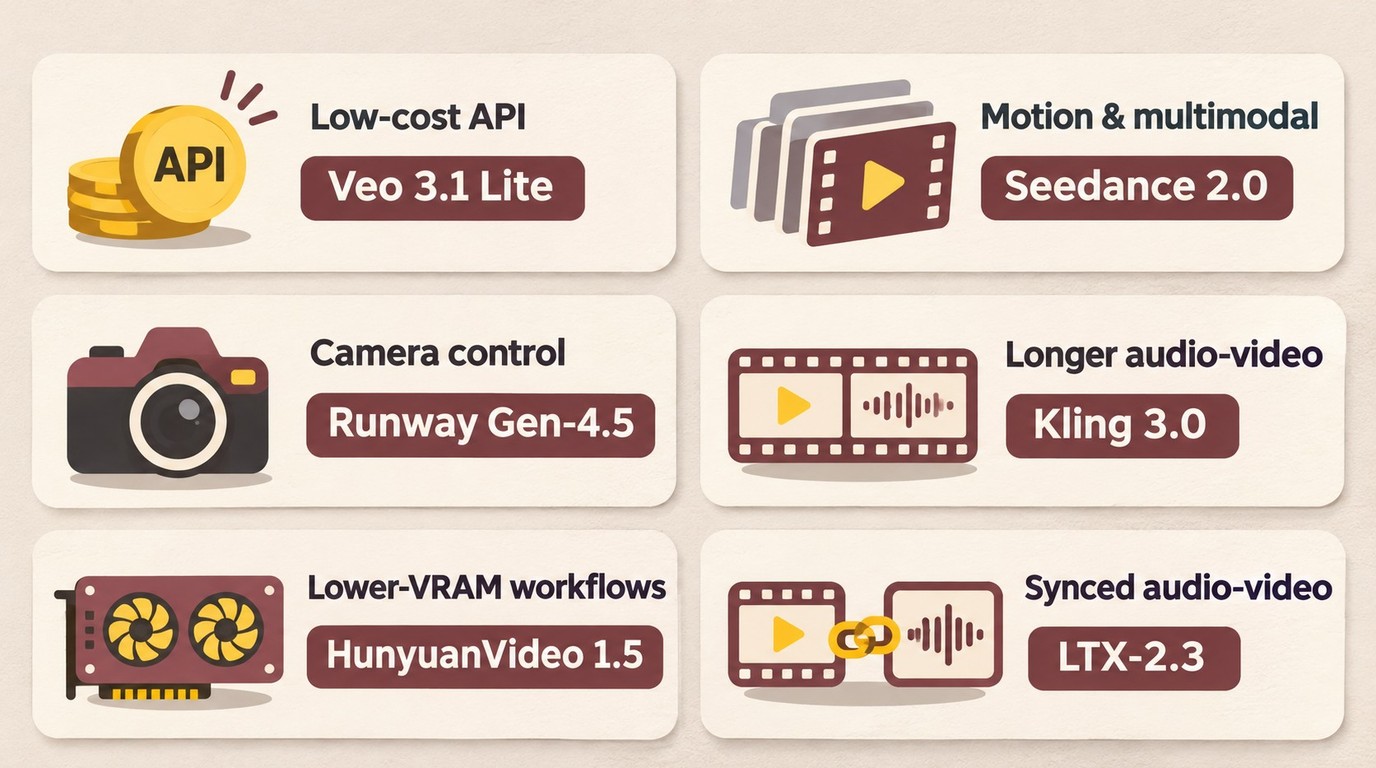
The practical choice is the model that delivers usable shots at an acceptable finished cost, not simply the lowest generation rate. Match audio, references, and deployment to the shot, then choose the lowest resolution that preserves the detail needed for delivery.
These recommendations cover the named versions, not every release in each model family.
| Priority | Model/version | Relevant capability | Main caveat |
|---|---|---|---|
| Low-cost direct API generation | Veo 3.1 Lite | 720p/1080p; optional native audio | Separate 4K upscaling, not native Lite 4K |
| Complex motion and references | Seedance 2.0 | Text, image, video, and audio references; multi-shot output | Hosted tiers do not establish native generation resolution |
| Filmmaking controls | Runway Gen-4.5 | Image guidance and camera-oriented controls | 720p-class generation; budget sound separately |
| Longer audiovisual clips | Kling 3.0 | 3–15 seconds; 720p/1080p; native audio | Credit billing; inspect dialogue and lip sync |
| Lower-VRAM local generation | HunyuanVideo 1.5 | Approximately 14 GB VRAM with offloading | 480p/720p native output; custom license; separate audio workflow |
| Local synchronized audio-video | LTX-2.3 local weights | Joint audio-video generation; ComfyUI and training support | Custom license; $10 million annual-revenue threshold |
Cost per accepted second equals generation spend divided by accepted delivered seconds; the full production-cost calculation also includes references, editing, keeper-only finishing, compute, and storage.
The word “best” is meaningful only after you define the shot. A model may lead a preference benchmark yet struggle with a specific product shape, character identity, camera move, or typography requirement. A cheaper model may also become more expensive if it needs twice as many attempts.
Fair Comparisons Start with the Same Requirements
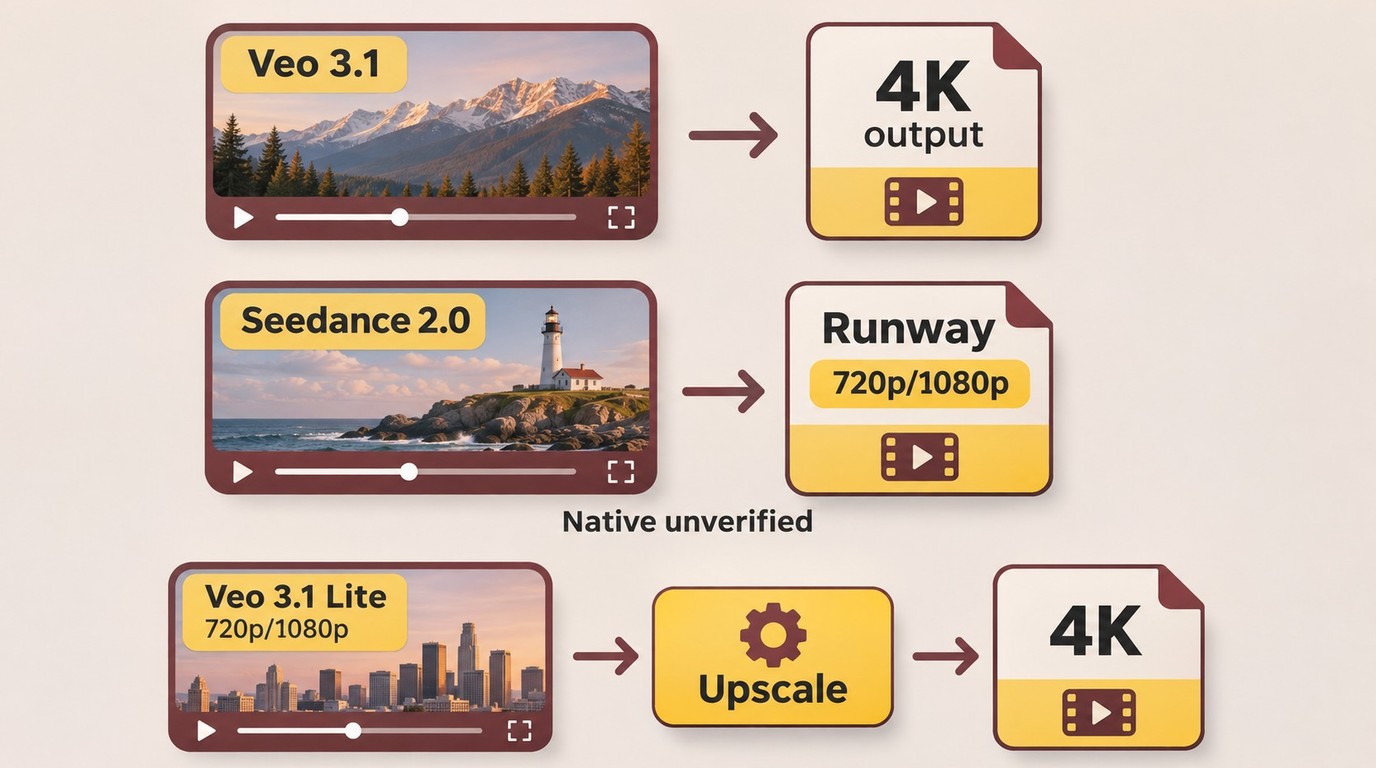
A fair comparison separates model capability from platform packaging. Evaluate prompt adherence, motion logic, identity and object continuity, temporal stability, native resolution, duration, audio, controls, and—most importantly—the percentage of generations you can accept.
Turnaround includes queue time and generation time; a tier named Fast is not a cross-model latency measurement.
Prices use direct vendor, hosted/reseller, official credits, or local cost billing. Credits remain credits without a verified official USD conversion. Local cost includes hardware or cloud GPU time, electricity, storage, maintenance, and labor. Retained generation rates are as of August 10, 2026, except where a later date is given.
Commercial production requires permission for the reference images, voices, and likenesses used; paid access alone does not grant every required right. Preserve provenance markers and follow applicable law, provider terms, and delivery-disclosure requirements.
Native generation resolution describes the model's initial frames; provider-side upscaling enlarges them within the service, while external finishing processes an exported clip. A 4K-sized export alone does not distinguish these stages.
Complete AI Video Generation Model Comparison
The rows distinguish specific versions and deployment paths. The Seedance and Kling homepages feature Seedance 2.5 and Kling 4.0, and the LTX repository points to LTX-2.5; the earlier-version specifications below remain tied to their named releases.
| Model/version | Access and deployment | Output resolution and stage | Audio workflow | Billing basis |
|---|---|---|---|---|
| Seedance 2.0 | ByteDance ecosystem; Runway-hosted | Runway export tiers: 480p/720p, 1080p, 4K | Synchronized stereo | Hosted generated seconds |
| Veo 3.1 Lite | Google Vertex AI | 720p/1080p generation; separate 4K upscaling | Optional native audio | Direct generated seconds |
| Veo 3.1 Fast | Google Vertex AI | GA generation: 720p/1080p | Optional native audio | Direct generated seconds |
| Veo 3.1 | Google Vertex AI | 720p/1080p/4K output tiers | Optional native audio | Direct generated seconds |
| Kling 3.0 / Omni | Kling AI hosted service | 720p/1080p generation | Native audio; optional voice control | Official credits per second |
| Runway Gen-4.5 | Runway API/platform | 720p-class generation | Separate sound workflow | 12 credits/s; $0.12/s direct |
| Runway Gen-4 Turbo | Runway API/platform | 720p-class generation | Separate sound workflow | 5 credits/s; $0.05/s direct |
| MiniMax H3 | Hosted API; partial local weights | Base: 768-pixel shorter side; hosted: up to 2K | Stereo audiovisual output | API billing or local compute |
| HunyuanVideo 1.5 | Local weights | 480p/720p generation; separate 1080p super-resolution | Separate sound workflow | Hardware, power, storage, labor |
| LTX-2.3 local weights | Local Python/ComfyUI | Checkpoint, hardware, and spatial-upscaling dependent | Synchronized audio-video | Hardware, power, storage, maintenance, labor |
| LTX-2.3 hosted API | Managed Fast/Pro endpoints | Fast output tiers: 1080p, 1440p, 4K | Synchronized audio-video | Hosted API billing |
Seedance 2.0 supports clips up to 15 seconds, as stated in ByteDance's Seedance 2.0 launch announcement. Runway's hosted 4K tier is an output tier and does not establish native ByteDance 4K generation.
Google direct Veo 3.1 rates are $0.20 per second for video-only 720p/1080p and $0.40 for 4K; audio-inclusive rates are $0.40 and $0.60 respectively under Google's resolution- and audio-based pricing. Veo 3.1 supports four-, six-, or eight-second clips. Fast's GA documentation lists 720p/1080p; a 4K pricing row alone does not establish a supported Fast production endpoint.
Kling 3.0's video-generation settings cover three- to 15-second clips. At 720p/1080p, silent video costs six/eight credits per second and native audio costs nine/12; voice control adds two credits per second. Dollar costs depend on the applicable credit pack.
Runway Gen-4.5 and Gen-4 Turbo support two- to ten-second API generations. Their direct rates in Runway API pricing are $0.12 and $0.05 per second respectively. Runway-hosted gemini_omni_flash access is a different service from the direct Google Gemini Omni Flash preview.
MiniMax H3's hosted service supports up to 15 seconds. The public Base FL2VA and Ref2VA weights in the MiniMax H3 release use a community license and do not include the hosted 2K regeneration component.
Sora 2 Pro, Sora 2, and the Videos API shut down on September 24, 2026 and are no longer available. The downloadable Wan 2.2 release remains a local reproducibility reference rather than a current shortlist entry.
HunyuanVideo 1.5's approximately 14 GB offloading path and territorial license conditions belong to that version's local deployment configuration. Its distilled 480p example completes in under 75 seconds on an RTX 4090; that timing does not apply to every duration or configuration.
The local weights use the LTX-2 Community License, including its $10 million annual-revenue threshold and competing-use restriction. The LTX-2.3 hosted Fast limits in the hosted model specifications are up to 20 seconds at 1080p or ten seconds at 1440p/4K; Pro supports up to ten seconds. Those hosted limits do not define the capabilities of local weights or newer releases.
Closed AI Video Models: What Each Is Best At
These sections focus on hosted generation workflows. MiniMax H3 also has partially released weights, so its hosted capabilities and downloadable components are distinguished separately.
Seedance: Multimodal Control and Complex Motion
ByteDance Seed's English homepage features Seedance 2.5. The reference limits, output capabilities, and hosted prices below describe Seedance 2.0, not Seedance 2.5.
Seedance 2.0 accepts text, image, video, and audio references. ByteDance says one request can use up to nine images, three video clips, and three audio clips alongside natural-language instructions. That gives creators more ways to communicate character appearance, action, camera movement, timing, sound, and shot relationships than a text-only prompt.
Its synchronized stereo output and multi-shot generation make it relevant to dialogue, advertisements, music visuals, and short narrative sequences. ByteDance also acknowledges remaining issues involving detail stability, realism, lively motion, multi-person lip sync, occasional audio distortion, multi-subject consistency, text rendering, and complex edits. Those limitations matter because a feature-rich generation may still be rejected if a face, hand, product, or word changes across frames.
Seedance 2.0 pricing also illustrates why provider labels are essential. Runway lists $0.36 per second for 480p/720p, $0.40 for 1080p, and $1.50 for its 4K tier. These are Runway-hosted prices, not official direct ByteDance prices. Runway's hosted 4K tier is an output tier and does not establish native ByteDance 4K generation.
Creators already using the model can consult the focused guide to upscale Seedance video after selecting structurally sound footage.
Veo 3.1: Transparent Tiers and Native Audio
The Veo family is comparatively easy to budget because Google publishes resolution- and audio-specific rates. Lite is the clearest low-cost baseline: 720p costs $0.03 per second without audio or $0.05 with audio, while 1080p costs $0.05 or $0.08.
Fast creates another step between Lite and the full model. Google's pricing table lists resolution-specific Fast rates, including 4K rows, but the current generally available Fast model documentation lists 720p and 1080p output. Treat Fast 4K as endpoint-dependent until the active production model explicitly exposes it; a retired preview endpoint previously supported 4K. Full Veo 3.1 documentation does list a 4K output option, subject to the current model ID, region, and request settings.
Pricing and model-reference pages can be updated on different schedules, so verify the exact endpoint and requested resolution before budgeting. Most importantly, Veo 3.1 Lite's direct generation is 720p or 1080p. Google's separate capability for enhancing existing footage to 1080p or 4K is an upscale operation, not native Lite 4K generation.
For accepted Google-model footage, use the separate guide to upscale Veo video for finishing.
Kling: Longer Audiovisual Clips and Motion
Kling’s homepage promotes Kling 4.0; the three- to 15-second duration and 720p/1080p specifications described here belong to Kling 3.0. It combines multimodal controls with native audio and optional voice control, making it suitable for actions that need more time to unfold than a typical short fixed-duration output.
Kling 3.0 uses the following credit rates. At 720p, video without native audio costs six credits per second, while native audio costs nine. At 1080p, the corresponding rates are eight and 12 credits per second. Voice control adds two credits per second.
The dollar cost depends on the credit-pack price available to your account and region. Subscription promotions, bonus credits, and plan-specific allocations can otherwise produce misleading results.
Kling's longer duration may reduce extensions and editing, but longer generation also gives drift more time to appear. Evaluate complete-shot acceptance, not isolated frames. The dedicated workflow to upscale Kling video is the appropriate next step for approved clips.
Runway Gen-4.5 and Turbo: Production-Oriented Control
Runway's advantage is its surrounding creative environment: image-guided generation, camera-oriented direction, asset management, predictable API credits, and integration into a broader production workflow.
Gen-4.5 supports two- to ten-second API generations at 720p-class dimensions and costs $0.12 per second. Gen-4 Turbo costs $0.05 per second and suits motion drafts, storyboard shots, and high-retry ideation. Budget sound separately when required.
Turbo is not automatically the cheapest final option. If its output needs more rerolls or repair, Gen-4.5 may have a lower cost per accepted second despite the higher rate. Conversely, paying for Gen-4.5 before composition and timing are settled can waste money. The sensible pattern is to test the least expensive model that preserves the creative decision, then move up only when the quality difference improves acceptance.
MiniMax H3: Multimodal References and Released Weights
MiniMax H3 supports hosted output up to 2K and 15 seconds, stereo audiovisual generation, multi-shot creation, reference-based generation, editing, and motion transfer.
MiniMax has released an official H3 repository and public Base FL2VA and Ref2VA weights under the MiniMax H3 Community License. The release is partial: H3-Context-IR, the hosted 2K regeneration component, and some sparse-attention implementation pieces are not included. The public base weights therefore should not be described as a complete mirror of every hosted H3 feature.
Sora 2: Shutdown and Workflow Alternatives
Sora 2 remains relevant because existing users need to finish or migrate projects.
Sora 2 models and the Videos API shut down on September 24, 2026 and are no longer available. Keep locally saved assets, preserve prompts and references, record aspect ratios and durations, and recreate representative shots in supported alternatives.
Possible migration candidates include Seedance for multimodal action, Veo for Google-hosted audiovisual production, Kling for longer clips, and Runway for production controls. Previously generated assets can still be finished through the archive-oriented guide to upscale Sora video.
Open and Open-Weight AI Video Models
Downloadable weights can improve privacy, customization, and cost control at volume, but local generation is not free. API fees are replaced by GPU purchases or rentals, electricity, downloads, storage, setup, software maintenance, failed jobs, and technical labor.
| Factor | Hosted or closed model | Open or open-weight local model |
|---|---|---|
| Initial setup | Low | Medium to high |
| Marginal billing | Per second, credit, operation, or plan | Hardware amortization, cloud GPU time, power, storage, and labor |
| Frontier access | Usually immediate and managed | Depends on released weights, optimizations, and community tooling |
| Fine-tuning and control | Limited by platform features | Usually greater, subject to model and license |
| Privacy | Provider terms and infrastructure apply | Stronger when inference is fully local |
| Hardware | Provider manages it | Approximately 14 GB VRAM to much higher requirements, depending on model and settings |
| Reliability | Managed service and queues | Depends on drivers, memory, workflow, and local maintenance |
| Licensing | API and product terms | Code license, weight license, territorial limits, revenue thresholds, and competing-use clauses may differ |
| Best fit | Teams prioritizing speed and operational simplicity | Technical users prioritizing privacy, customization, or sustained volume |
Wan 2.2: A Local Reproducibility Reference
Wan 2.2 weights remain downloadable under Apache 2.0; removal from Runware’s hosted catalog does not remove the downloadable release. The TI2V-5B checkpoint unifies text-to-video and image-to-video generation and produces 1280×704 or 704×1280 output at 24 fps. The default 121-frame configuration is approximately five seconds.
The documented offloaded path requires at least 24 GB VRAM, with an RTX 4090 given as an example. The repository reports under nine minutes for a five-second output on a single consumer GPU without model-specific optimization. That is a developer-published configuration result, not a promise for every 24 GB GPU, operating system, interface, quantization method, or prompt.
Wan's separate S2V-14B handles audio-conditioned video; use a separate sound workflow for TI2V-5B.
HunyuanVideo 1.5: Lower-VRAM Local Generation
HunyuanVideo 1.5 provides 480p and 720p text-to-video and image-to-video generation, followed by a separate super-resolution process to 1080p. With model offloading, the official repository lists approximately 14 GB as the minimum GPU-memory path.
The repository documents distilled and sparse-attention acceleration options. One distilled 480p example is described as completing within 75 seconds on an RTX 4090, while a separate benchmark discusses ten-second 720p synthesis. These results cannot be generalized across all durations, step counts, GPUs, offloading modes, or attention implementations.
Use a separate sound workflow. The model also uses the Tencent Hunyuan Community License rather than a standard permissive license. Its terms exclude use in the European Union, United Kingdom, and South Korea. A separate Tencent license is required when the licensee's combined products and services exceeded 100 million monthly active users in the specified preceding calendar month. The license also restricts using outputs to improve another AI model except Tencent Hunyuan or its derivatives, so organizations should review the complete terms before deployment.
LTX: Local Weights and Hosted API Limits
The official LTX repository points to LTX-2.5 weights and inference paths; LTX-2.3 hosted limits describe a different version and deployment path. The LTX-2.3 local ecosystem includes official Python inference, ComfyUI support, training tools, retakes, keyframe interpolation, dubbing, pose and camera controls, and multiple LoRAs.
The commonly cited limit of up to 20 seconds at 1080p or ten seconds at 1440p/4K belongs to the hosted LTX-2.3 Fast API specification. It is not a universal resolution-duration ceiling for the downloadable local weights, whose practical limits depend on checkpoint, hardware, quantization, frame rate, offloading, and spatial-upscaling stages. Teams should decide explicitly whether they are comparing the managed API or self-hosted inference.
The downloadable LTX-2.3 weights are best described as open weight under the LTX-2 Community License. Entities with aggregated annual revenues of at least $10 million require a paid commercial agreement. The license also contains restrictions relevant to products that compete with Lightricks' commercial offerings. Teams should evaluate the complete license before incorporating the weights into a commercial service.
Which AI Video Model Gives the Best Value?
Sticker price measures generated output. Production cost measures accepted output. Generation cost per accepted second equals total generation spend divided by accepted delivered seconds.
Let:
Pgen= generation price per second at the selected resolution and audio settingL= generated clip length in secondsN= number of attemptsA= number of accepted clipsSaccepted= accepted delivered secondsPinput= reference-image, reference-video, or audio charges per attemptPup= upscaling cost per accepted secondPpost= editing, repair, denoise, interpolation, storage, and transfer costClocal= local hardware amortization, electricity, cloud GPU, and operator cost
Cost per Generated Attempt
Generation attempt cost = (Pgen × L) + Pinput
Cost per Accepted Second
Cost per accepted second
= Total generation spend ÷ accepted delivered seconds
For equal-length clips:
Cost per accepted second
= [N × ((Pgen × L) + Pinput)] ÷ (A × L)
This figure can reverse a sticker-price ranking. A $0.05-per-second model that needs ten attempts costs more than a $0.12-per-second model that succeeds in three, assuming the same clip length and no other charges.
Keeper-Only Finishing Cost
Finishing cost
= (Saccepted × Pup) + Ppost + Clocal
Only accepted shots—or a locked master containing accepted shots—should be upscaled. Processing every draft removes the economic advantage.
Total Delivered Cost
Total delivered cost
= generation attempts
+ reference charges
+ editing and repair
+ keeper-only upscaling
+ local or cloud compute
+ storage and transfer
For a local model:
Local job cost
= GPU rental or hardware amortization
+ electricity
+ storage
+ operator time
Then divide local job cost by accepted delivered seconds, not total seconds rendered.
Illustrative Worked Example with Explicit Assumptions
As of November 2026, Runway’s direct API rates are $0.05 per generated second for Gen-4 Turbo and $0.12 for Gen-4.5. Assuming six attempts at a six-second clip with one accepted clip, generation costs $1.80 for Turbo and $4.32 for Gen-4.5, or $0.30 and $0.72 per accepted second, respectively, before reference charges, editing, finishing, compute, storage, and transfer. Six attempts and one accepted clip are illustrative assumptions, not measured success rates.
The separate resolution comparison uses the retained Google Vertex rates and a supported six-second Veo 3.1 Lite duration. It assumes six attempts, one accepted clip, and no reference charges:
- 720p video-only:
$0.03 per second - 1080p video-only:
$0.05 per second - Clip length:
6 seconds - Attempts:
6 - Accepted clips:
1 - Accepted footage:
6 seconds - Reference charges:
$0for simplicity
At 720p:
Generation spend
= 6 × (6 × $0.03)
= $1.08
Generation cost per accepted second
= $1.08 ÷ 6
= $0.18
At 1080p:
Generation spend
= 6 × (6 × $0.05)
= $1.80
Generation cost per accepted second
= $1.80 ÷ 6
= $0.30
The 720p route leaves a maximum difference of:
$1.80 − $1.08 = $0.72 per accepted six-second clip
Therefore, 720p plus finishing is cheaper in this example only if the incremental keeper-finishing cost is below $0.72 and the finished quality is acceptable. With audio enabled, Lite costs $0.05 per second at 720p and $0.08 at 1080p, changing the same six-attempt generation spend to $1.80 versus $2.88.
The break-even condition is:
N × low-resolution attempt cost + keeper finishing cost
< N × high-resolution attempt cost
The left side becomes more attractive as retry count increases. It becomes less attractive when the first attempt succeeds, the source lacks enough stable detail, or finishing introduces unacceptable artifacts.
For a full treatment of this specific workflow and its variables, use the dedicated cheapest-way-to-make-4K guide rather than applying one fixed savings percentage to every project.
Do You Need Native 4K AI Video?
“4K AI video” may describe three different processes:
- Native 4K generation: the generative model creates its initial frames at approximately 4K.
- Provider-side upscaling: the platform generates lower-resolution footage and applies a separate enlargement or enhancement stage.
- External AI upscaling: a post-production application enlarges an accepted export.
All three can create a 4K-sized file. They do not contain equivalent source detail.
Generate at 720p When the Shot Is Still a Decision
Use 720p while testing prompt interpretation, composition, camera movement, timing, action, or basic character behavior. It is especially useful when several rerolls are expected, the model is capped near 720p, or the final platform is primarily mobile.
Do not finish the footage yet if hands, faces, text, product geometry, physics, or interactions remain uncertain. Resolution cannot rescue a structurally wrong shot.
Move to 1080p Earlier for Fine Detail
Use 1080p earlier when the shot includes faces, hair, product materials, signage, interfaces, thin geometry, particles, or dense line art. A short upscale test may reveal whether a 720p source has enough stable information to survive enlargement.
A modest 1080p surcharge can be worthwhile once the shot is nearly final and retries are unlikely. It also provides more room for cropping, stabilization, reframing, and a 4K delivery master.
Pay for Native 4K When the Detail Has Production Value
Native 4K can earn its premium for a hero product shot, VFX plate, projection asset, texture-heavy scene, or crop-intensive master. Fine typography, foliage, fabrics, particles, repeated patterns, and interface elements can expose the limits of lower-resolution sources.
Before paying for multiple high-resolution retries, confirm that the model and endpoint genuinely generate native 4K. A provider-side 4K option may be a separate upscale. Then compare the native result with 1080p plus finishing on a difficult segment. The premium is justified only if the difference survives the intended display, compression, and viewing distance.
Why 8K Is Rarely the Right Default
8K is useful for specialist displays, archival masters, aggressive reframing, projections, or oversampling. It is rarely required for ordinary social and YouTube delivery. An application that exports 8K or 16K dimensions does not thereby prove that it recovered authentic scene detail at that resolution.
The Cost-Effective Generation-to-Upscaling Workflow
The practical pipeline is:
AI Video Generation → Low-Resolution Output → Select/Repair → Edit Lock → AI Video Upscaling → High-Resolution Final Video
Choose the model by motion, references, duration, audio, privacy, license, and likely acceptance rate. Iterate at the lowest resolution that still lets you judge the shot, reject structural failures before finishing, lock the edit, test a difficult segment, and upscale AI-generated video only after approval, using the real delivery target.
Generating at lower resolution and finishing only accepted shots can be the cheapest way to make 4K AI video when retry savings exceed keeper-only finishing costs and the source retains enough detail for delivery.
Recommended AI Video Upscalers for the Finishing Stage
Once the edit is locked, the next decision is which AI video upscaler should process the approved footage. For this workflow, two established desktop choices are UniFab Video Upscaler AI and Topaz Video. Both can enlarge and enhance generated footage, but they are designed for different levels of control and restoration complexity.
UniFab Video Upscaler AI: A Guided Route from Low Resolution to 4K
UniFab Video Upscaler AI is a practical fit when a structurally sound 720p or 1080p generation needs a clearer 4K delivery master without a highly technical setup. Its footage-oriented models include Equinox for general video, Vellum for texture-rich scenes, Kairo for anime and line art, and Titanus for more demanding film and television material. The desktop application advertises output dimensions up to 16K, while FabCloud generally provides cloud processing up to 4K for users who do not want to rely entirely on local GPU performance.
UniFab offers fewer specialist restoration paths and less granular manual control than Topaz. For AI-generated footage, the main advantage is workflow simplicity: select the model that matches the visual style, test a difficult segment, and then batch only the accepted shots. Output quality still depends on the stability and detail of the generated source; regenerate shots with incorrect anatomy, missing objects, unreadable text, identity drift, impossible physics, or severe temporal morphing before finishing. Separate UniFab tools can address noise, soft faces, or frame rate when those problems are actually present.
Topaz Video: A Deeper Restoration Toolkit
The current application is called Topaz Video; Topaz Video AI is its discontinued predecessor and remains a common search term. Topaz Video is better suited to creators who need detailed model selection, previews, manual controls, professional export options, or difficult restoration work. Proteus is a flexible general-purpose model, Rhea targets texture-intensive enlargement, Gaia is designed for animation and CGI, and Iris is particularly effective at recovering faces. The Starlight series uses diffusion-based enhancement, with different variants designed for low-resolution, challenging, or higher-quality footage.
Topaz also offers denoising, deinterlacing, motion deblur, stabilization, frame interpolation, and batch queues. Its integrations differ by host application: Premiere Pro uses a cloud-connected UXP panel, while After Effects and DaVinci Resolve Studio provide more limited local plugins for supported enhancement and motion-deblur workflows. The trade-offs are a steeper learning curve, recurring subscription cost, and potentially long render times or substantial GPU requirements for advanced models such as Rhea and Starlight. The detailed Topaz upscale review explains its models, workflow, speed considerations, and source-quality limitations.
UniFab vs. Topaz Video: A Finishing-Stage Decision
| Decision factor | UniFab Video Upscaler AI | Topaz Video |
|---|---|---|
| Best fit | Guided 720p/1080p-to-4K finishing | Specialist restoration and detailed control |
| Model approach | General footage, textures, anime, cinema; fewer specialist restoration paths | Specialist models for faces, animation, texture, noise, and damaged sources |
| Controls and learning curve | Footage-driven choices; less granular manual control; preview a difficult segment | More parameters, previews, and model decisions; steeper learning curve |
| Processing options | Desktop processing plus FabCloud | Local and supported cloud rendering; advanced models demand substantial hardware |
| Professional workflow | Primarily a standalone enhancement suite | Premiere Pro, After Effects, and DaVinci Resolve integrations |
| Purchase model | Lifetime and bundle options; offers and cloud-credit terms vary | Monthly and annual subscriptions; recurring costs |
Choose UniFab when the generated clip is already coherent and primarily needs a straightforward resolution-and-detail finishing pass. Choose Topaz Video when the footage is unusually degraded or the project benefits from specialist models and close manual control.
Best Workflow by Use Case
| Use case | Working approach | Finishing target |
|---|---|---|
| Shorts and Reels | Iterate at 720p; prioritize motion and vertical composition | 1080p or a tested 4K master |
| YouTube and music videos | Use 1080p for important faces and details; lock the edit first | Usually 4K |
| Ads and product shots* | Start critical shots at 1080p; test verified native 4K for hero material | 4K |
| Anime and motion comics | Choose 720p/1080p by line density; inspect flicker and thin lines | 4K |
| AI short drama | Draft at 720p, then finish approved face-heavy shots | Keeper-only 4K batch |
| Local/private production | Compare license, VRAM, render time, and labor with API cost | Model-dependent 1080p/4K |
*For ads and product shots, converting a 4:3 source to 16:9 requires cropping, padding, or recomposing the shot. Stretching changes shapes.
Final Decision: Model First, Resolution Second
Ask which model has the best acceptance rate for the shot, what is the cheapest resolution that preserves the necessary detail, and whether delivery truly requires native high resolution. The meaningful figure is the total cost of an accepted, edited, finished second—not the number beside the Generate button.
Hosted models favor operational simplicity. Open or open-weight models favor privacy and customization when hardware, setup, and licensing are manageable.
Frequently Asked Questions
What should former Sora users use now?
Consider Seedance 2.0 for reference-heavy movement, Veo 3.1 for Google-hosted audiovisual production, Kling 3.0 for longer clips, and Runway Gen-4.5 for production controls. Preserve locally saved prompts, reference assets, aspect ratios, durations, and post-production settings to help recreate representative shots in a replacement workflow.
Which open-weight video models allow commercial use?
Wan 2.2 TI2V-5B is a downloadable release under Apache 2.0 that permits commercial use subject to its license terms. HunyuanVideo 1.5 uses a community license with territorial restrictions and a separate-license requirement at the specified user scale. LTX-2.3 weights use the LTX-2 Community License: entities with aggregated annual revenues of at least $10 million require a paid commercial agreement, and competing-use restrictions also apply. Hosted LTX access is governed by separate service terms. “Open source” should not be applied to every downloadable model without checking both code and weight terms.
How do retries change the cost per minute?
Multiply a per-second rate by 60 only when the resolution, audio, provider, and settings stay identical. Runway Gen-4 Turbo’s direct API rate is $0.05 per generated second, so one generated minute costs $3 before retries. With an illustrative six complete attempts for one accepted minute, generation alone costs $18 before references, editing, repair, upscaling, compute, storage, or transfer.
Can a 4K export still come from lower-resolution footage?
Yes. Provider-side upscaling and external AI upscaling can produce a 4K-sized export from lower-resolution frames. Native generation resolution describes the model’s initial output; export dimensions alone do not establish whether the footage was generated at native 4K.
Which models can generate clips longer than 10 seconds?
For hosted services in this comparison, the LTX-2.3 Fast API lists up to 20 seconds at 1080p and ten seconds at 1440p/4K. Seedance 2.0, Kling 3.0, and the hosted MiniMax H3 service list up to 15 seconds. These hosted limits should not be treated as universal limits for locally downloaded LTX weights, whose practical duration depends on hardware and configuration. Longer duration is useful only if temporal consistency remains acceptable.
Can a 14 GB GPU run a local video model?
Yes. HunyuanVideo 1.5 documents an approximately 14 GB VRAM path with offloading, while the documented Wan 2.2 TI2V-5B offloaded single-GPU path requires at least 24 GB VRAM. LTX-2.3 requirements vary by checkpoint, duration, resolution, quantization, and pipeline. Offloading lowers VRAM pressure but generally increases latency.