A YouTube aspect ratio can look correct in an editor and still crop a face, hide Edge text, or expose soft detail when the same footage is rebuilt for Shorts. This guide pairs a fast YouTube video dimensions lookup with current Shorts rules, upload settings, and practical resizing fixes.
The useful distinction is simple: choose the frame shape for the destination first, then choose enough pixels and bitrate to preserve the source. That order prevents most avoidable reframing problems. For youtube aspect ratio, verify this point on the actual source before processing the complete file.
How to Choose the Right Youtube Aspect Ratio Workflow in 2026
Use the same decision criteria across tools: source type, expected output, supported formats, local versus uploaded processing, free limits, hardware requirements, and the risk of visible artifacts. The related intents YouTube video dimensions, YouTube Shorts aspect ratio, YouTube thumbnail size should be evaluated as distinct needs rather than interchangeable labels. For youtube aspect ratio, verify this point on the actual source before processing the complete file.
What YouTube Aspect Ratio Means
Quick answer: youtube aspect ratio should be chosen or configured by matching the source, viewing device or platform, quality target, privacy needs, and export limits. Test a representative clip, compare the result at full size, and avoid settings that add artifacts or unnecessary recompression. The latest GSC comparison shows that the optimization priority is the page is not in a material click decline in this comparison window; optimization focuses on protecting gains and expanding high-intent query coverage.
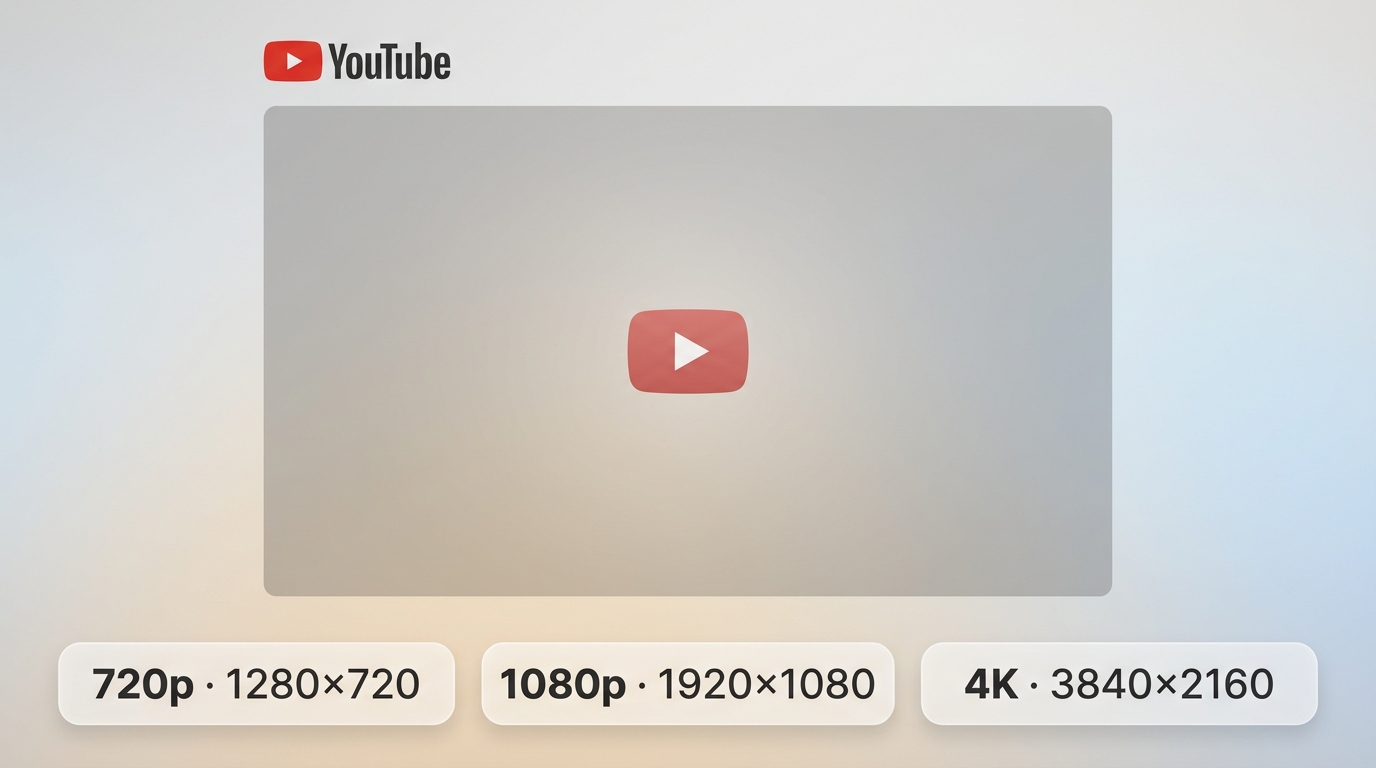
YouTube aspect ratio describes the proportional shape of the video frame. The standard aspect ratio for YouTube landscape videos is 16:9, while Shorts are usually designed on a 9:16 canvas for an immersive mobile view.
Aspect Ratio vs. Resolution
| Term | What it describes | Example |
| Aspect ratio | The relationship between frame width and height | 16:9, 9:16, 1:1, or 4:3 |
| Resolution | The number of pixels across and down the frame | 1920x1080 or 1080x1920 |
1920x1080 resolution is one common 16:9 resolution, not a synonym for every 16:9 file. Confusing shape with pixel count is why an export can have the expected dimensions yet still use the wrong composition or magnify a low-detail source. For youtube aspect ratio, verify this point on the actual source before processing the complete file.
Standard YouTube Aspect Ratios
The practical YouTube aspect ratio choices are 16:9 for landscape, 9:16 for full-screen vertical viewing, 1:1 for square repurposing, 4:3 for legacy material, and wider formats for intentionally cinematic framing.
16:9 for Standard Videos
The 16:9 ratio YouTube viewers encounter most often is the standard choice for tutorials, reviews, livestreams, interviews, and other landscape videos. It fits desktop and TV playback naturally and remains readable on phones when key details are not placed too close to the edges. For youtube aspect ratio, verify this point on the actual source before processing the complete file.
- Common dimensions: 1280x720, 1920x1080, 2560x1440, and 3840x2160.
- Good fit: scenes that need horizontal context, side-by-side visuals, or screen demonstrations.
- Editing judgment: start with 16:9 when the viewer needs to see an interface or environment rather than one tightly framed subject.
9:16 for Immersive Shorts
A 9:16 ratio is the recommended immersive presentation for YouTube Shorts because it fills a phone held vertically. It is not the sole ratio that can qualify under current Shorts classification rules. For youtube aspect ratio, verify this point on the actual source before processing the complete file.
- Common canvas: 1080x1920.
- Good fit: single-subject clips, demonstrations framed vertically, and caption-led short videos.
- Keep faces, captions, logos, and calls to action inside a central vertical video safe zone so interface controls do not cover them.
1:1 Square Video
Square uploads can be useful when one edit must travel across several social platforms. Under current rules, a square video may be classified as a Short, although it uses less of a tall phone screen than 9:16. For youtube aspect ratio, verify this point on the actual source before processing the complete file.
The trade-off is screen coverage: 1:1 preserves a centered composition but gives up vertical space above and below compared with a full 9:16 Short. For youtube aspect ratio, verify this point on the actual source before processing the complete file.
4:3 Legacy Video
A 4:3 aspect ratio is appropriate for archival footage, older television material, and projects that intentionally keep the source framing. YouTube's adaptive player can pad the image on wider displays without requiring the creator to add bars to the file. For youtube aspect ratio, verify this point on the actual source before processing the complete file.
For preservation work, keeping the original 4:3 composition is often better than cutting away meaningful picture information merely to fill a 16:9 screen.
21:9 and Other Wide Ratios
Wide ratios such as 21:9 suit film-style compositions but occupy less vertical space on a typical 16:9 display. The player may add padding according to the video and device, while bars already rendered into the export remain part of the picture.
YouTube Ratio Comparison
| Format | Aspect ratio | Common pixel dimensions | Use case | Shorts eligibility | Typical player behavior | Main editing risk |
| Landscape | 16:9 | 1920x1080 | Standard videos and screen-based tutorials | No, when uploaded as a conventional landscape video | Fills most desktop and TV players | Small text can become hard to read on phones |
| Vertical | 9:16 | 1080x1920 | Immersive Shorts | Yes, under current duration and classification rules | Fills a vertical phone screen | Edge elements can sit under interface controls |
| Square | 1:1 | 1080x1080 | Cross-platform repurposing | Potentially yes under current rules | Centered with unused screen area on tall or wide displays | Less mobile screen coverage than 9:16 |
| Legacy | 4:3 | 1440x1080 | Archival and retro footage | No in a conventional landscape upload | Player padding may appear on widescreen devices | Forcing 16:9 can cut original content |
| Ultra-wide | 21:9 | 2560x1080 | Cinematic compositions | No in a conventional landscape upload | Padding may appear above and below on 16:9 screens | Reduced picture height and smaller on-screen text |
YouTube Resolutions and Pixel Dimensions
YouTube video dimensions determine pixel count, while aspect ratio determines shape. Choose a resolution that matches the source and destination instead of enlarging a small source merely to display a larger number in the export settings.
YouTube Size Cheat Sheet
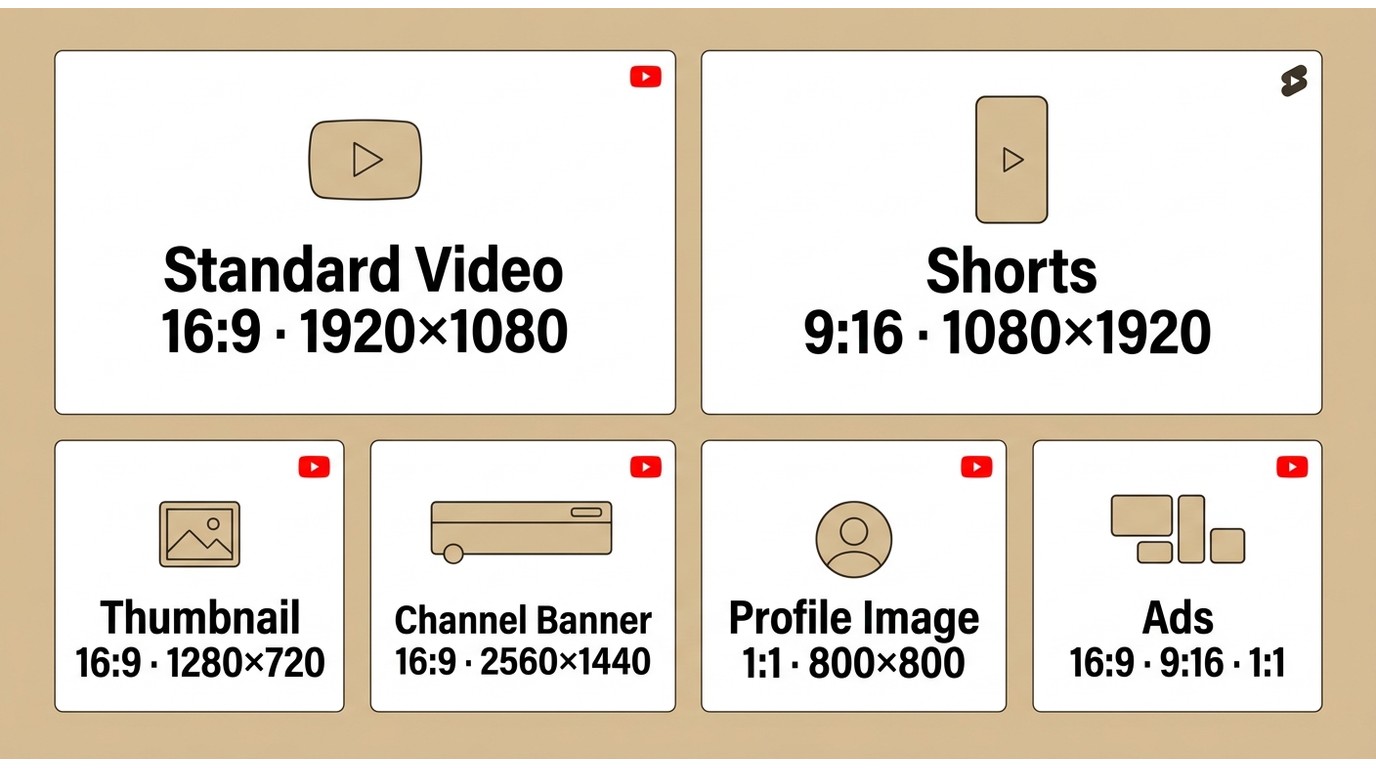
This YouTube size cheat sheet combines the most-used creative dimensions. Time-sensitive YouTube classifications and placement specifications are presented as of July 2026.
| Asset | Aspect ratio | Recommended dimensions | Use note |
| Standard YouTube video | 16:9 | 1920x1080 | Full HD landscape target for most long-form uploads |
| YouTube Short | 9:16 recommended | 1080x1920 | Full-screen vertical target; square or vertical uploads may qualify under current rules |
| Thumbnail | 16:9 | 1280x720 | Keep the subject and short text readable at small display sizes |
| Channel banner | 16:9 | 2560x1440 | Place critical text and logos inside the centered safe area |
| Profile image | 1:1 | 800x800 | Use a centered mark that remains recognizable after circular cropping |
| Landscape video ad | 16:9 | 1920x1080 | Common horizontal export for in-stream and in-feed placements |
| Vertical video ad | 9:16 | 1080x1920 | Designed for mobile-first vertical placements |
| Square video ad | 1:1 | 1080x1080 | Flexible centered layout across mixed placements |
16:9 Resolution Table
| Label | Dimensions | Practical use |
| 480p | 854x480 | Small legacy or bandwidth-limited source |
| 720p | 1280x720 | Basic HD delivery |
| 1080p | 1920x1080 | Common Full HD upload target |
| 1440p | 2560x1440 | Higher-detail desktop viewing |
| 4K | 3840x2160 | More detail and more reframing room from a native 4K source |
| 8K | 7680x4320 | Specialized high-resolution workflows |
The choice among 1080p, 4K, and 8K belongs to the broader topic of video resolution; for this page, the key is to keep the selected dimensions consistent with the aspect ratio and the detail actually present in the source.
9:16 Shorts Resolution Table
| Label | YouTube Shorts dimensions | Practical note |
| 480p vertical | 480x854 | Low-detail source; text can become difficult to read |
| 720p vertical | 720x1280 | HD vertical delivery |
| 1080p vertical | 1080x1920 | Standard full-screen 9:16 target |
| 1440p vertical | 1440x2560 | Useful only when the source contains matching detail |
| 4K vertical | 2160x3840 | Large export with more processing and storage demand |
A 1080x1920 YouTube export defines the canvas, not the source quality. A tightly cropped 1080p landscape clip can still look soft because the vertical edit enlarges a smaller portion of the original frame.
Choosing Ratios by YouTube Content Type
Choose the aspect ratio for YouTube according to what the viewer must see: 16:9 preserves horizontal context, while the recommended YouTube Shorts aspect ratio of 9:16 prioritizes one subject on a phone.
Standard YouTube Videos
Use 16:9 for standard YouTube videos when the frame contains interfaces, multiple people, landscapes, product demonstrations, or other information spread across the width.
For tutorials, horizontal room is functional rather than decorative. Cropping an interface into a vertical canvas can remove menus, cursors, or before-and-after context that the explanation depends on.
Shorts at 1080x1920
For an immersive Short, build a 1080x1920 canvas, frame the subject for 9:16, and keep essential elements away from the top, bottom, and side edges. Square or vertical uploads can qualify, but 9:16 uses the phone screen more fully.
- Orientation: export vertically rather than relying on rotation metadata.
- Duration: eligible square or vertical videos uploaded on or after October 15, 2024 can be categorized as Shorts when they run up to three minutes.
- Audio: music availability may cover less than the full runtime, and a Short longer than one minute with an active Content ID claim can be blocked.
- Safe placement: center faces, captions, logos, and calls to action within the vertical video safe zone.
- Phone check: upload an unlisted draft and review title text, captions, and Edge elements in the Shorts interface before publishing.
The editorial point is that 1080x1920 is a canvas target, not evidence that the source contains enough detail for a sharp close crop.
YouTube Thumbnails
Use a 16:9 thumbnail at 1280x720, then judge it at small size rather than on a large editing monitor. One focal subject and short, readable text usually survive scaling better than several competing elements.
YouTube Channel and Ad Dimensions
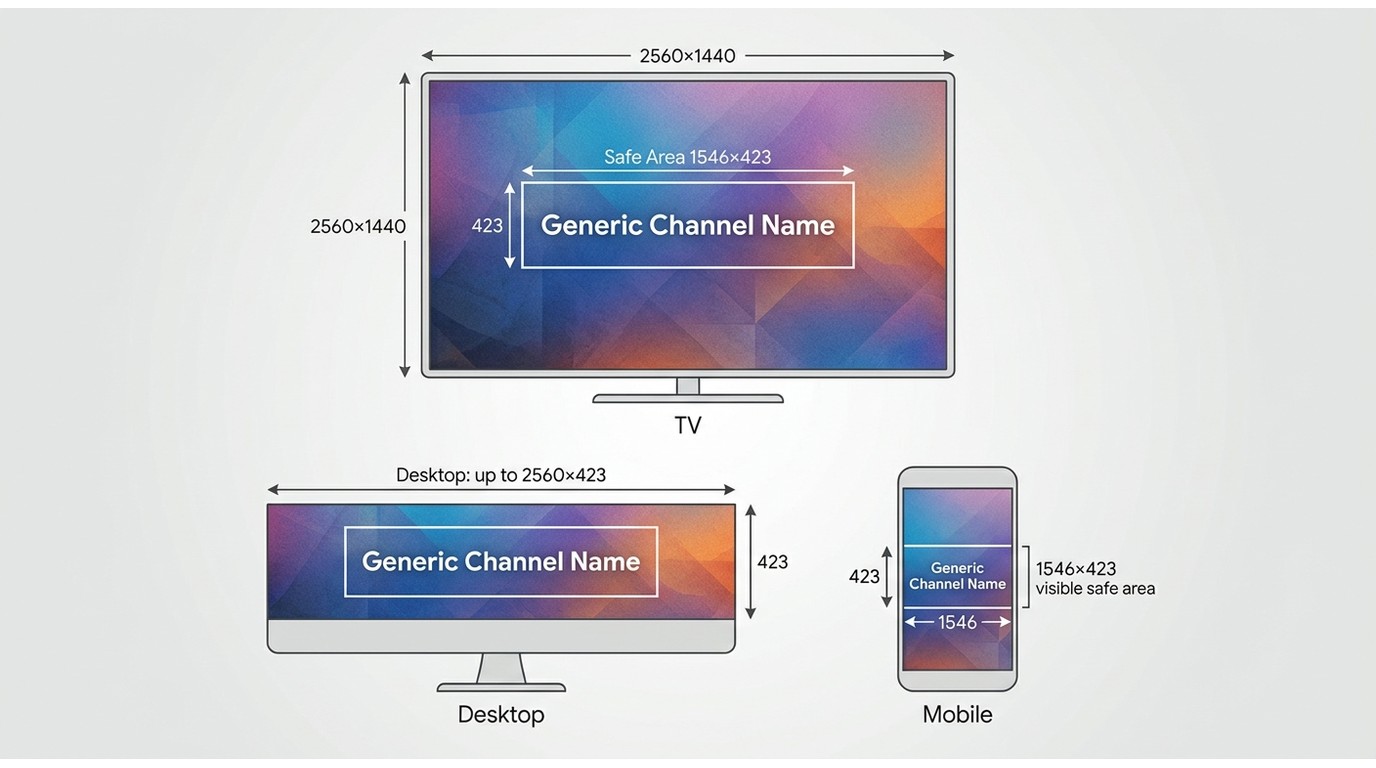
Channel and ad artwork follows the same composition principle as video: start with the delivery canvas, then keep critical content inside the area that remains visible across placements and devices.
Channel Banner
A 2560x1440 channel banner gives YouTube room to adapt the artwork across TV, desktop, and mobile views. Keep the channel name, logo, and central message within the safe center because outer areas may be cropped.
YouTube Ad Dimensions
Video ads commonly use 16:9, 9:16, or 1:1 creative. Match the ratio to the intended placement instead of stretching one export, and keep captions and branding clear when the same campaign uses both horizontal and vertical versions.
YouTube Upload Settings and Bitrates
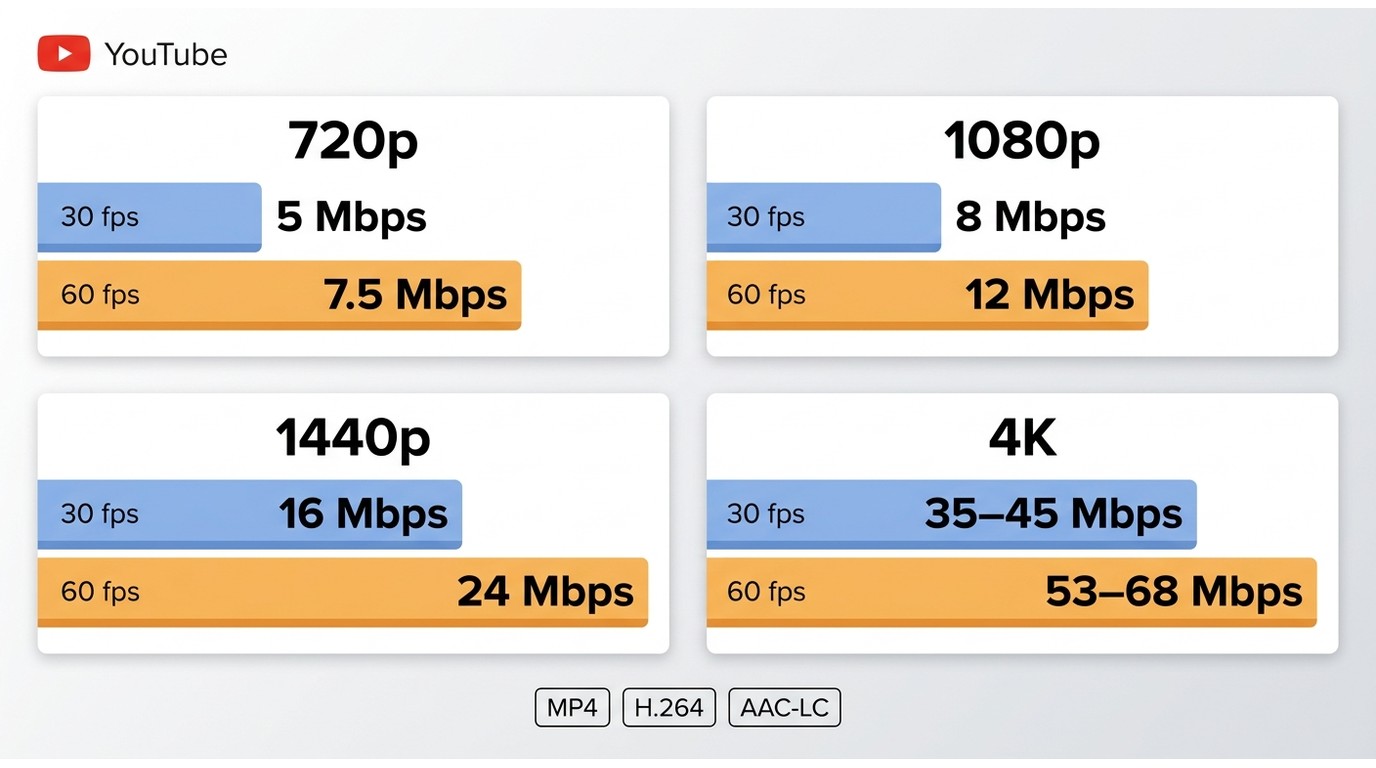
YouTube upload settings should preserve the source frame rate, use a supported format, and supply enough bitrate for the selected resolution. The platform re-encodes uploads, so clean source detail matters more than artificially large dimensions.
Recommended Upload Specifications
| Setting | Practical recommendation |
| Container | MP4 |
| Video codec | H.264 |
| Audio codec | AAC-LC |
| Frame rate | Match the recorded frame rate |
| Platform upload maximum | 256 GB or 12 hours, whichever is less |
| SDR color | BT.709 |
Do not invent a separate Shorts file-size cap. For Shorts, concentrate on 9:16 or square framing, readable safe-zone placement, a supported codec, and a bitrate appropriate to the resolution.
Recommended Bitrates
Bitrate controls how much data represents each second of the export, so a sensible video bitrate helps retain texture and motion without treating file size as a quality score by itself.
| Resolution | 24-30 fps | 48-60 fps |
| 720p | 5 Mbps | 7.5 Mbps |
| 1080p | 8 Mbps | 12 Mbps |
| 1440p | 16 Mbps | 24 Mbps |
| 4K | 35-45 Mbps | 53-68 Mbps |
Other Supported Formats
YouTube also accepts formats such as MOV, AVI, WMV, WebM, MPEG, ProRes, CineForm, DNxHR, and HEVC. A playback helper such as Enhancer for YouTube changes viewing controls, not the dimensions or composition encoded in the uploaded video.
Upload Quality Checklist
- Set the project canvas to the delivery ratio before detailed editing.
- Match export frame rate to the source instead of creating duplicate frames.
- Use the source's real detail as the ceiling when you resize video without quality loss claims.
- Review captions, logos, and faces on a phone-sized preview.
- Do not render padding or black bars into the file.
- Keep a channel overlay compact; the practical YouTube watermark size must remain readable without covering the subject.
Changing YouTube Video Aspect Ratio
Changing 16:9 to 9:16 is a composition decision, not a simple dimension swap. Choose whether to crop and reframe, fit the horizontal shot inside a designed background, create a separate edit, or track the subject.
Desktop Editing Software
Desktop editors provide the most control for converting 16:9 to 9:16 because they allow keyframed position changes, separate graphics layouts, and shot-by-shot reframing.
- Create a sequence at the target dimensions, such as 1080x1920 for vertical delivery.
- Place the landscape source in the new sequence without stretching it.
- Reframe each shot around the subject and check whether important context has left the frame.
- Move captions and graphics into the vertical video safe zone.
- Export a short test and inspect it in a phone-sized viewer before rendering the full project.
A 4K landscape source provides more reframing headroom than a 1080p source because a vertical crop can retain more pixels. For tutorials and screen recordings, a separate vertical edit or a designed background is usually safer than a center crop that removes interface details.
Online Resizing Tools
Online tools are convenient for short clips and simple canvas changes, but uploading can be slow for large files and fine shot-by-shot control may be limited. Use crop, fit, and background controls deliberately rather than accepting an automatic center crop.
If the resized source is genuinely soft, an online AI Video Enhancer can address visible softness, but it cannot restore content discarded by an aggressive crop or choose the correct composition.
Mobile Editing Apps
Mobile editors are a practical fit for phone-shot clips that already follow the subject closely. Set the YouTube mobile aspect ratio first, reposition each shot, and review text against the actual interface rather than the clean editing preview.
Fix Black Bars and Cropping
YouTube black bars have two different causes: adaptive player padding around a nonmatching ratio, or bars baked into the exported picture. Do not add padding before upload because YouTube's player already adapts to the video and device.
| Symptom | Likely cause | Editing fix |
| Bars above and below | A wide image inside a taller frame, or baked-in letterboxing | Use the native wide ratio, crop deliberately, or rebuild the frame without rendered bars |
| Bars on both sides | A narrow image in a wide frame, or baked-in pillarboxing | Keep the native ratio for archival work or redesign the background |
| Subject cut off | Crop-to-fill removed Edge content | Reposition by shot, use subject-aware tracking, or choose fit with a designed background |
| Distorted faces or circles | The image was stretched to fill the canvas | Restore proportional scaling; stretching is not a valid ratio fix |
| Soft vertical close-up | A small region of the landscape source was enlarged | Use higher-resolution source footage, reduce crop intensity, or create an alternate composition |
My editorial preference is to protect meaning before screen fill: if cropping removes the action, label, or interface being explained, fit or redesign the frame instead of forcing full-screen coverage.
Upscaling Low-Resolution YouTube Footage
Upscaling is useful when the source is genuinely low resolution or a vertical crop exposes softness. It does not correct the wrong YouTube aspect ratio, poor framing, baked-in bars, or pixels discarded by an excessive crop.
UniFab Video Upscaler AI is a local Windows and Mac option with four upscaling models and output targets up to 16K. It is suitable for creators with soft source footage who prefer local processing, but not for someone who only needs to change a canvas size.
Searches for the best free AI video upscaler often mix two different tasks: resizing a frame and reconstructing visible detail. Compare alternatives on the second task, and keep composition work in the editor.
Professional AI Video Upscaler
- Upscale Video and Maintain Crystal-Clear Detail
- 30-day free trial with full features—no watermark
UniFab Video Upscaler AI
Professional AI Video Upscaler
- Upscale Video and Maintain Crystal-Clear Detail
- 30-day free trial with full features—no watermark
UniFab Video Upscaler AI for Mac
Frequently Asked Questions
What is the best way to use youtube aspect ratio?
Start with the source quality, target platform, privacy requirement, and final export settings. For youtube aspect ratio, use a short representative clip first, compare the result at 100% view, and keep the original file so you can revise the workflow without generation loss. This also applies to YouTube video dimensions.
Is youtube aspect ratio free?
Some youtube aspect ratio workflows are free, while others limit file size, duration, resolution, credits, watermarks, or export formats. Verify the current plan on the provider's official page because free allowances can change. This also applies to YouTube Shorts aspect ratio.
Does youtube aspect ratio reduce quality?
youtube aspect ratio can reduce quality when it adds unnecessary recompression, aggressive enhancement, or incorrect output settings. Match resolution, frame rate, codec, and bitrate to the source and delivery platform, then inspect motion, edges, audio sync, and fine detail. This also applies to YouTube thumbnail size.
Which formats or devices support youtube aspect ratio?
Support depends on the chosen application and workflow. Check operating system, input and output formats, hardware acceleration, browser upload limits, and whether the destination platform accepts the selected settings before processing a full project. This also applies to YouTube video dimensions.
How long does youtube aspect ratio take?
Processing time varies with duration, resolution, codec, AI model, hardware, and export settings. A short test provides the most reliable estimate; online tools also add upload and download time, while local tools depend more heavily on CPU and GPU performance. This also applies to YouTube Shorts aspect ratio.
Can beginners use youtube aspect ratio?
Yes. Beginners can use youtube aspect ratio by following a conservative workflow: duplicate the source, choose an appropriate preset, process a short sample, compare before and after, and only then export the complete file. This also applies to YouTube thumbnail size.
What should I check before choosing a tool for youtube aspect ratio?
Compare source fit, output quality, privacy, platform support, batch capability, watermark policy, free limits, price, and control. Do not choose a youtube aspect ratio tool only because it advertises the highest resolution, frame rate, or AI label. This also applies to YouTube video dimensions.
Is desktop or online processing better for youtube aspect ratio?
Online processing is convenient for short, non-sensitive files, but it can impose upload, retention, watermark, credit, and resolution limits. Desktop processing is usually better for private, long, high-resolution, or batch youtube aspect ratio work. This also applies to YouTube Shorts aspect ratio.
What are the main limitations of youtube aspect ratio?
The main limits are source quality, missing detail, motion artifacts, incompatible formats, hardware demand, upload constraints, and generation loss. youtube aspect ratio cannot always reconstruct information that was never captured, so results should be described realistically. This also applies to YouTube thumbnail size.
How does youtube aspect ratio compare with manual editing?
Automated youtube aspect ratio is faster and easier to repeat, while manual editing gives more local control and may avoid overprocessing. A practical workflow uses automation for the first pass and manual review for difficult scenes, transitions, faces, text, and audio sync. This also applies to YouTube video dimensions.
Conclusion
The YouTube aspect ratio decision becomes easier when it follows the content: use 16:9 for standard videos, use 9:16 and 1080x1920 for the most immersive Shorts presentation, and treat 1:1 as eligible but less screen-filling.
When one source must serve several formats, choose crop and reframe for a strong central subject, fit with a designed background when context matters, or create a separate edit when the layouts are fundamentally different. The measured choice is the one that preserves the information viewers came to see.