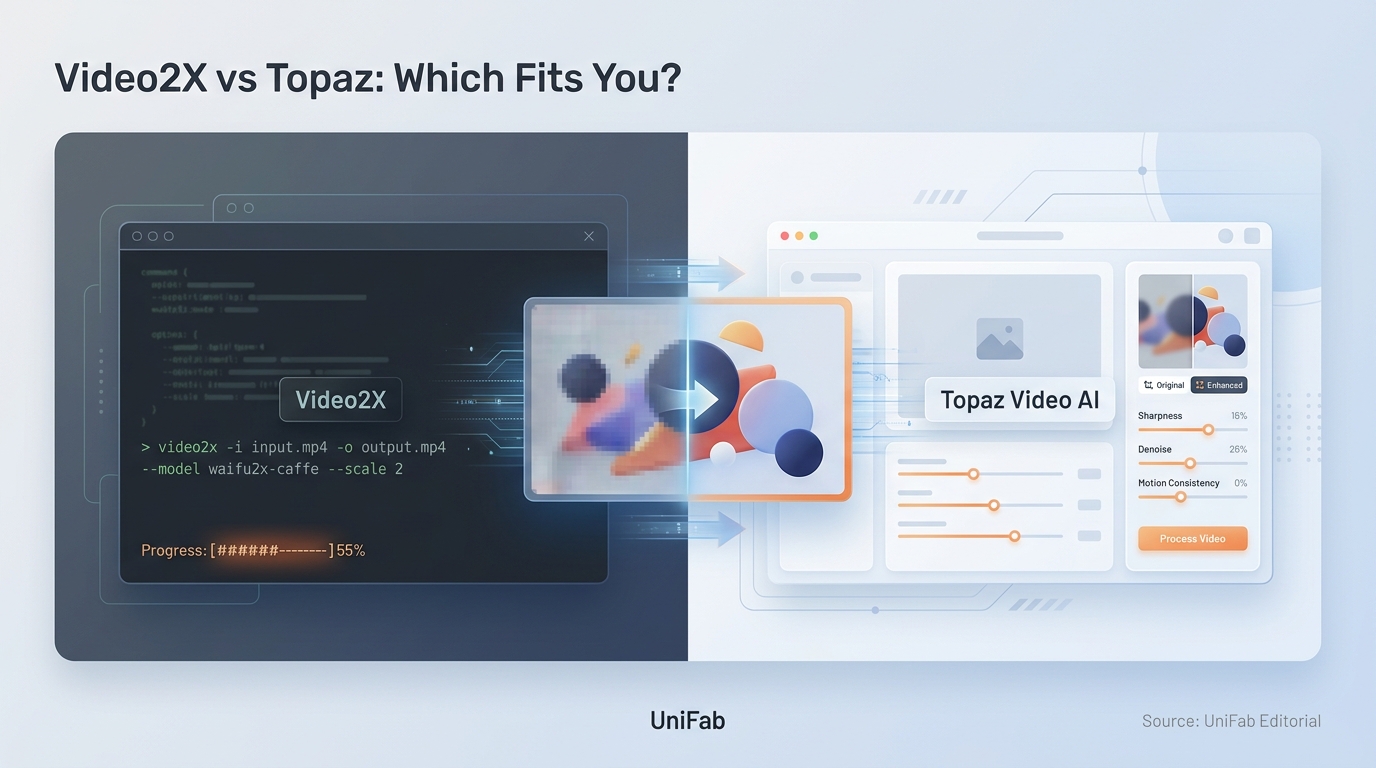
If you are comparing Video2X and Topaz, there is no universal winner. Pick Video2X for anime or 2D upscaling if you want zero software cost and do not mind configuring models. Pick Topaz for live-action restoration and a guided interface that hides the technical work.
The sharpest take on this question frames it as a trade rather than a contest. Topaz is the easy paid benchmark that gets pricey and slow. Video2X rewards people who like to tinker. My editorial read is that Topaz's subscription buys workflow certainty, not a universal quality win. An r/VideoEditing comment warns that Video2X's default anime models are a poor fit for live action, while an r/TopazLabs comment likewise shows that Topaz results depend heavily on model choice. A Topaz license therefore guarantees a smoother process, but it does not guarantee a better picture. The more useful way to read it is that the "free versus paid" headline is a distraction. The real split is how much of the work you are willing to do yourself. Video2X moves the cost from your wallet to your setup time and troubleshooting; Topaz moves it back to a recurring subscription. So this article walks the comparison in the order that actually decides it: footage type first, then how much workflow friction you can live with. Cost comes last, once you add render time and hardware.
Video2X vs Topaz: The Short Verdict
If you want one line: Video2X is the better fit for cost-sensitive anime and technical users. Topaz better fits editors who value a polished, guided workflow and broader live-action restoration. The right choice is set by your footage and your tolerance for setup, not by which tool has the bigger name.
As one Reddit user in r/upscaling put it, "If you want the easiest paid option, Topaz Video AI is still the obvious benchmark, but it gets expensive and slow fast. If you're comfortable tinkering, Video2X / Real-ESRGAN-based workflows..." That single comment captures the entire trade-off. The rest of this article is really just detail on top of it.
Choose Video2X if cost and control come first
Video2X is free and open source, which removes the purchase decision entirely. It shines on 2D and anime material, where its Waifu2x and anime-oriented Real-ESRGAN models are genuinely strong. The catch is setup. You choose models yourself and rely on the command line or a third-party GUI wrapper. You also troubleshoot GPU and dependency issues when they come up.
Best for anime and 2D restorers, budget-conscious hobbyists, and technical users who like control.
Not ideal for anyone who wants a one-click experience or who works mainly with mixed live-action footage.
Choose Topaz if workflow polish and restoration breadth matter more
Topaz gives you a guided desktop interface with a live preview and a wide catalog of models tuned for live action, faces, denoising, and stabilization. You pay for that convenience, and as of late 2025 you pay for it as a subscription rather than a one-time purchase. For editors billing client work, the time saved can justify the cost; for occasional projects, the recurring fee is harder to defend.
Best for live-action restorers, editors on deadlines, and anyone who wants results without configuring a pipeline.
Not ideal for casual users who upscale a few clips a year, or anyone who specifically wanted to own the software outright.
Video2X and Topaz Compared at a Glance
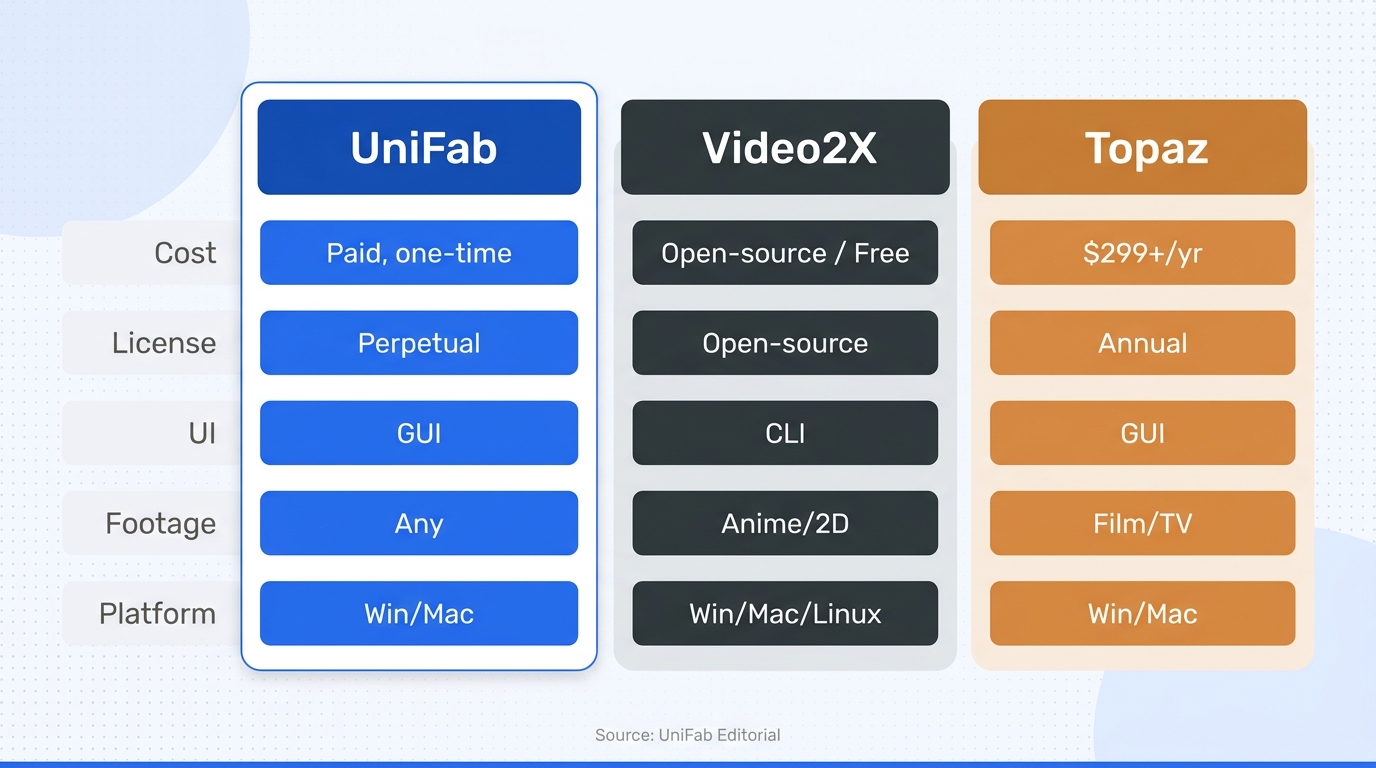
Video2X and Topaz differ most on cost model, interface, and where each one is strongest. Video2X is free, command-line-first, and anime-leaning; Topaz is subscription-based, GUI-first, and broader on live-action restoration. Both lean heavily on your GPU, and both can be slow on long, high-quality jobs. The table below translates the technical differences into who benefits.
| Dimension | Video2X | Topaz |
| Software cost | Free and open source | About $59 per month or $299 per year for the consumer plan |
| Licensing | Open-source license | Subscription-only current product; legacy perpetual licenses ended |
| Interface | Command line plus third-party GUI options | Polished desktop GUI with a live preview |
| AI models | Open models such as Real-ESRGAN, Waifu2x, Anime4K, and SRMD, chosen manually | A large guided catalog including Proteus, Gaia, Iris, and Nyx |
| Typical speed | Model- and GPU-dependent; slower on modest hardware | GPU-optimized and fast on modern cards, but slow on long high-quality jobs |
| Typical strength | Anime and 2D workflows with selectable open models | Live-action restoration, denoising, stabilization, and guided model selection |
| Hardware and platform caveat | Vulkan or compatible GPU workflow; limited macOS practicality | Modern GPU strongly preferred; Windows and macOS desktop workflow |
Sources: Topaz Labs documentation for current licensing, plus the Cococlip and YesChat comparisons for Video2X interface, model, and platform details, as of July 2026.
Strip away brand reputation, and the decision comes down to two levers you control. One is how much you want to pay over time. The other is how much configuration you are willing to do.
Core specifications and pricing
Video2X costs nothing and ships under an open-source license. There is no tier to compare and no renewal to track. Topaz sits at the other end. Per Topaz Labs' documentation, the current Topaz Video product is subscription-only after perpetual licenses were retired in October 2025. The consumer plan costs around $299 per year or roughly $59 per month, with a higher Pro tier above that. Video2X exposes a handful of open networks you pick by hand. Topaz instead ships a larger managed catalog with previews, letting you judge a model before committing to a full render.
Best fit by user type
Anime and 2D hobbyists usually land on Video2X, because its animation models are strong and free. Live-action restorers usually land on Topaz, because its guided models handle faces, noise, and motion with less manual tuning. Beginners tend to prefer Topaz for the interface; advanced users often prefer Video2X for the control. For occasional one-off projects, the free tool avoids a subscription you would barely use; for frequent commercial work, Topaz's time savings can outweigh its fee. What this means for you: match the tool to how often you will actually use it, not to which one reviewers rank higher.
Output Quality Depends on the Footage and Model
For anime and 2D animation, Video2X can match or rival paid tools. For mixed live action, faces, and heavy noise, Topaz's guided models tend to pull ahead. But the single biggest quality variable in either tool is not the brand, it is whether you picked the right model for the source. A strong model on the wrong footage looks worse than a modest model on the right footage.
Anime and 2D animation
Line art and flat animation are where Video2X is most competitive. Its Waifu2x and anime-oriented Real-ESRGAN models are built for exactly this material. As one Reddit user in r/Dandere2x put it, "Dandere2x is good for quickly upscaling anime videos and uses waifu2x to do this... Video2x is if you want the highest quality result[s]." The practical upshot: for clean 2D sources, the paid-versus-free quality gap narrows to something most viewers will not notice, so paying a subscription purely for anime upscaling is hard to justify.
Live action, faces, noise, and motion
Live-action footage is messier, mixing soft detail, grain, compression artifacts, and motion, and this is where Topaz's broader catalog and preview controls earn their keep. As one r/VideoEditing user warns, Video2X's default anime-oriented models are the wrong tool for live action: "Waifu2x is intended for animated content, it won't get good results at all with live action content. Video2x is the same way. The default AI models are also intended for animated content. You need to swap the model to SRMD (Faster, lower quality) or RealSR." Topaz removes some of that guesswork, though it is not automatic either. As one Reddit user in r/TopazLabs put it, "For HD 720p, 1080i, 1080p, and 2160p: Iris MQ is a game changer. Very strong and no artifacts with sane settings." The lesson for both tools is the same: the model choice, not the logo, decides the result.
When upscaling cannot restore missing detail
No upscaler can recover detail that was never captured. On badly degraded, low-bitrate, or heavily compressed sources, both tools eventually stop restoring real texture. They start inventing plausible-looking detail that may look sharp in a still frame, then shimmer or crawl in motion. The honest expectation is enhancement, not resurrection. Aim to make a decent source clearly better. Treat a hopeless source as a candidate for reshooting or replacing rather than upscaling.
The Real Cost: Money, Time, Hardware, and Setup
Beyond the purchase price, expect to spend on setup time, render time, and capable hardware, and those costs often dominate the sticker price. Free software is better described as a transfer of cost than as zero cost. Video2X trades money for your configuration and troubleshooting time. Topaz trades a subscription for convenience, but it still needs a strong GPU to be usable.
Video2X setup, GUI, and operating-system limits
Video2X's friction is real and shows up before you upscale a single frame. You work through the command line or a third-party GUI, install GPU and Vulkan dependencies, and download models yourself. Newer builds are not immune either. As one Reddit user in r/upscaling advised when the Qt build misbehaved, "If Video2X QT is giving you trouble, I'd look at the workflow rather than a single replacement app." macOS is the weakest case. The practical, well-supported path runs on Windows with a compatible GPU. Mac users frequently hit a wall. Best for people comfortable owning their setup; not ideal for anyone who wants to open an app and go.
Topaz pricing and the subscription transition
Topaz's cost story changed in a way that is driving much of the current "alternative" search interest. Per Topaz Labs' documentation, the standalone Topaz Video AI product was retired and perpetual licenses ended in October 2025. The current Topaz Video is subscription-only. The consumer plan costs roughly $299 per year or about $59 per month, with a higher Pro tier above it. If you preferred owning your software outright, that option is no longer offered. The recurring fee is now a permanent line item rather than a one-time hit.
Render time, GPU load, and storage
Render time is the cost nobody budgets for. Resolution, model, frame count, and your GPU affect it more than the tool you choose. Topaz is optimized to run fast on modern cards, but even it slows down on the heaviest settings. As one Reddit user in r/software put it, "Topaz can be super slow, especially with long videos and high-quality settings." Video2X's speed swings widely by model. Higher-quality networks run slower. On top of time, expect large intermediate and output files. A 1080p H.264 stream at around 5 Mbps already produces roughly 2 GB per hour, and 4K output multiplies that. My editorial judgment is that Topaz's subscription is defensible mainly for repeat live-action work: its smoother workflow is paired with recurring cost and documented long-render frustration, while the r/Dandere2x evidence is strongest for Video2X's configurable anime-oriented work. The upshot: for a long project, the render queue and your drive space can cost you more than the license does.
How to Choose in Four Steps
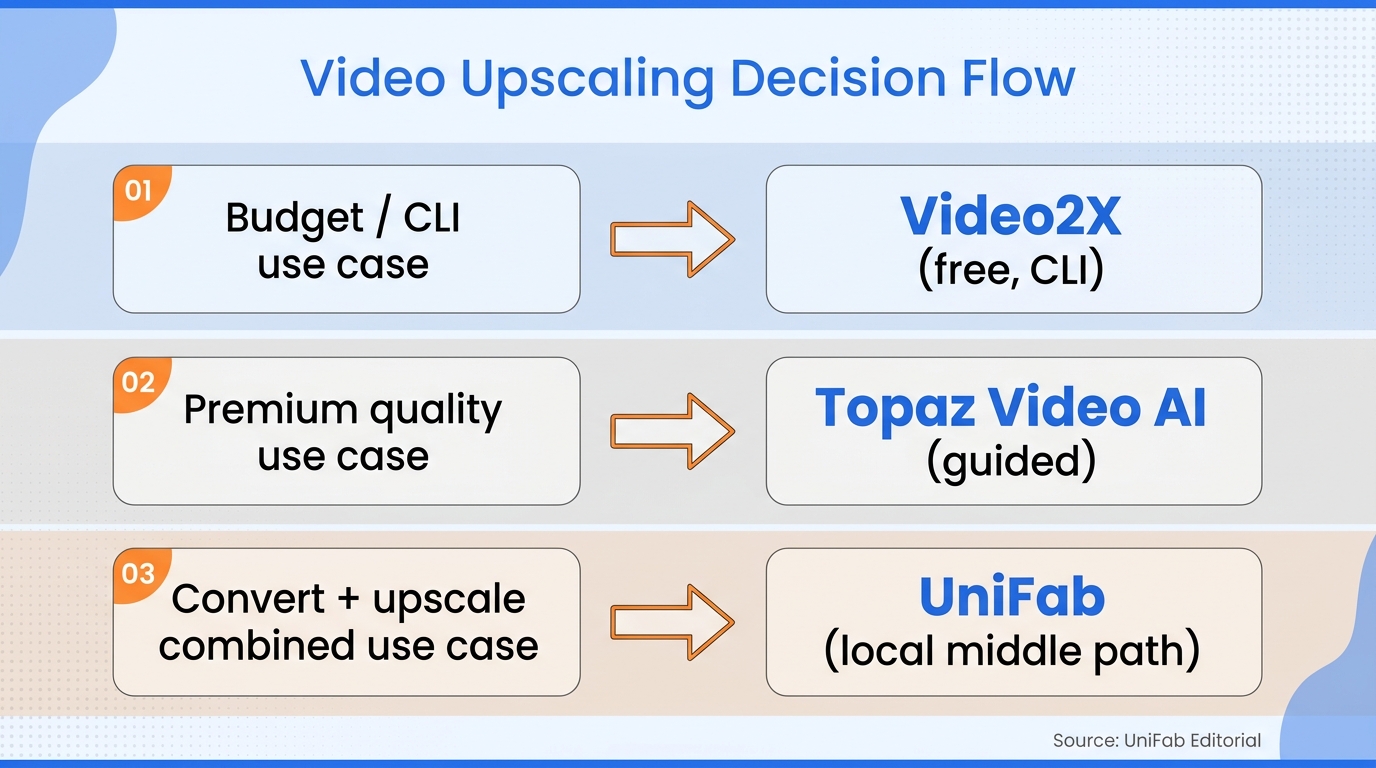
A reliable way to identify the right upscaler is to decide by footage and friction before you spend anything, then confirm with a short test. Work through these in order:
- Identify the footage and the exact defect you are fixing.
- Check your hardware and workflow prerequisites.
- Compare total cost for the workload you actually expect.
- Run the same short test clip through your shortlist before committing.
1. Identify the footage and the defect
Start by separating anime and 2D from live action, because that split alone points you toward Video2X or Topaz. Then name the actual problem. Are you scaling resolution, removing noise, deinterlacing old broadcast footage, stabilizing shaky motion, or interpolating frames for smoother playback? A tool that is excellent at scaling can be mediocre at denoising, so define the defect before you shortlist anything.
2. Check the hardware and workflow prerequisites
Confirm the boring prerequisites next, since they quietly rule options in or out. Check your operating system, your GPU and whether it is supported, and how much free storage you have for large intermediate files. Decide whether local processing matters to you for privacy, and be honest about how much model configuration you are willing to do. If you are on macOS or you want a one-click flow, Video2X's high-friction path may end the discussion early. For many casual users, this step alone rules out one of the two tools before any quality test is needed.
3. Compare total cost for the expected workload
Add up the real cost for your workload rather than the headline price. Weigh a subscription or purchase against setup time, render time, and how often you will repeat the job. A subscription can be reasonable if you upscale weekly for paid work, and hard to justify if you touch the tool twice a year. Free software still costs you the hours you spend configuring and troubleshooting it, so count those hours as part of the price. A useful rule of thumb: if you cannot honestly say you will use the tool most weeks, the recurring fee rarely pays for itself.
4. Run the same short test clip
Before you commit money or a long overnight render, run one representative clip through every tool on your shortlist and judge them on equal terms. Use the same source crop, a comparable model and scale factor, and the same output codec, then compare the results directly. Watch for faces and line art holding up, motion artifacts and shimmer, the final render time, and the output file size. This is advice for your own evaluation, not a benchmark reported here. It is the fastest way to replace opinion with evidence for your specific footage.
Where UniFab Fits Between Free and Subscription Tools
UniFab makes the most sense when you want a guided, local, one-time-purchase workflow plus features neither comparison tool offers. It is not the free choice and not the subscription choice; it is a paid local middle path. Neither Video2X nor Topaz includes HDR conversion or audio upmixing, and that is where UniFab's feature set diverges, more than on any "better AI" claim.
What UniFab adds to the comparison
UniFab All-In-One is a Windows and Mac desktop app for local batch processing, with MP4 and MKV output up to 16K. Its relevant additions are a dedicated Kairo anime model, SDR-to-HDR10 conversion, and audio upmixing. That makes it a broader enhancement suite than a single-purpose upscaler without creating a conflicting second resolution ceiling.
Pricing and fit
On cost, UniFab offers a lifetime-license path rather than requiring Topaz's recurring subscription model. That structural difference changes the math the longer you keep the tool. UniFab suits editors who want a local, owned workflow plus HDR or audio features. It is overkill for someone who only upscales clean anime, where free Video2X already does the job.
Limitations to weigh before choosing UniFab
Two honest drawbacks matter before you choose it. First, it is neither open source nor free the way Video2X is, so if a zero-cost tool covers your needs, UniFab is a harder sell. Second, advanced users who live in per-parameter tuning may still prefer Topaz's wider model ecosystem and more granular controls. It also carries less third-party tutorial coverage and lower name recognition than Topaz, which can matter when you are stuck and searching for help. None of that is disqualifying, but it should be weighed against the feature and licensing advantages rather than ignored.
Bottom Line: Match the Tool to the Project
There are three clean paths here, and the right one is set by your project, not by a ranking. Choose Video2X if you want free, configurable, anime-oriented upscaling and you do not mind owning the setup. Choose Topaz if you restore live-action footage, want a guided interface, and can absorb a subscription. Choose UniFab if you want a paid but locally owned middle path with broader video and audio enhancement. That includes HDR and surround upmixing, which the other two skip. If you are still unsure, do not overthink it. Run one short representative clip through your top two. Let the result on your footage make the call for you.
Frequently Asked Questions
These are the practical questions that most often decide a Video2X-versus-Topaz call. Each answer depends on your footage and hardware.
Is Video2X completely free, and does it add a watermark?
Yes. Video2X is free and open source, with no purchase and no watermark on its output. The cost you do pay is indirect: capable GPU hardware, storage for large files, and the time to configure models. So "free software" is accurate, but "free project" is not.
How much does Topaz cost now, and can Video2X replace it for professional work?
Per Topaz Labs' documentation, Topaz has been subscription-only since perpetual licenses ended in October 2025. The consumer plan costs roughly $299 per year or about $59 per month. Video2X can replace it for reproducible anime and 2D pipelines run by someone comfortable with configuration. For deadline-driven live-action restoration, Topaz is still the smoother professional choice.
Are there good alternatives to both Video2X and Topaz?
Yes, the category is crowded, and searches for options like Aiarty and Nomos2 reflect the interest Topaz's subscription switch created. UniFab is one local option that combines a one-time license with HDR and audio features. Evaluate it against your own footage using the four-step test above. Cloud services exist too, but they require uploading your footage.
Does Video2X work well on macOS, including recent Qt builds?
macOS is Video2X's weakest platform. The best-supported path runs on Windows with a compatible GPU, and Mac users often hit dependency and performance issues. Recent Qt builds can add their own quirks, so a native cross-platform desktop app is usually the lower-friction route on a Mac.
Is Topaz Video AI discontinued, and does upscaling run locally for private footage?
Per Topaz Labs' documentation, the legacy Topaz Video AI name and its perpetual license were retired in October 2025. The current subscription-based Topaz Video replaced them. Both Video2X and Topaz run their core upscaling locally, which keeps private footage off the cloud. Local processing is the safer default; just download software and models only from official sources.