Mono carries one audio channel, while stereo carries distinct left and right channels that can create width and positional cues. Neither format is universally better: the right mono vs stereo choice depends on the source, the playback system, and what the finished audio needs to communicate.
My editorial rule is simple: choose the least complex channel layout that preserves the information listeners need. Centered speech often benefits from mono consistency; music, games, and scene-based video usually need meaningful left-right differences.
What Is Stereo Sound?
Stereo audio uses two channels, normally left and right, with content that can differ between them. That audio channel count lets a mix place voices, instruments, and effects across a horizontal soundstage rather than presenting everything from one point.
How Stereo Sound Works
Stereo sound quality comes from useful differences between the two channels, not from the presence of two channel labels alone. During recording or mixing, elements may be captured from different positions or panned between left and right.
- Left channel: carries material intended for the left side of the soundstage.
- Right channel: carries material intended for the right side.
- Center image: a voice or instrument sent equally to both channels appears between the speakers.
- Side information: level, timing, and tonal differences create width and direction.
A centered vocal can therefore remain stable while guitars, room tone, or effects occupy the sides. The practical value is separation: stereo should make the program easier to understand or more spatially convincing, not merely wider.
Stereo, Surround, and Spatial Formats
Two-channel stereo is different from surround and spatial audio. A stereo to surround workflow adds more playback channels, while spatial formats can also describe sound as objects positioned around the listener.
- Stereo: two channels, left and right.
- 5.1 surround: front, center, surround, and low-frequency channels arranged for multichannel playback.
- 7.1 surround: adds more surround positioning than 5.1.
- Dolby Atmos: an object-based spatial-audio system that can include height information.
These layouts are related, but they are not interchangeable names. A stereo file does not become surround simply because it plays through a multichannel receiver; the source or playback system must provide an intentional upmix or surround mix.
What Is Mono Audio?
Mono audio uses one channel, so the full program is carried as a single signal. It may play from one speaker or be sent equally to several speakers, but the underlying audio channel count remains one.
A lead vocal is often recorded as a mono source and then positioned inside a stereo mix. This distinction matters: a mono recording can be part of a stereo production without becoming a stereo recording by itself.
When Mono Audio Makes Sense
Mono works well when spatial placement adds little value or when consistent coverage matters more than width. Mono speaker playback also reduces the chance that one side of a stereo program will be missed.
- Single-voice podcasts and narration: keeps speech centered and simplifies delivery.
- Phone calls and voice messages: prioritizes intelligibility over imaging.
- PA and distributed speaker systems: gives listeners similar content in different positions.
- Accessibility: a mono listening setting can combine left and right content so neither side is omitted.
- Compatibility checks: reveals whether a stereo mix loses important material when summed.
Mono is not a lower-grade version of stereo. For centered speech and uncertain speaker placement, it is often the more reliable delivery format.
Mono vs Stereo Sound: Key Differences
The key difference is channel content. Mono carries one program channel, stereo carries two channels with meaningful differences, and dual mono stores two channels that may contain identical or separately managed mono signals.
| Format | Channel count | Left and right content | Spatial imaging | Mono compatibility | File size at equal PCM settings | File size at a fixed compressed bitrate | Best use cases | Main drawbacks |
|---|---|---|---|---|---|---|---|---|
| Mono | 1 | One shared program signal | No left-right image | Direct and predictable | Uses about half the audio data of two-channel stereo | Can be similar to stereo when both exports use the same total bitrate | Centered speech, calls, PA systems, accessibility | Cannot carry directional left-right information |
| Stereo | 2 | Left and right can differ | Width and positional cues | Needs a mono check when phase-sensitive elements matter | Uses about twice the audio data of mono | Can be similar to mono when both exports use the same total bitrate | Music, video, gaming, multi-position sound | Can translate poorly outside the listening sweet spot or after mono summing |
| Dual mono | 2 | Often identical; may also hold two independent mono feeds | No true stereo image when both channels match | Usually stable when identical, but routing must be checked | Uses two-channel storage at equal PCM settings | Depends on the selected total bitrate and encoder | Redundant feeds, language tracks, separately routed mono sources | Easy to mistake for true stereo from channel count alone |
The practical upshot is that channel count identifies the layout, but the relationship between channels determines the listening result.
Sound Quality and Dual Mono
True stereo creates an image because the left and right channels contain useful differences. Copying one mono signal into both channels creates dual mono, not stereo depth, even though the file reports two channels.
The phrase dual mono vs stereo is therefore about content, not just track count. Dual mono may contain identical copies, or it may carry two independent mono feeds that are meant to be routed separately. Inspect the waveforms and routing before assuming a two-channel file is a stereo mix.
Joint stereo is different again: it is an encoding technique used by some compressed formats to store stereo information efficiently. It does not mean the source has been collapsed into dual mono.
For music and scene-based video, stereo sound quality is useful when it creates separation without weakening the center. For speech, identical channels add storage and routing complexity without adding spatial information.
Loudness, File Size, and Bitrate
Mono is not automatically louder, and stereo is not automatically larger in every export. Perceived loudness depends on level and phase; file size depends on whether the audio is uncompressed or encoded at a fixed total bitrate.
- Uncompressed PCM: at the same duration, sample rate, and bit depth, two-channel stereo carries about twice the audio data of mono.
- Fixed-bitrate MP3 or AAC: a mono and stereo export set to the same total bitrate can produce similar file sizes, although the encoder distributes those bits differently.
- Variable or quality-based encoding: size changes with the encoder, content, and chosen quality target.
- Loudness: summing stereo to mono can reinforce centered material or weaken out-of-phase material, so level-match before comparing.
For podcast audio export, mono can spend the available data on one speech channel. That does not make every mono file smaller; it means the chosen format and bitrate should match the delivery platform rather than an assumed size rule. The same conditions should be stated whenever mono file size or stereo file size is compared.
Benefits and Drawbacks of Mono and Stereo
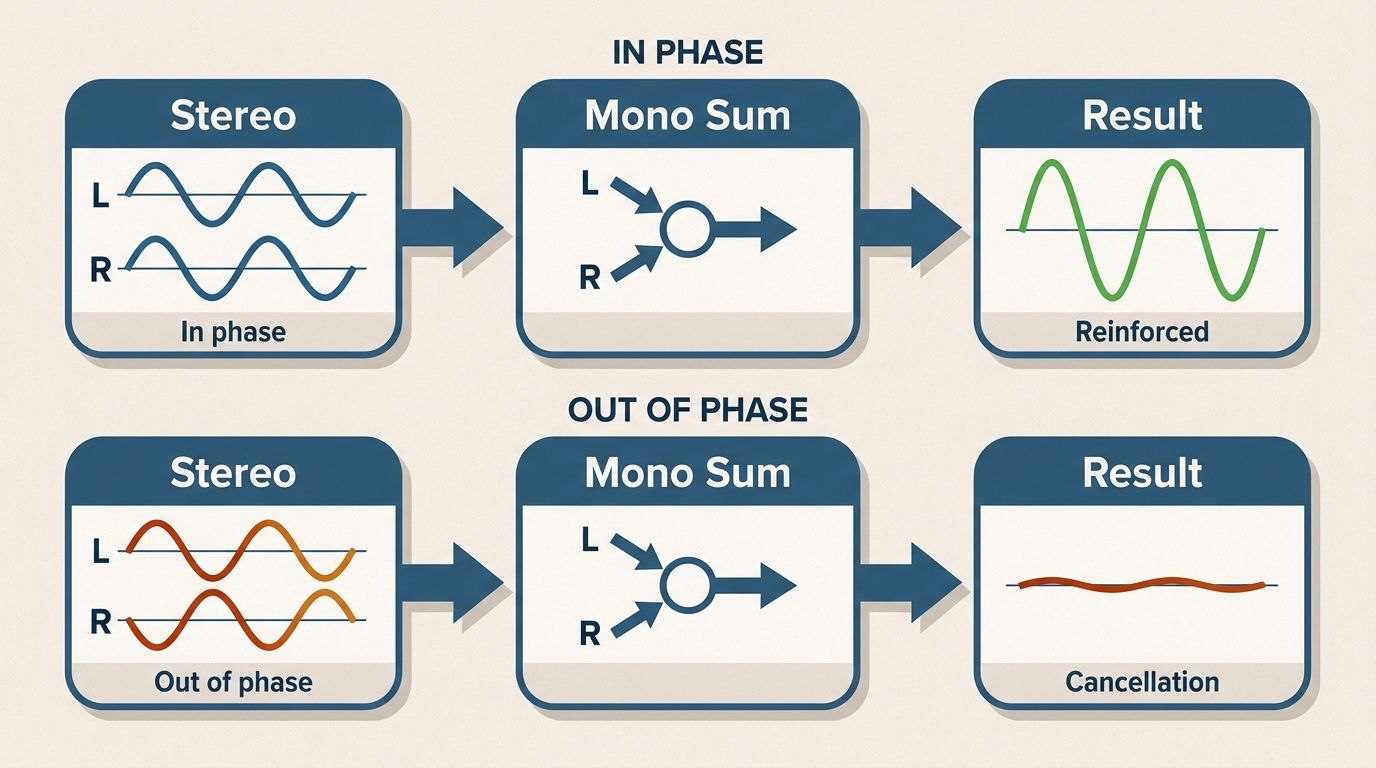
Mono favors consistency and compatibility; stereo favors space and directional detail. The tradeoff is whether the program gains meaningful information from two channels and whether that information survives the listener's playback setup.
| Format | Benefits | Drawbacks |
|---|---|---|
| Mono | Centered delivery, broad mono compatibility, simpler routing, efficient for single-source speech | No left-right placement, less useful for spatial music or directional effects |
| Stereo | Width, separation, positional cues, and a more natural fit for many music and video mixes | More routing decisions, possible phase problems, and dependence on speaker position |
My strongest recommendation is to judge the format by translation, not by headphones alone. Stereo adds useful space only when the important elements remain clear on real speakers and after a mono check; mono remains safer for centered speech and inconsistent speaker placement.
Phase Cancellation and Mono Checks
Mono compatibility matters because some stereo effects use timing or polarity differences that can weaken when left and right are combined. A wide effect may shrink, change tone, or partially disappear even though it sounds impressive in stereo.
- Listen to the finished stereo mix normally and identify essential voices, music, and effects.
- Use the editor, DAW, or playback device to sum the mix to mono.
- Compare the center level, low frequencies, and any wide effects at a matched listening level.
- If an essential element drops, reduce the phase-sensitive processing or rebalance the mix, then check again.
This check does not require making the final release mono. It confirms that the stereo version remains usable on single-speaker devices, accessibility settings, and playback systems that combine channels.
When to Choose Stereo vs Mono
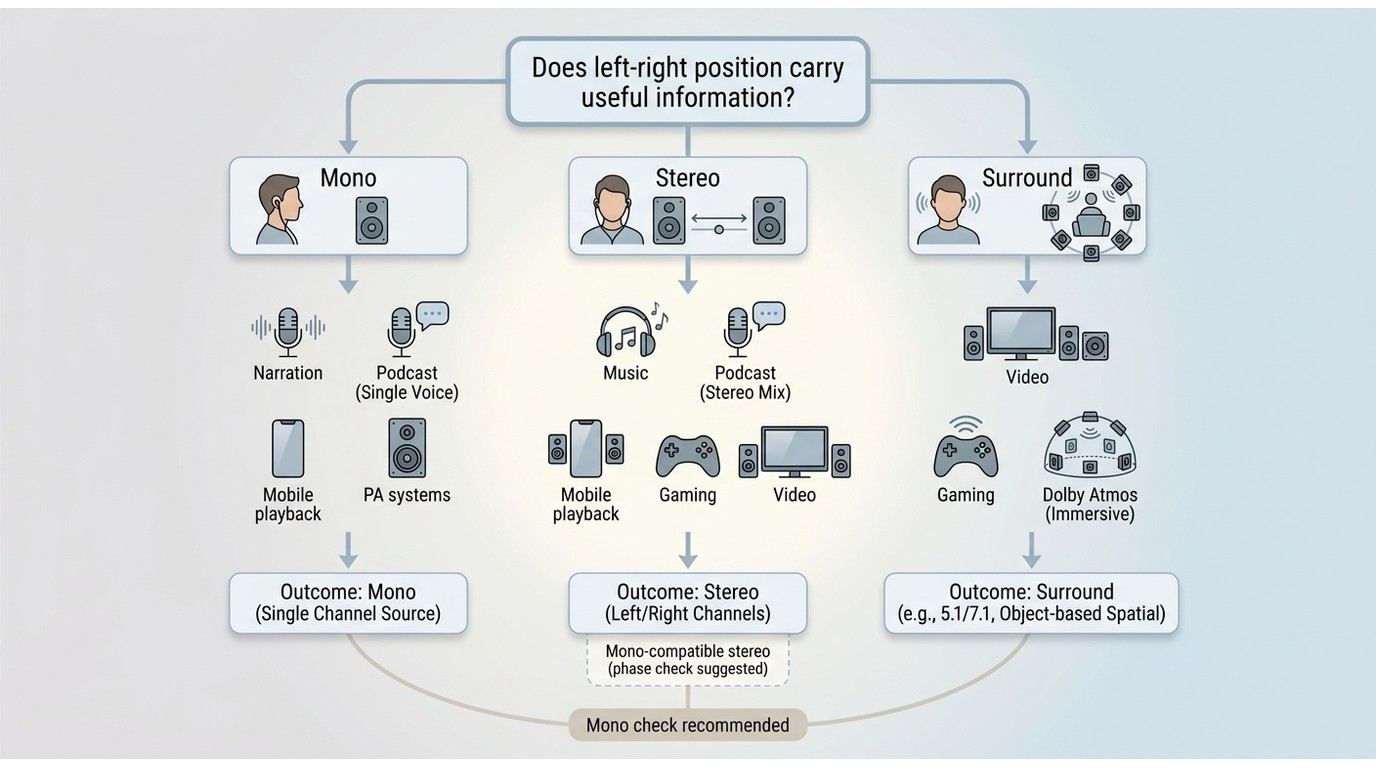
Choose mono for centered information that should reach every listener consistently. Choose stereo when left-right placement improves understanding, realism, or navigation. The decision should follow the content, not the number of speakers in the room.
| Scenario | Recommended format | Best for | Not ideal for | Main tradeoff |
|---|---|---|---|---|
| Single-host podcast or narration | Mono | Centered speech and straightforward podcast audio export | Programs that intentionally place voices or scenes across the soundstage | Consistency over width |
| Multi-host podcast | Mono or stereo | Mono when all voices stay centered; stereo when separation helps identify positions | Hard-panned voices that become tiring or inaccessible | Identity cues versus uniform playback |
| Music | Stereo | Instrument separation, ambience, and intentional panning | Systems where listeners hear only one side | Spatial detail versus mono compatibility |
| Gaming | Stereo or surround | Directional cues and scene positioning | Games or devices that provide no meaningful positional information | Navigation cues versus playback complexity |
| Video with music and effects | Stereo | Dialogue centered with music and effects arranged around it | Voice-only clips delivered mainly through a single speaker | Scene depth versus simpler delivery |
| Accessibility-focused delivery | Mono-compatible mix | Ensuring left-only or right-only details are not lost | Mixes that place essential information on one side | Complete access versus extreme width |
| PA or distributed speakers | Mono | Consistent coverage across changing listener positions | Content that depends on a precise stereo sweet spot | Coverage versus imaging |
| Mobile playback | Mono-compatible stereo or mono | Stereo for capable devices, provided the mix also survives channel combining | Critical details isolated to one side | Device variety versus spatial detail |
The editorial choice is rarely “stereo whenever possible.” Use stereo when the second channel carries a purpose; otherwise mono is cleaner, easier to verify, and less likely to surprise listeners.
Stereo-to-Surround Upmixing with UniFab
After choosing and confirming a suitable stereo source, surround upmixing can be an optional next step for compatible video playback. It is not required for a good stereo mix, and it should not be presented as a mono-to-stereo fix.
UniFab Audio Upmix AI is a Windows and Mac desktop tool for AI spatial-audio reconstruction. Its documented stereo to surround workflow processes supported stereo-source video and targets EAC3 5.1 or DTS 7.1 output.
UniFab Audio Upmix AI
- Upmix audio to EAC3 5.1/DTS 7.1 for a surround sound experience
- 30-day free trial with full feature access – no watermark!
UniFab Audio Upmix AI
UniFab Audio Upmix AI
- Upmix audio to EAC3 5.1/DTS 7.1 for a surround sound experience
- 30-day free trial with full feature access – no watermark!
UniFab Audio Upmix AI
Suitable for: supported video with a genuine stereo source when the delivery setup calls for 5.1 or 7.1 surround. Less suitable for: mono-to-stereo conversion, audio-only workflows outside the supported input path, or projects that need manual channel-by-channel sound design.
Two limitations should be explicit. First, the verified workflow does not establish mono input or stereo output, so it should not be recommended for creating true stereo from a mono recording. Second, it is a desktop workflow for Windows and Mac with supported video and output formats, not a universal processor for every container, device, or audio-only source.
Using UniFab Audio Upmix AI
The workflow begins with source verification. Confirm that the video contains real stereo information rather than dual mono, then choose surround output only if the playback target can use it.
- Install and open UniFab, select Audio Upmix AI, and import a supported video containing a stereo audio track.
- Confirm the source and output settings, then select the documented 5.1 or 7.1 surround option appropriate for the project.
- Start processing and review the result on the intended surround setup, paying attention to dialogue placement and whether ambience spreads naturally.
Use video and audio that you own or are authorized to process. From an editing standpoint, upmixing is most convincing when it extends a clean stereo bed; it cannot restore spatial decisions that were never present in a mono source.
Check If Audio Is Mono or Stereo
Channel metadata is the most reliable first check. Listening helps, but identical sound in both ears can be mono playback or dual mono, so it does not prove the source has only one channel.
- Read the metadata: open the file's audio details in the operating system or a media-information tool and find the audio channel count.
- Inspect the waveforms: one channel indicates mono; two waveforms indicate a two-channel file, but matching waveforms may be dual mono.
- Compare left and right: solo each channel in an audio editor. True stereo usually reveals meaningful differences.
- Listen on headphones: use movement and separation as supporting evidence, not the sole test.
- Run a mono check: combine the channels temporarily and listen for missing or weakened elements.
This sequence prevents the common mistake of treating any two-channel file as stereo. It also links format choice to execution: whether or not you plan a later upmix, verify the source before exporting or processing it.
FAQs About Mono and Stereo
Are Phone Speakers Mono or Stereo?
Phone speaker layouts vary by model: some use one main speaker, while others combine speakers as a stereo pair. That hardware design is separate from the Mono Audio accessibility setting, which combines left and right program content so both sides remain available.
What Does Merged Stereo Mean?
“Merged stereo” is not one formal channel format. It may describe combining left and right, linking two mono tracks, or exporting a two-channel file; inspect whether the channels actually differ before treating it as true stereo rather than dual mono.
Does an MP4 File Require Stereo Audio?
No. MP4 is a container and can carry supported mono, stereo, or multichannel audio layouts depending on the codec and playback target. Choose the channel layout for the content and destination rather than assuming the file extension requires stereo audio.
Do Mono and Stereo Use Different Cables?
Not necessarily. Connector shape and channel layout are separate issues: for example, a TRS connection may carry unbalanced stereo or balanced mono. Check the device's wiring and input specification instead of identifying mono vs stereo from the plug alone.